
Raspberry Pi Cảm Biến Siêu Âm Piezo Buzzer
Hướng dẫn này sẽ chỉ bạn cách sử dụng Raspberry Pi và cảm biến siêu âm để điều khiển piezo buzzer. Cụ thể:
- Raspberry Pi phát ra âm thanh khi có vật thể gần cảm biến siêu âm.
- Raspberry Pi dừng âm thanh khi vật thể cách xa cảm biến siêu âm.
- Raspberry Pi phát một giai điệu khi vật thể gần cảm biến siêu âm.
Linh Kiện Cần Thiết
| 1 | × | Raspberry Pi 5 | Amazon | |
| 1 | × | Cảm Biến Siêu Âm | Amazon | |
| 1 | × | Active Piezo Buzzer 3-24V | Amazon | |
| 1 | × | Module Active Piezo Buzzer | Amazon | |
| 1 | × | Module Passive Piezo Buzzer | Amazon | |
| 1 | × | breadboard (Bo mạch thí nghiệm) | Amazon | |
| 1 | × | Dây Jumper | Amazon | |
| 1 | × | (Khuyến nghị) Screw Terminal Block Shield for Raspberry Pi | Amazon | |
| 1 | × | (Khuyến nghị) Raspberry Pi Prototyping Base Plate & Breadboard Kit | Amazon | |
| 1 | × | (Khuyến nghị) HDMI Touch Screen Monitor for Raspberry Pi | Amazon |
Or you can buy the following kits:
| 1 | × | DIYables Sensor Kit (18 sensors/displays) | Amazon |
Về Piezo Buzzer và Cảm Biến Siêu Âm
Nếu bạn chưa quen thuộc với piezo buzzer và cảm biến siêu âm (bao gồm sơ đồ chân, cách hoạt động và cách lập trình), các hướng dẫn sau có thể cung cấp thêm thông tin cho bạn:
Sơ Đồ Kết Nối
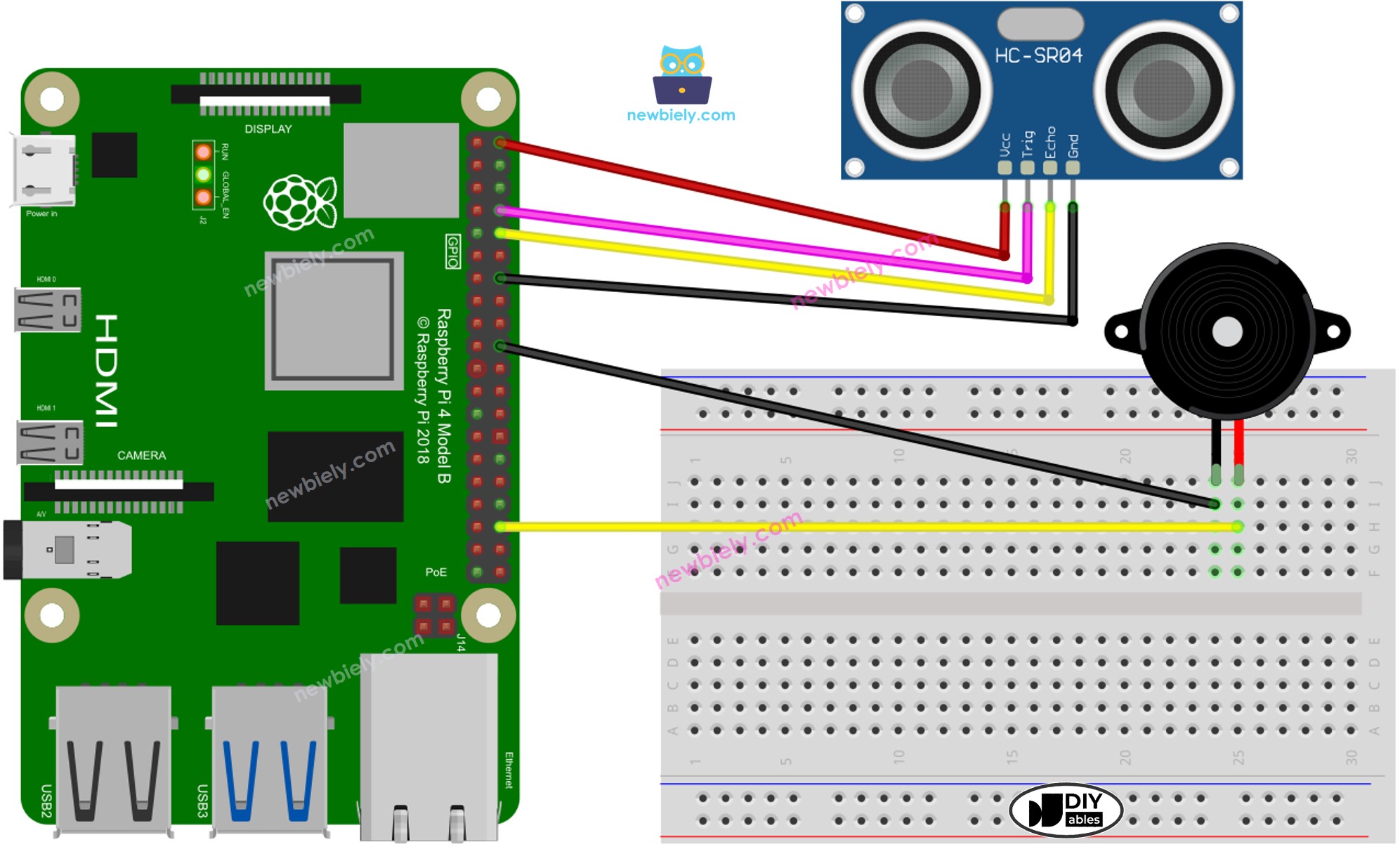
This image is created using Fritzing. Click to enlarge image
Code Raspberry Pi - Âm Thanh Đơn Giản
Trong phần này, chúng ta sẽ lập trình Raspberry Pi để điều khiển piezo buzzer phát ra âm thanh đơn giản bất cứ khi nào khoảng cách đo được bởi cảm biến siêu âm thấp hơn ngưỡng đặt trước.
Các Bước Thực Hiện
- Đảm bảo bạn đã cài đặt Raspbian hoặc hệ điều hành tương thích khác với Raspberry Pi.
- Đảm bảo Raspberry Pi của bạn đã kết nối với cùng mạng cục bộ với máy tính của bạn.
- Đảm bảo Raspberry Pi của bạn đã kết nối internet nếu cần cài đặt các thư viện.
- Nếu đây là lần đầu tiên bạn sử dụng Raspberry Pi, hãy xem Raspberry Pi - Cài Đặt Phần Mềm
- Kết nối máy tính của bạn với Raspberry Pi qua SSH sử dụng SSH client có sẵn trên Linux và macOS hoặc PuTTY trên Windows. Xem cách kết nối máy tính với Raspberry Pi qua SSH.
- Đảm bảo bạn đã cài đặt thư viện RPi.GPIO. Nếu chưa, hãy cài đặt bằng lệnh sau:
- Tạo file script Python ultrasonic_sensor_buzzer.py và thêm đoạn code sau:
- Lưu file và chạy script Python bằng cách thực thi lệnh sau trong terminal:
- Vẫy tay trước mặt cảm biến.
- Lắng nghe âm thanh từ piezo buzzer.
Script chạy trong vòng lặp vô hạn liên tục cho đến khi bạn nhấn Ctrl + C trong terminal.
Giải Thích Code
Hãy xem giải thích từng dòng code trong phần comment của source code!
Raspberry Pi Phát Giai Điệu Bài Hát
Trong phần này, chúng ta sẽ lập trình Raspberry Pi để kích hoạt piezo buzzer phát bài hát "Jingle Bells" khi khoảng cách nhỏ hơn ngưỡng đặt trước.
Các Bước Thực Hiện
- Tạo file script Python ultrasonic_sensor_buzzer_Jingle_Bells.py và thêm đoạn code sau:
- Lưu file và chạy script Python bằng cách thực thi lệnh sau trong terminal:
- Di chuyển tay trước mặt cảm biến.
- Nghe giai điệu được phát bởi piezo buzzer.
Giải Thích Code
Hãy xem giải thích từng dòng code trong phần comment của source code!
Video Tutorial
Việc sản xuất video tốn rất nhiều thời gian. Nếu video hướng dẫn hữu ích cho việc học của bạn, hãy đăng ký kênh YouTube để ủng hộ. Nếu nhu cầu đủ cao, chúng tôi sẽ cố gắng làm thêm nhiều video.
Bài hướng dẫn liên quan
📱 Ứng dụng đề xuất
 English for KidsHọc tiếng Anh vui nhộn cho trẻ nhỏ.Tải về trênGoogle PlayTải về trênApp Store
 Bubble NoteGhi chú tự xóa — viết như nhắn tin.Tải về trênGoogle PlayTải về trênApp Store
 Tôi Không MuaĐánh bại mua sắm bốc đồng, tiết kiệm hơn.Tải về trênGoogle PlayTải về trênApp Store
 Con Đường Tri ThứcBài thi thử để học mọi thứ.Tải về trênGoogle PlayTải về trênApp Store