Arduino UNO R4 WiFi Bluetooth RTC Example Đồng Bộ Đồng Hồ Thời Gian Thực qua BLE Tutorial

Tổng quan

Ví dụ Bluetooth RTC cung cấp khả năng đồng bộ đồng hồ thời gian thực thông qua ứng dụng DIYables Bluetooth STEM. Được thiết kế cho Arduino UNO R4 WiFi sử dụng BLE (Bluetooth Low Energy) để đồng bộ hardware RTC tích hợp của board với đồng hồ smartphone và hiển thị thời gian. Arduino UNO R4 WiFi có module RTC tích hợp, làm cho nó trở nên lý tưởng cho các dự án về thời gian mà không cần hardware RTC ngoài. Hoàn hảo cho đồng hồ, ghi log dữ liệu với timestamp, tự động hóa theo lịch trình, và các dự án dựa trên thời gian.

Lưu ý: Arduino UNO R4 WiFi chỉ hỗ trợ BLE (Bluetooth Low Energy). Nó không hỗ trợ Classic Bluetooth. Ứng dụng DIYables Bluetooth hỗ trợ cả BLE và Classic Bluetooth trên Android, và BLE trên iOS. Vì board này sử dụng BLE, ứng dụng hoạt động trên cả Android và iOS.
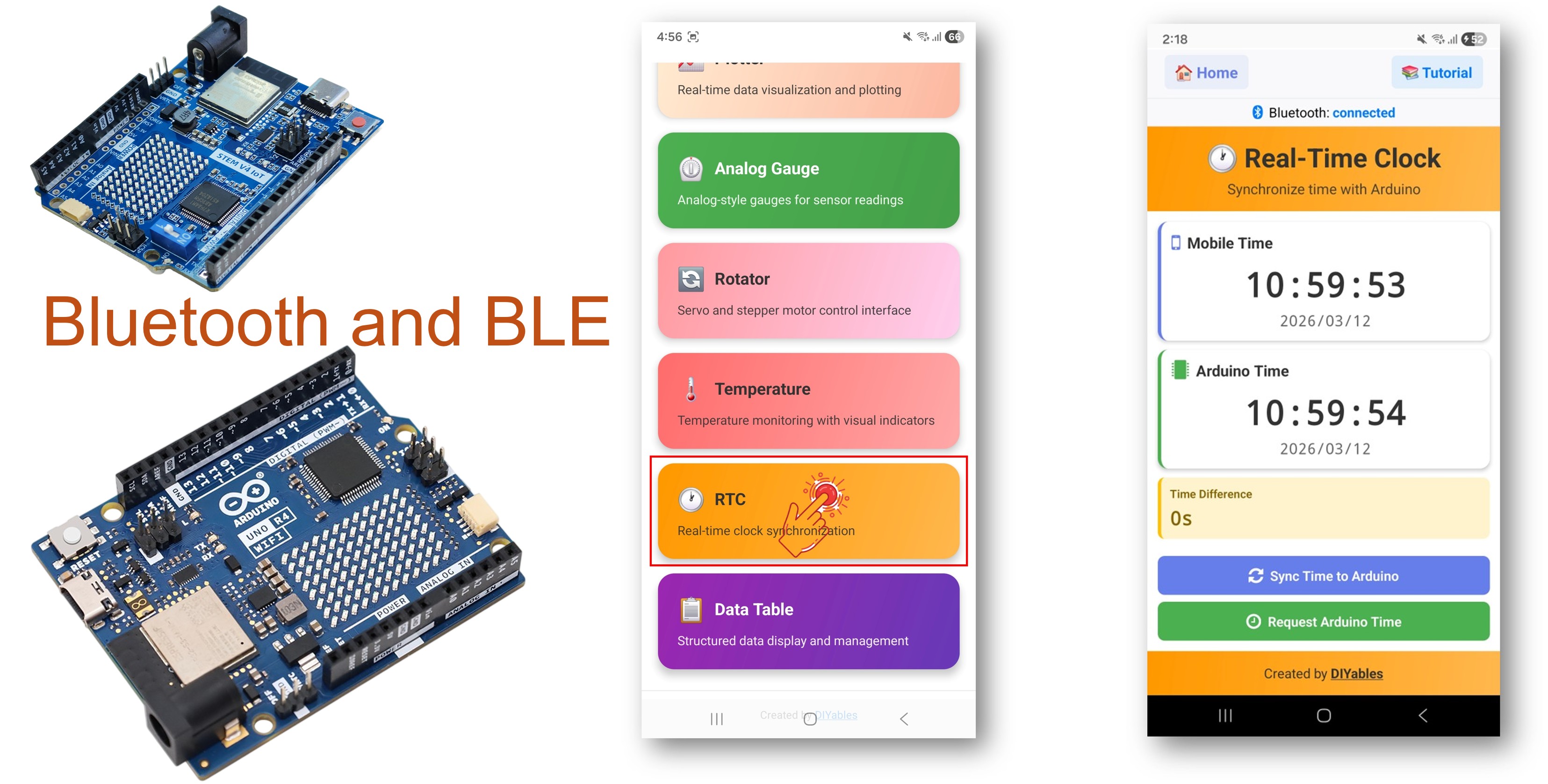
Arduino UNO R4 WiFi Bluetooth rtc example - Đồng bộ Đồng hồ thời gian thực qua ble tutorial

Tính năng

  • Hardware RTC Tích hợp: Sử dụng RTC onboard của Arduino UNO R4 WiFi — không cần module ngoài
  • Đồng bộ Thời gian từ Điện thoại: Đồng bộ thời gian từ smartphone qua Unix timestamp hoặc các thành phần thời gian local
  • Hiển thị Thời gian Thực: Hiển thị thời gian hiện tại trên app, cập nhật mỗi giây
  • Yêu cầu Thời gian: App có thể yêu cầu thời gian hiện tại từ board
  • Giữ Thời gian Bền vững: RTC giữ thời gian khi board được cấp nguồn
  • Hoạt động trên Android & iOS: BLE được hỗ trợ trên cả hai nền tảng
  • Không Cần Ghép nối: BLE tự động kết nối mà không cần ghép nối thủ công

Phần cứng Cần thiết

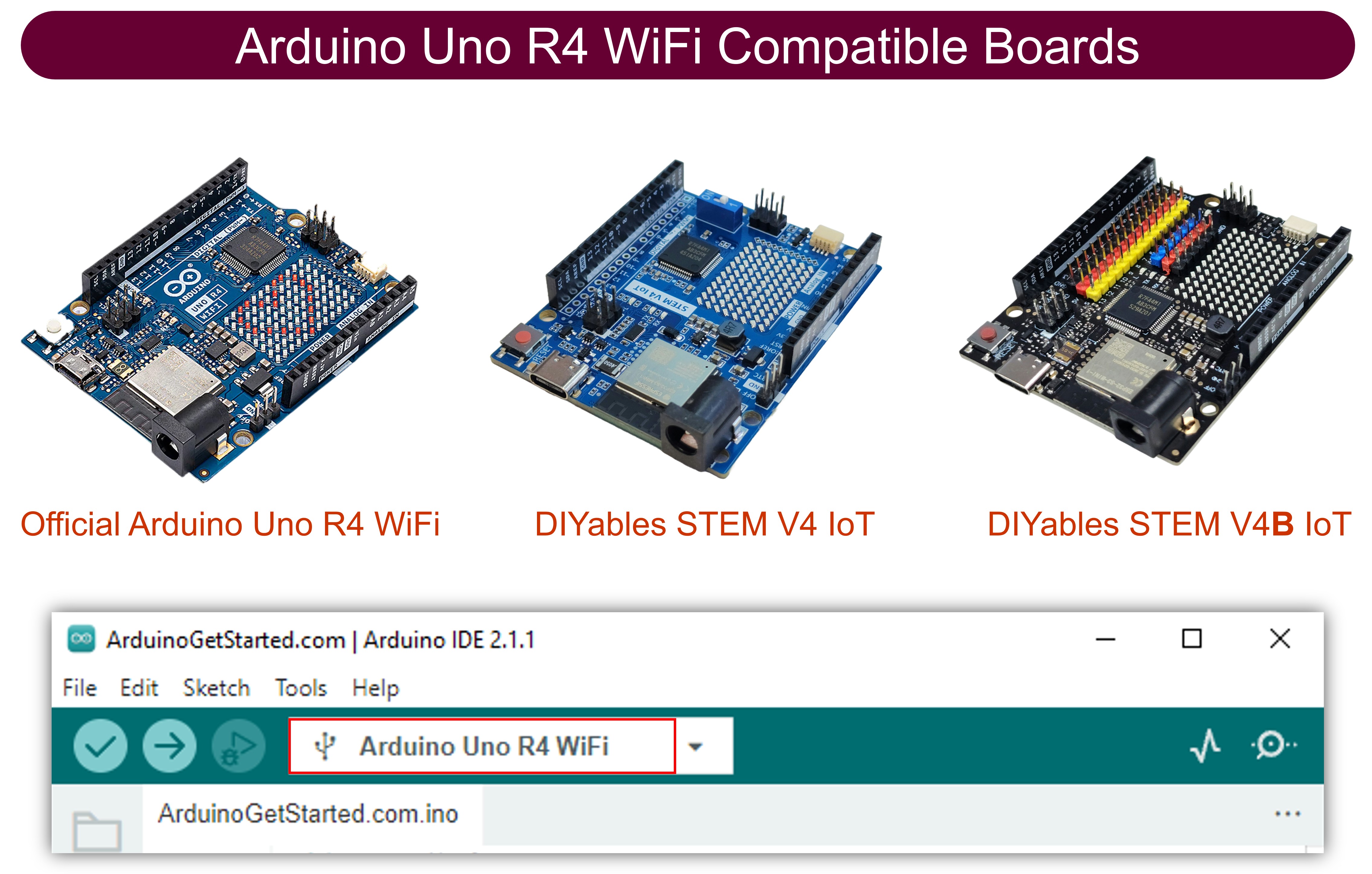
1×Arduino UNO R4 WiFi
1×Alternatively, DIYables STEM V4 IoT
1×(Tùy chọn) DIYables STEM V4 IoT
1×Cáp USB Type-C
1×(Khuyến nghị) Screw Terminal Block Shield for Arduino UNO R4
1×(Khuyến nghị) Breadboard Shield for Arduino UNO R4
1×(Khuyến nghị) Enclosure for Arduino UNO R4
1×(Khuyến nghị) Power Splitter for Arduino UNO R4
1×(Khuyến nghị) Prototyping Base Plate & Breadboard Kit for Arduino UNO

Or you can buy the following kits:

1×DIYables STEM V4 IoT Starter Kit (Arduino included)
1×DIYables Sensor Kit (30 sensors/displays)
1×DIYables Sensor Kit (18 sensors/displays)

Lưu ý: Không cần module RTC ngoài! Arduino UNO R4 WiFi có hardware RTC tích hợp có thể truy cập qua thư viện RTC.h.

Code Arduino UNO R4 WiFi

Các Bước Nhanh

Thực hiện theo các hướng dẫn sau từng bước:

  • Nếu đây là lần đầu bạn sử dụng Arduino UNO R4 WiFi, hãy tham khảo Arduino UNO R4 - Cài Đặt Phần Mềm.
  • Kết nối board Arduino UNO R4 WiFi với máy tính của bạn bằng cáp USB.
  • Khởi động Arduino IDE trên máy tính.
  • Chọn board Arduino UNO R4 WiFi và COM port phù hợp.
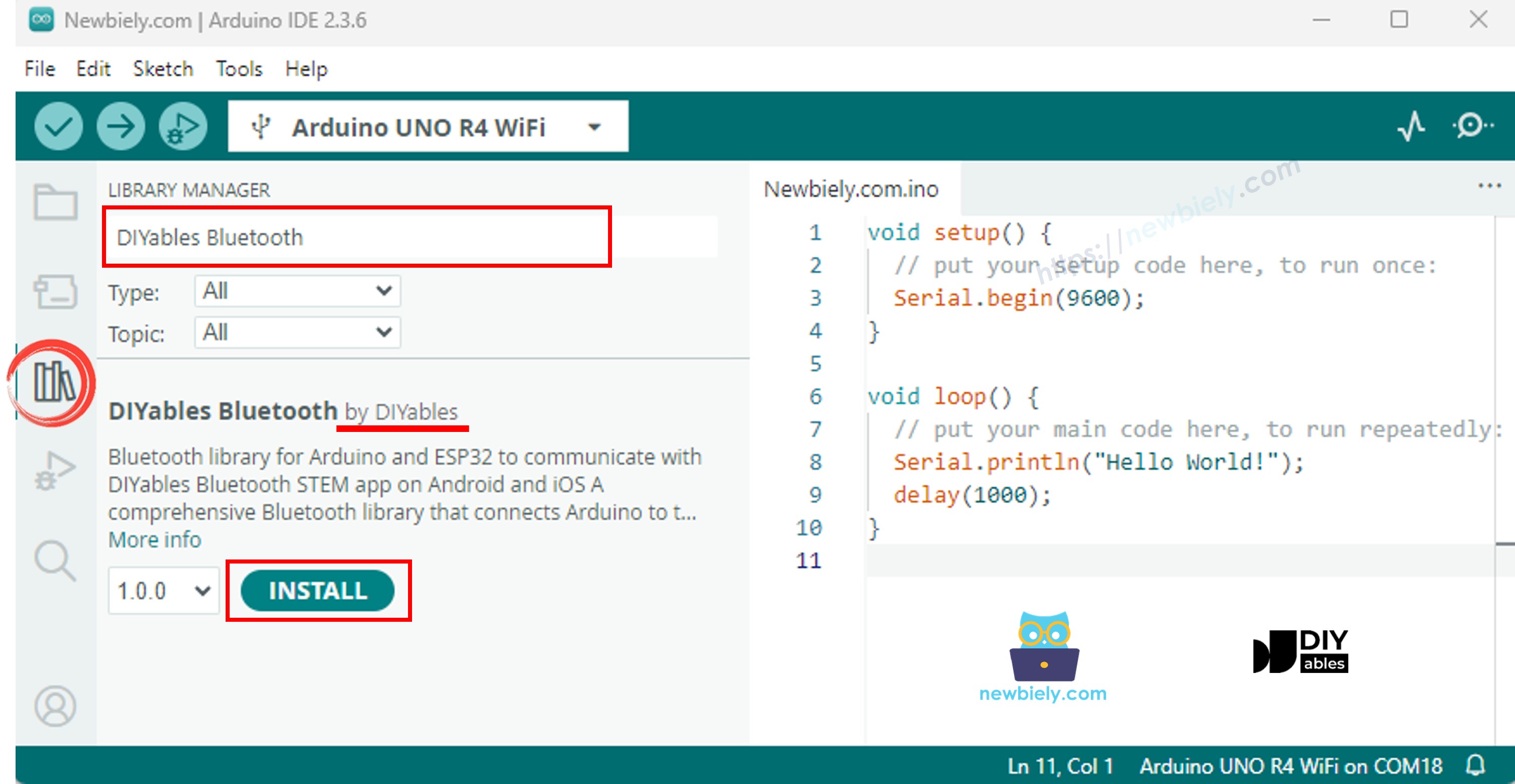
  • Điều hướng đến biểu tượng Libraries ở thanh bên trái của Arduino IDE.
  • Tìm kiếm "DIYables Bluetooth", sau đó tìm thư viện DIYables Bluetooth của DIYables
  • Nhấp nút Install để cài đặt thư viện.
Arduino UNO R4 diyables Bluetooth thư viện
  • Bạn sẽ được hỏi về việc cài đặt một số thư viện phụ thuộc khác
  • Nhấp nút Install All để cài đặt tất cả các thư viện phụ thuộc.
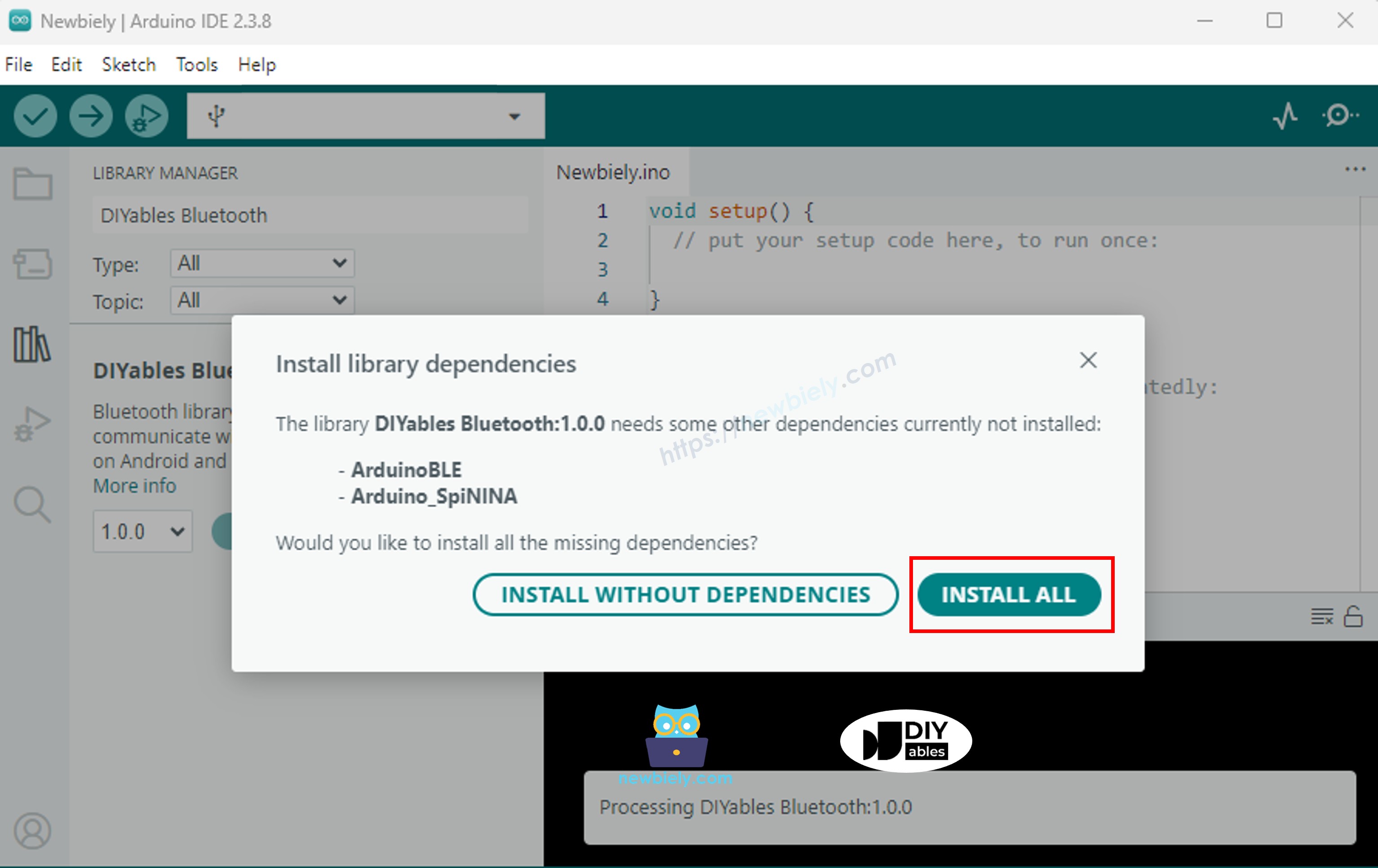
Arduino UNO R4 diyables Bluetooth dependency

BLE Code

  • Trên Arduino IDE, Vào File Examples DIYables Bluetooth ArduinoBLE_RTC example, hoặc sao chép code trên và dán vào editor của Arduino IDE
/* * DIYables Bluetooth Library - Bluetooth RTC Example * Works with DIYables Bluetooth STEM app on Android and iOS * * This example demonstrates the Bluetooth RTC (Real-Time Clock) feature: * - Real-time clock display for both Arduino and mobile app * - One-click time synchronization from mobile app to Arduino * - Hardware RTC integration for persistent timekeeping * - Visual time difference monitoring * * Compatible Boards: * - Arduino UNO R4 WiFi (with built-in RTC) * Note: This example requires a board with hardware RTC. * Other BLE boards can be used with an external RTC module (e.g., DS3231). * * Setup: * 1. Upload the sketch to your Arduino * 2. Open Serial Monitor to see connection status * 3. Use DIYables Bluetooth App to connect and sync time * * Tutorial: https://diyables.io/bluetooth-app * Author: DIYables */ #include <DIYables_BluetoothServer.h> #include <DIYables_BluetoothRTC.h> #include <platforms/DIYables_ArduinoBLE.h> #include "RTC.h" // BLE Configuration const char* DEVICE_NAME = "Arduino_RTC"; const char* SERVICE_UUID = "19B10000-E8F2-537E-4F6C-D104768A1214"; const char* TX_UUID = "19B10001-E8F2-537E-4F6C-D104768A1214"; const char* RX_UUID = "19B10002-E8F2-537E-4F6C-D104768A1214"; // Create Bluetooth instances DIYables_ArduinoBLE bluetooth(DEVICE_NAME, SERVICE_UUID, TX_UUID, RX_UUID); DIYables_BluetoothServer bluetoothServer(bluetooth); // Create RTC app instance DIYables_BluetoothRTC bluetoothRTC; void setup() { Serial.begin(9600); delay(1000); Serial.println("DIYables Bluetooth - RTC Example"); // Initialize RTC RTC.begin(); // Check if RTC is running and set initial time if needed RTCTime savedTime; RTC.getTime(savedTime); if (!RTC.isRunning() || savedTime.getYear() == 2000) { Serial.println("RTC is NOT running, setting initial time..."); // Set a default time - you can modify this to match current time RTCTime startTime(28, Month::AUGUST, 2025, 12, 0, 0, DayOfWeek::THURSDAY, SaveLight::SAVING_TIME_ACTIVE); RTC.setTime(startTime); Serial.println("RTC initialized with default time"); } else { Serial.println("RTC is already running"); } // Print initial RTC time RTCTime initialTime; RTC.getTime(initialTime); Serial.print("Initial RTC Time: "); Serial.print(initialTime.getYear()); Serial.print("/"); Serial.print(Month2int(initialTime.getMonth())); Serial.print("/"); Serial.print(initialTime.getDayOfMonth()); Serial.print(" - "); if (initialTime.getHour() < 10) Serial.print("0"); Serial.print(initialTime.getHour()); Serial.print(":"); if (initialTime.getMinutes() < 10) Serial.print("0"); Serial.print(initialTime.getMinutes()); Serial.print(":"); if (initialTime.getSeconds() < 10) Serial.print("0"); Serial.print(initialTime.getSeconds()); Serial.println(); // Initialize Bluetooth server with platform-specific implementation bluetoothServer.begin(); // Add RTC app to server bluetoothServer.addApp(&bluetoothRTC); // Set up connection event callbacks bluetoothServer.setOnConnected([]() { Serial.println("Bluetooth connected!"); // Send current time to app on connection sendCurrentTimeToApp(); }); bluetoothServer.setOnDisconnected([]() { Serial.println("Bluetooth disconnected!"); }); // Set callback for time sync from mobile app (Unix timestamp) bluetoothRTC.onTimeSync(onTimeSyncReceived); // Set callback for local time sync from mobile app (date/time components) bluetoothRTC.onLocalTimeSync(onLocalTimeSyncReceived); // Set callback for time request from mobile app bluetoothRTC.onTimeRequest(onTimeRequested); Serial.println("Waiting for Bluetooth connection..."); Serial.println("Connect via app to sync time"); } void loop() { // Handle Bluetooth server communications bluetoothServer.loop(); // Send current time to mobile app and print to Serial every 1 second static unsigned long lastUpdate = 0; if (millis() - lastUpdate >= 1000) { lastUpdate = millis(); // Get current RTC time RTCTime currentTime; RTC.getTime(currentTime); // Send time to mobile app in human readable format bluetoothRTC.sendTime(currentTime.getYear(), Month2int(currentTime.getMonth()), currentTime.getDayOfMonth(), currentTime.getHour(), currentTime.getMinutes(), currentTime.getSeconds()); // Print time to Serial Monitor Serial.print("RTC Time: "); Serial.print(currentTime.getYear()); Serial.print("/"); Serial.print(Month2int(currentTime.getMonth())); Serial.print("/"); Serial.print(currentTime.getDayOfMonth()); Serial.print(" - "); if (currentTime.getHour() < 10) Serial.print("0"); Serial.print(currentTime.getHour()); Serial.print(":"); if (currentTime.getMinutes() < 10) Serial.print("0"); Serial.print(currentTime.getMinutes()); Serial.print(":"); if (currentTime.getSeconds() < 10) Serial.print("0"); Serial.print(currentTime.getSeconds()); Serial.println(); } delay(10); } // Callback function called when mobile app sends time sync command void onTimeSyncReceived(unsigned long unixTimestamp) { Serial.print("Time sync received (Unix): "); Serial.println(unixTimestamp); // Convert Unix timestamp to RTCTime RTCTime newTime; newTime.setUnixTime(unixTimestamp); // Set RTC time RTC.setTime(newTime); Serial.println("Arduino RTC synchronized from Unix timestamp!"); } // Callback function called when mobile app sends local time sync with components void onLocalTimeSyncReceived(int year, int month, int day, int hour, int minute, int second) { Serial.print("Local time sync received: "); Serial.print(year); Serial.print("/"); Serial.print(month); Serial.print("/"); Serial.print(day); Serial.print(" "); Serial.print(hour); Serial.print(":"); Serial.print(minute); Serial.print(":"); Serial.println(second); // Create RTCTime from components (local time) // Convert month integer to Month enum Month monthEnum; switch(month) { case 1: monthEnum = Month::JANUARY; break; case 2: monthEnum = Month::FEBRUARY; break; case 3: monthEnum = Month::MARCH; break; case 4: monthEnum = Month::APRIL; break; case 5: monthEnum = Month::MAY; break; case 6: monthEnum = Month::JUNE; break; case 7: monthEnum = Month::JULY; break; case 8: monthEnum = Month::AUGUST; break; case 9: monthEnum = Month::SEPTEMBER; break; case 10: monthEnum = Month::OCTOBER; break; case 11: monthEnum = Month::NOVEMBER; break; case 12: monthEnum = Month::DECEMBER; break; default: monthEnum = Month::JANUARY; break; } RTCTime newTime(day, monthEnum, year, hour, minute, second, DayOfWeek::MONDAY, SaveLight::SAVING_TIME_ACTIVE); // Set RTC time RTC.setTime(newTime); Serial.println("Arduino RTC synchronized from local time components!"); } // Callback function called when mobile app requests current Arduino time void onTimeRequested() { Serial.println("Time requested by app"); sendCurrentTimeToApp(); } // Helper function to send current time to mobile app void sendCurrentTimeToApp() { // Get current RTC time and send to app in human readable format RTCTime currentTime; RTC.getTime(currentTime); bluetoothRTC.sendTime(currentTime.getYear(), Month2int(currentTime.getMonth()), currentTime.getDayOfMonth(), currentTime.getHour(), currentTime.getMinutes(), currentTime.getSeconds()); }
  • Nhấp nút Upload trên Arduino IDE để upload code lên Arduino UNO R4 WiFi
  • Mở Serial Monitor
  • Kiểm tra kết quả trên Serial Monitor. Nó trông như bên dưới:
COM6
Send
DIYables Bluetooth - RTC Example Waiting for Bluetooth connection... RTC not running or year is 2000, waiting for time sync...
Autoscroll Show timestamp
Clear output
9600 baud  
Newline  

Ứng dụng Di động

  • Cài đặt ứng dụng DIYables Bluetooth trên smartphone: Android | iOS

Lưu ý: Ứng dụng DIYables Bluetooth hỗ trợ cả BLE và Classic Bluetooth trên Android, và BLE trên iOS. Vì Arduino UNO R4 WiFi sử dụng BLE, ứng dụng hoạt động trên cả Android và iOS. Không cần ghép nối thủ công cho BLE — chỉ cần scan và kết nối.

  • Mở ứng dụng DIYables Bluetooth
  • Khi mở ứng dụng lần đầu tiên, nó sẽ yêu cầu quyền. Vui lòng cấp các quyền sau:
    • Quyền Nearby Devices (Android 12+) / quyền Bluetooth (iOS) - cần thiết để scan và kết nối với thiết bị Bluetooth
    • Quyền Location (chỉ Android 11 trở xuống) - cần thiết cho các phiên bản Android cũ để scan thiết bị BLE
  • Đảm bảo Bluetooth được bật trên điện thoại
  • Trên màn hình chính, nhấp nút Connect. Ứng dụng sẽ scan thiết bị BLE.
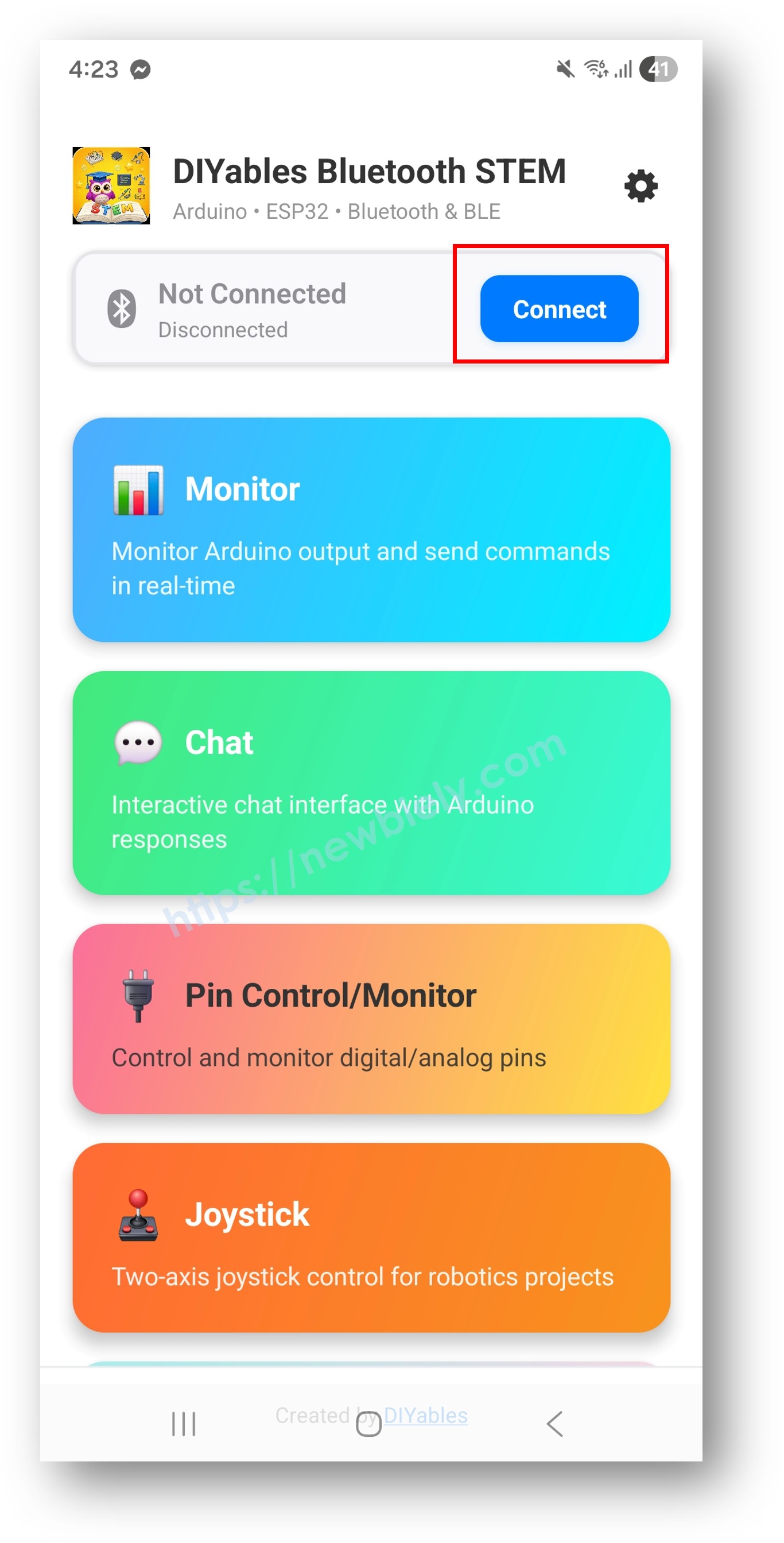
diyables Bluetooth app - home screen with scan nút nhấn
  • Tìm và nhấp "Arduino_RTC" trong kết quả scan để kết nối.
  • Sau khi kết nối, ứng dụng tự động quay về màn hình chính. Chọn ứng dụng RTC từ menu ứng dụng.
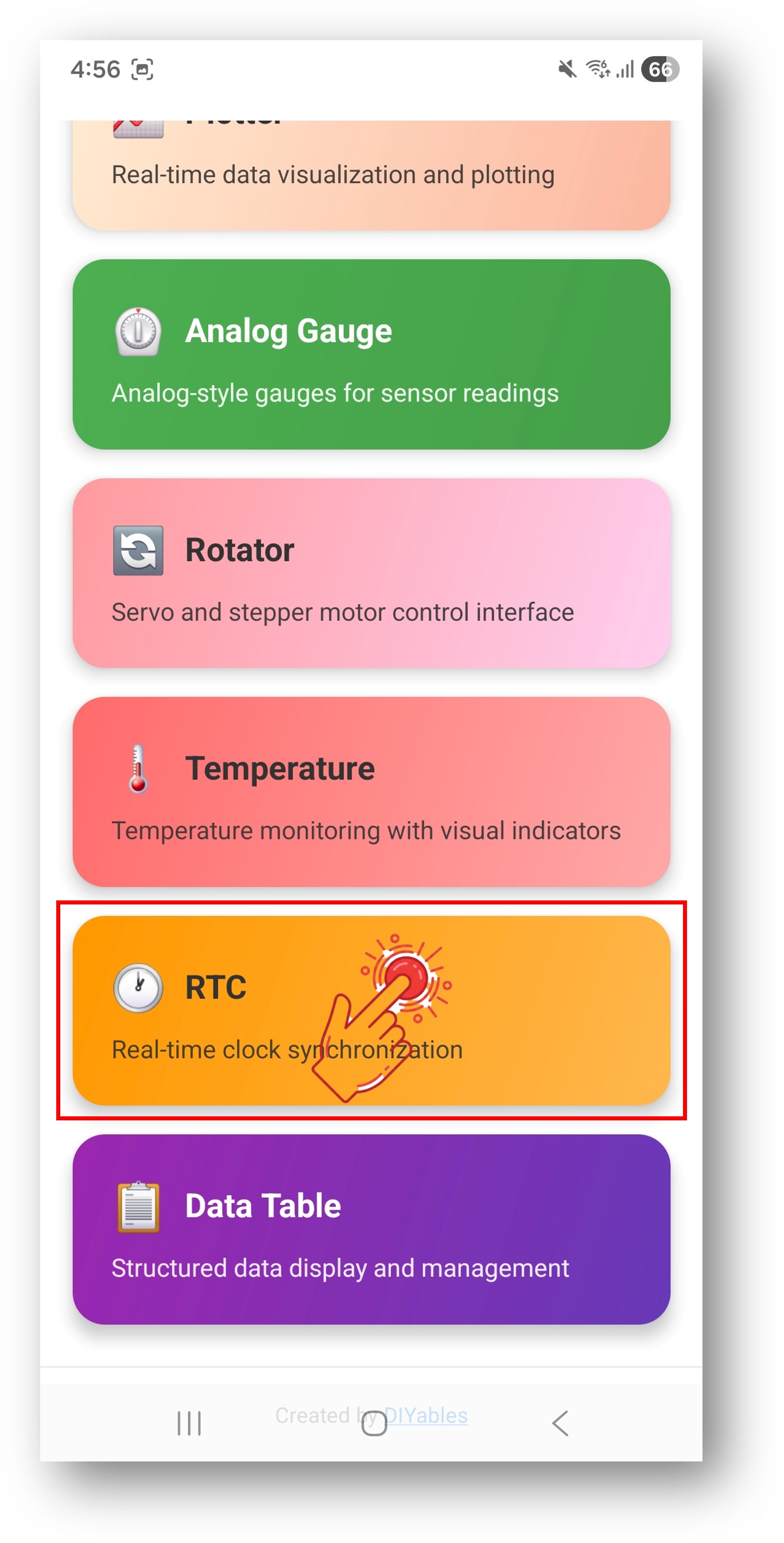
diyables Bluetooth app - home screen with rtc app

Lưu ý: Bạn có thể nhấp biểu tượng cài đặt trên màn hình chính để ẩn/hiện ứng dụng trên màn hình chính. Để biết thêm chi tiết, xem Hướng dẫn Sử dụng Ứng dụng DIYables Bluetooth.

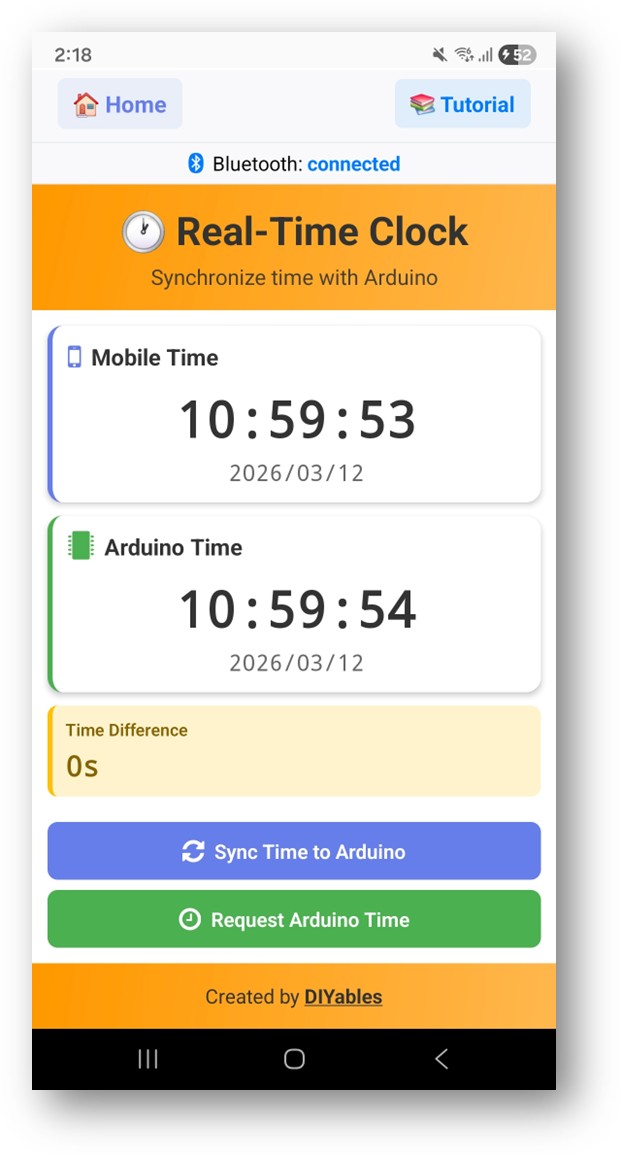
  • Ứng dụng sẽ hiển thị thời gian hiện tại từ RTC của Arduino
  • Sử dụng nút Sync để đồng bộ thời gian điện thoại với Arduino
  • Thời gian cập nhật mỗi giây
diyables Bluetooth app - rtc screen

Bây giờ hãy nhìn lại Serial Monitor trên Arduino IDE. Bạn sẽ thấy:

COM6
Send
Bluetooth connected! Time sync received (unix): 1719849600 RTC set to: 2025/07/01 12:00:00 Current time: 2025/07/01 12:00:01 Current time: 2025/07/01 12:00:02
Autoscroll Show timestamp
Clear output
9600 baud  
Newline  

Tùy chỉnh Sáng tạo - Điều chỉnh Code cho Dự án của Bạn

Phương pháp Đồng bộ Thời gian

Ứng dụng có thể đồng bộ thời gian với Arduino sử dụng hai phương pháp:

// Phương pháp 1: Đồng bộ Unix timestamp bluetoothRTC.onTimeSync([](unsigned long unixTime) { // Chuyển đổi Unix timestamp và thiết lập RTC Serial.print("Unix time: "); Serial.println(unixTime); }); // Phương pháp 2: Đồng bộ các thành phần thời gian local bluetoothRTC.onLocalTimeSync([](int year, int month, int day, int hour, int minute, int second) { // Thiết lập RTC trực tiếp với các thành phần Serial.print("Local time: "); Serial.print(year); Serial.print("/"); Serial.print(month); Serial.print("/"); Serial.println(day); });

Gửi Thời gian tới App

// Gửi thời gian hiện tại tới ứng dụng bluetoothRTC.sendTime(year, month, day, hour, minute, second);

Xử lý Yêu cầu Thời gian

bluetoothRTC.onTimeRequest([]() { // App đang yêu cầu thời gian hiện tại // Đọc RTC và gửi thời gian trở lại RTCTime currentTime; RTC.getTime(currentTime); bluetoothRTC.sendTime( currentTime.getYear(), Month2int(currentTime.getMonth()), currentTime.getDayOfMonth(), currentTime.getHour(), currentTime.getMinutes(), currentTime.getSeconds() ); });

Sử dụng RTC Tích hợp

RTC tích hợp của Arduino UNO R4 WiFi được truy cập qua thư viện RTC.h:

#include "RTC.h" void setup() { RTC.begin(); // Khởi tạo hardware RTC } // Thiết lập thời gian trên RTC RTCTime timeToSet; timeToSet.setYear(2025); timeToSet.setMonth(Month::JULY); timeToSet.setDayOfMonth(1); timeToSet.setHour(12); timeToSet.setMinute(0); timeToSet.setSecond(0); RTC.setTime(timeToSet); // Đọc thời gian từ RTC RTCTime currentTime; RTC.getTime(currentTime); int year = currentTime.getYear(); int month = Month2int(currentTime.getMonth()); int day = currentTime.getDayOfMonth(); int hour = currentTime.getHour(); int minute = currentTime.getMinutes(); int second = currentTime.getSeconds();

Ví dụ Lập trình

Đồng hồ với Hiển thị Serial

void loop() { bluetoothServer.loop(); static unsigned long lastTime = 0; if (millis() - lastTime >= 1000) { lastTime = millis(); RTCTime currentTime; if (RTC.getTime(currentTime)) { char timeStr[20]; sprintf(timeStr, "%04d/%02d/%02d %02d:%02d:%02d", currentTime.getYear(), Month2int(currentTime.getMonth()), currentTime.getDayOfMonth(), currentTime.getHour(), currentTime.getMinutes(), currentTime.getSeconds()); Serial.println(timeStr); // Cũng gửi tới ứng dụng bluetoothRTC.sendTime( currentTime.getYear(), Month2int(currentTime.getMonth()), currentTime.getDayOfMonth(), currentTime.getHour(), currentTime.getMinutes(), currentTime.getSeconds() ); } } }

Data Logger với Timestamp

void logSensorData() { RTCTime currentTime; RTC.getTime(currentTime); float temperature = readSensor(); char logEntry[50]; sprintf(logEntry, "%04d/%02d/%02d %02d:%02d:%02d - Temp: %.1f°C", currentTime.getYear(), Month2int(currentTime.getMonth()), currentTime.getDayOfMonth(), currentTime.getHour(), currentTime.getMinutes(), currentTime.getSeconds(), temperature); Serial.println(logEntry); }

Khắc phục Sự cố

Vấn đề Thường gặp

1. Không thể tìm thấy thiết bị trong ứng dụng

  • Đảm bảo Arduino UNO R4 WiFi được cấp nguồn và sketch đã được upload
  • Đảm bảo Bluetooth của điện thoại đã được bật
  • Trên Android 11 trở xuống, cũng bật dịch vụ Location

2. Thời gian hiển thị 2000/01/01 hoặc thời gian không đúng

  • RTC cần được đồng bộ ít nhất một lần sau khi cấp nguồn
  • Sử dụng nút Sync trong ứng dụng để thiết lập thời gian
  • RTC mất thời gian khi board bị tắt nguồn (không có sao lưu pin)

3. Thời gian không đồng bộ từ ứng dụng

  • Xác minh các callback onTimeSynconLocalTimeSync đã được thiết lập
  • Kiểm tra Serial Monitor cho các thông báo sync
  • Đảm bảo kết nối BLE ổn định

4. RTC trôi theo thời gian

  • Tinh thể RTC tích hợp có độ chính xác hạn chế
  • Đồng bộ lại định kỳ qua ứng dụng
  • Đối với timing quan trọng, hãy xem xét sử dụng NTP qua WiFi

5. Vấn đề chuyển đổi tháng

  • RTC Arduino UNO R4 WiFi sử dụng enum Month, không phải integer
  • Sử dụng hàm chuyển đổi (như Month2int() trong ví dụ) cho tháng integer
  • Tháng bắt đầu từ 1 (January = 1)

6. Upload thất bại hoặc board không được nhận diện

  • Cài đặt gói board Arduino UNO R4 mới nhất qua Board Manager
  • Thử cáp USB hoặc port khác

Ý tưởng Dự án

  • Đồng hồ số với đồng bộ thời gian BLE
  • Data logger với timestamp chính xác
  • Tự động hóa nhiệm vụ theo lịch trình (bật/tắt vào thời gian cụ thể)
  • Đồng hồ báo thức với điều khiển smartphone
  • Ghi sự kiện có timestamp

Bước tiếp theo

Sau khi thành thạo ví dụ Bluetooth RTC, hãy thử:

  1. Bluetooth Monitor - Cho hiển thị trạng thái dựa trên text với timestamp
  2. Bluetooth Table - Cho dữ liệu có cấu trúc với trường thời gian
  3. Bluetooth Chat - Cho giao tiếp hai chiều
  4. Multiple Bluetooth Apps - Kết hợp RTC với các ứng dụng khác

Hỗ trợ

Để được hỗ trợ thêm:

  • Kiểm tra tài liệu API Reference
  • Diễn đàn cộng đồng Arduino