
Arduino Điều khiển khóa cửa qua Web
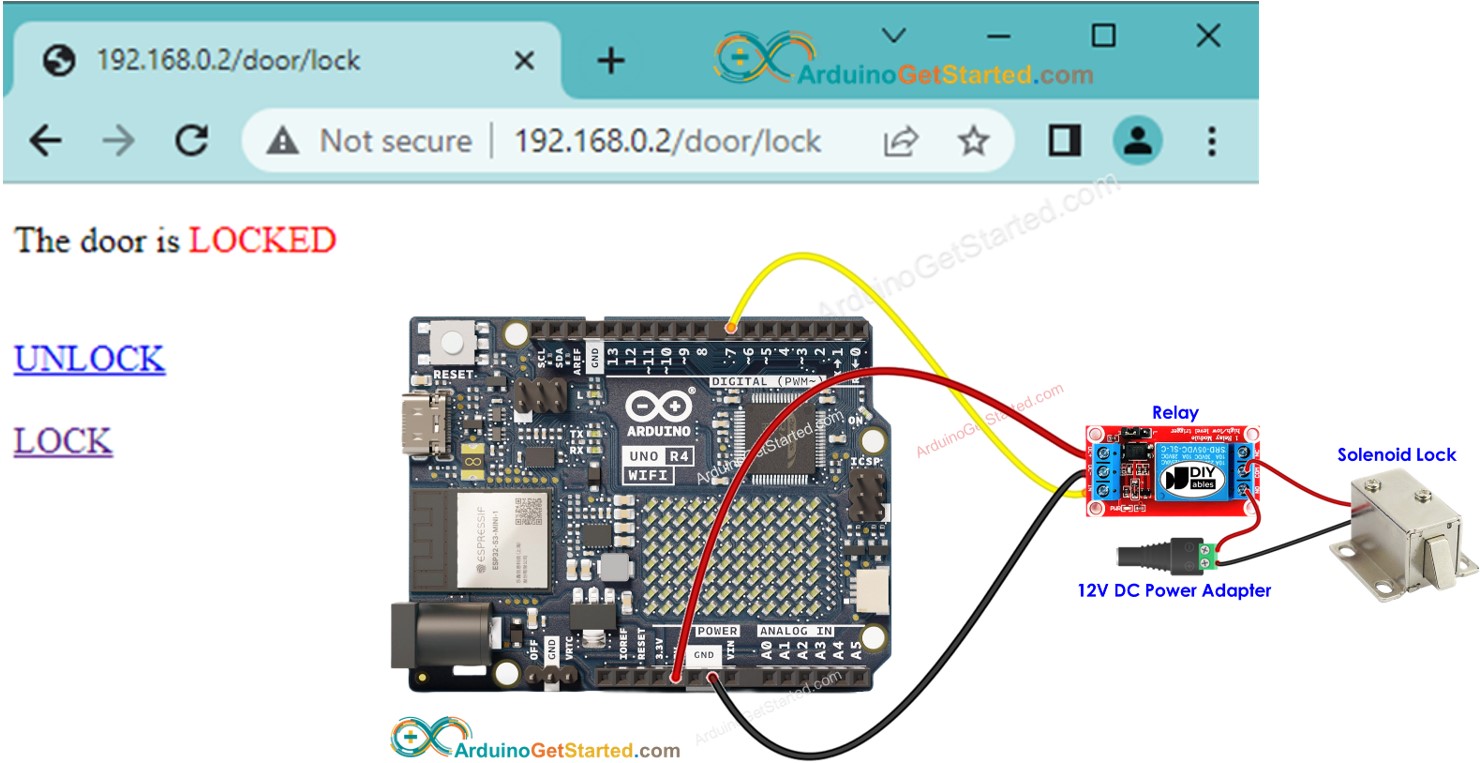
Trong hướng dẫn này, chúng ta sẽ tìm hiểu cách sử dụng Arduino để điều khiển khóa cửa thông qua một giao diện web có thể truy cập được bằng trình duyệt trên máy tính hoặc điện thoại thông minh. Dưới đây là cách mọi thứ hoạt động:
- Chúng ta sẽ lập trình Arduino để hoạt động như một máy chủ web
- Khi bạn gõ địa chỉ IP của Arduino vào trình duyệt web, trình duyệt web sẽ gửi yêu cầu HTTP đến Arduino.
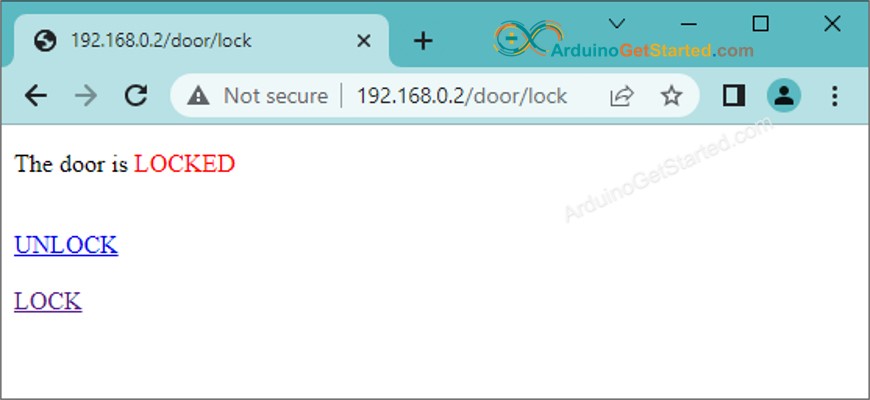
- Arduino trả về cho trình duyệt một trang web. Trang web sẽ hiển thị:
- Cửa hiện đang bị khóa hay mở.
- Một nút mở khóa cửa.
- Một nút khác để khóa cửa.
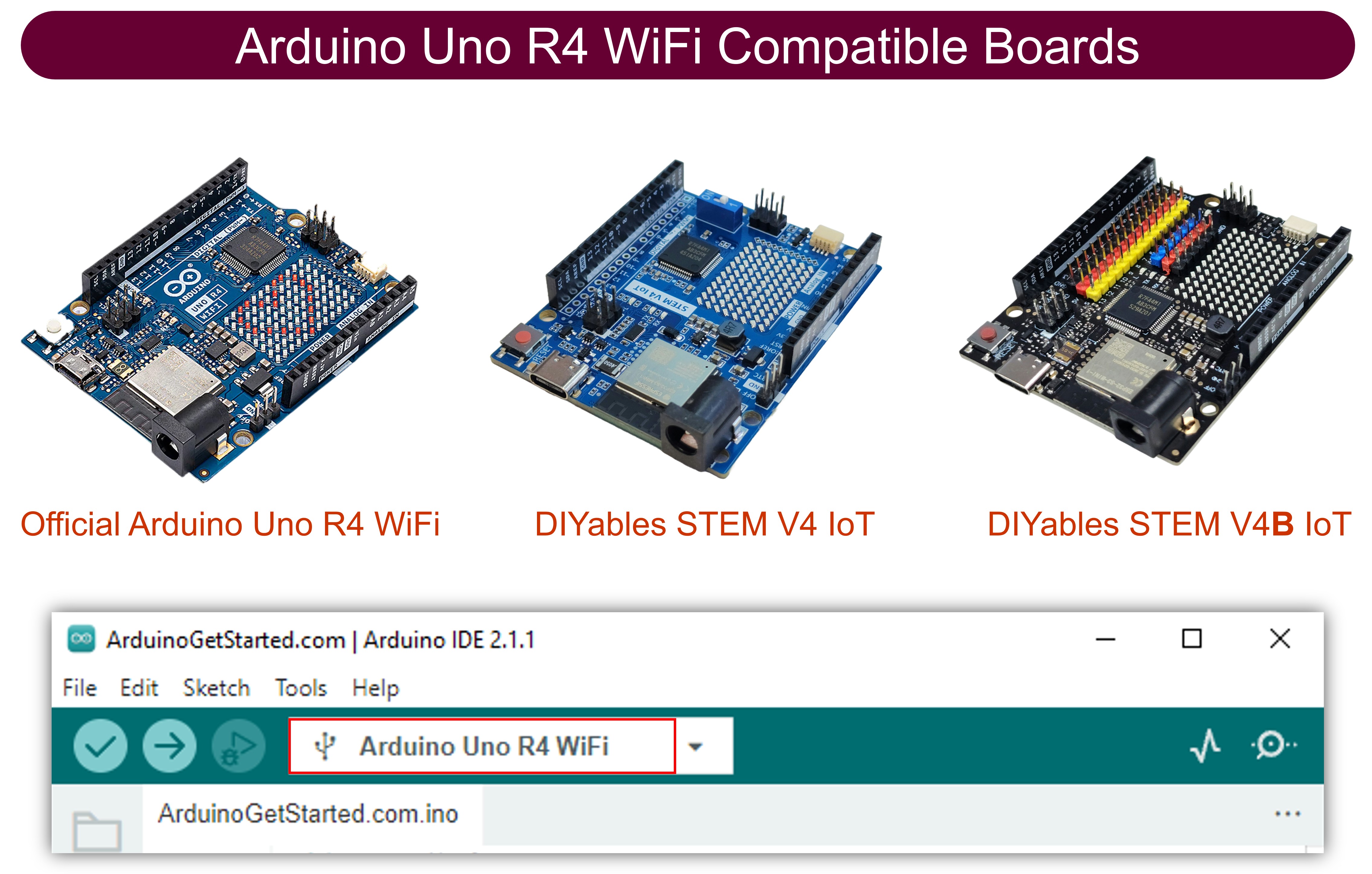
- Nếu đây là lần đầu bạn sử dụng Arduino Uno R4, hãy xem Cách bắt đầu với Arduino UNO R4.
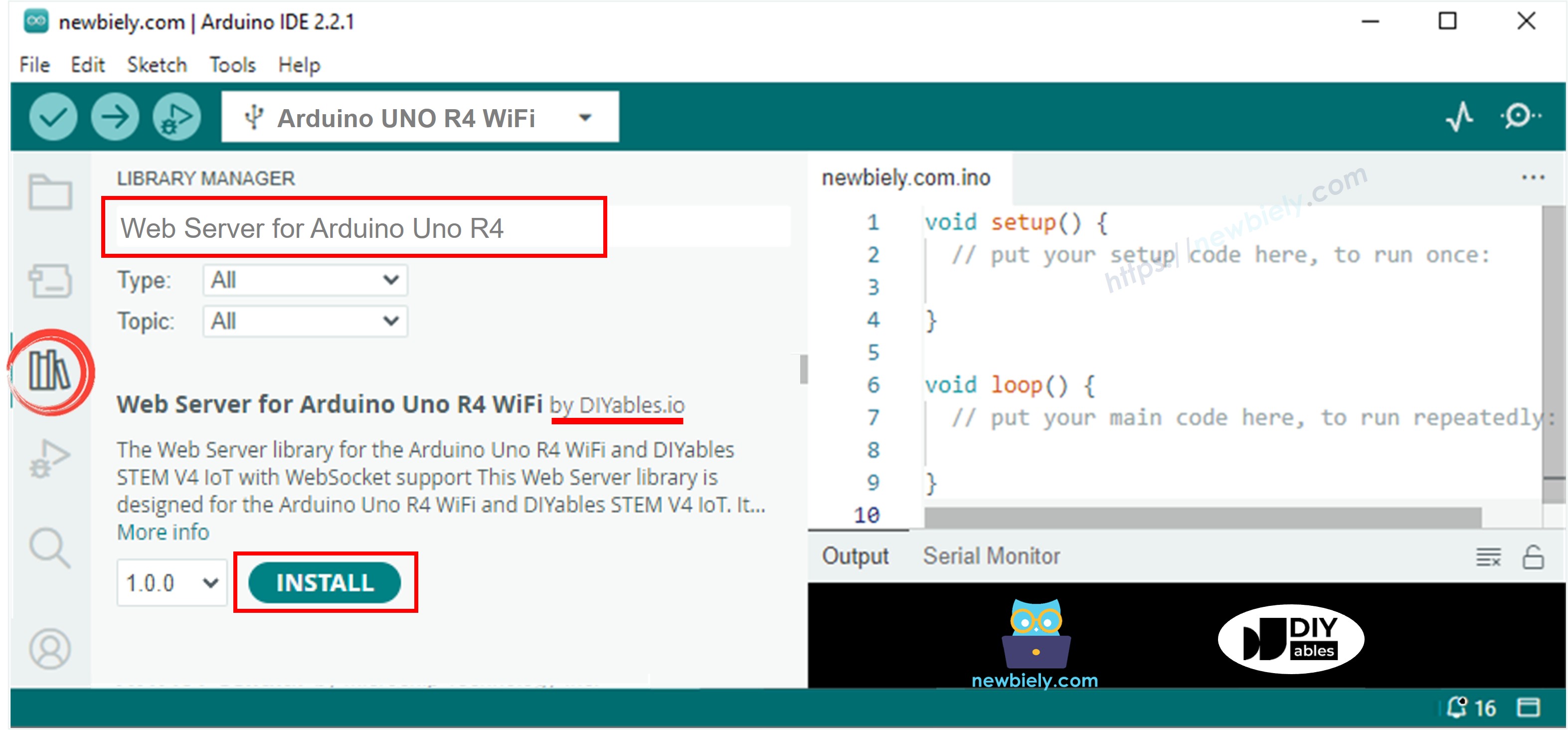
- Mở Quản lý Thư viện bằng cách nhấp vào biểu tượng Library Manager ở bên trái IDE Arduino.
- Tìm kiếm Web Server for Arduino Uno R4 WiFi và tìm thư viện Web Server do DIYables tạo ra.
- Nhấp vào nút Install để thêm thư viện Web Server.
- Sao chép đoạn mã ở trên và mở bằng Arduino IDE
- Thay đổi thông tin Wi‑Fi (SSID và mật khẩu) trong mã thành của bạn
- Nhấn nút Tải lên trên Arduino IDE để tải mã lên Arduino
- Mở Serial Monitor
- Xem kết quả trên Serial Monitor.
- Bạn sẽ thấy một địa chỉ IP, ví dụ: 192.168.0.2. Đây là địa chỉ IP của máy chủ web Arduino
- Mở một trình duyệt web và nhập một trong ba cú pháp dưới đây vào thanh địa chỉ:
- Xin lưu ý rằng địa chỉ IP có thể khác nhau. Hãy đảm bảo kiểm tra giá trị hiện tại trên Serial Monitor.
- Ngoài ra, bạn sẽ thấy đầu ra sau đây trên Serial Monitor.
- Kiểm tra trạng thái khóa cửa
- Bạn sẽ thấy trang web của bảng Arduino trên trình duyệt web như dưới đây:
Phần cứng cần chuẩn bị
| 1 | × | Arduino UNO R4 WiFi | Amazon | |
| 1 | × | Alternatively, DIYables STEM V4 IoT | Amazon | |
| 1 | × | Alternatively, DIYables STEM V4B IoT | Amazon | |
| 1 | × | (Tùy chọn) DIYables STEM V4 IoT | Amazon | |
| 1 | × | USB Cable Type-A to Type-C (for USB-A PC) | Amazon | |
| 1 | × | USB Cable Type-C to Type-C (for USB-C PC) | Amazon | |
| 1 | × | Relay | Amazon | |
| 1 | × | Solenoid Lock | Amazon | |
| 1 | × | 12V Power Adapter | Amazon | |
| 1 | × | DC Power Jack | Amazon | |
| 1 | × | dây jumper | Amazon | |
| 1 | × | (Khuyến nghị) Screw Terminal Block Shield for Arduino UNO R4 | Amazon | |
| 1 | × | (Khuyến nghị) Sensors/Servo Expansion Shield for Arduino UNO R4 | Amazon | |
| 1 | × | (Khuyến nghị) Breadboard Shield for Arduino UNO R4 | Amazon | |
| 1 | × | (Khuyến nghị) Enclosure for Arduino UNO R4 | Amazon | |
| 1 | × | (Khuyến nghị) Power Splitter for Arduino UNO R4 | Amazon | |
| 1 | × | (Khuyến nghị) Prototyping Base Plate & Breadboard Kit for Arduino UNO | Amazon |
Or you can buy the following kits:
| 1 | × | DIYables STEM V4 IoT Starter Kit (Arduino included) | Amazon | |
| 1 | × | DIYables Sensor Kit (18 sensors/displays) | Amazon |
Tiết lộ: Một số liên kết trong bài viết này là liên kết tiếp thị Amazon và có thể nhận hoa hồng theo chính sách của chương trình.
Giới thiệu về Khóa Solenoid và Arduino Uno R4
Nếu bạn chưa quen với Arduino Uno R4 và khóa solenoid (như sơ đồ chân, cách chúng hoạt động và cách lập trình chúng), bạn có thể tìm hiểu tất cả về chúng trong các bài hướng dẫn dưới đây:
Sơ đồ đấu dây
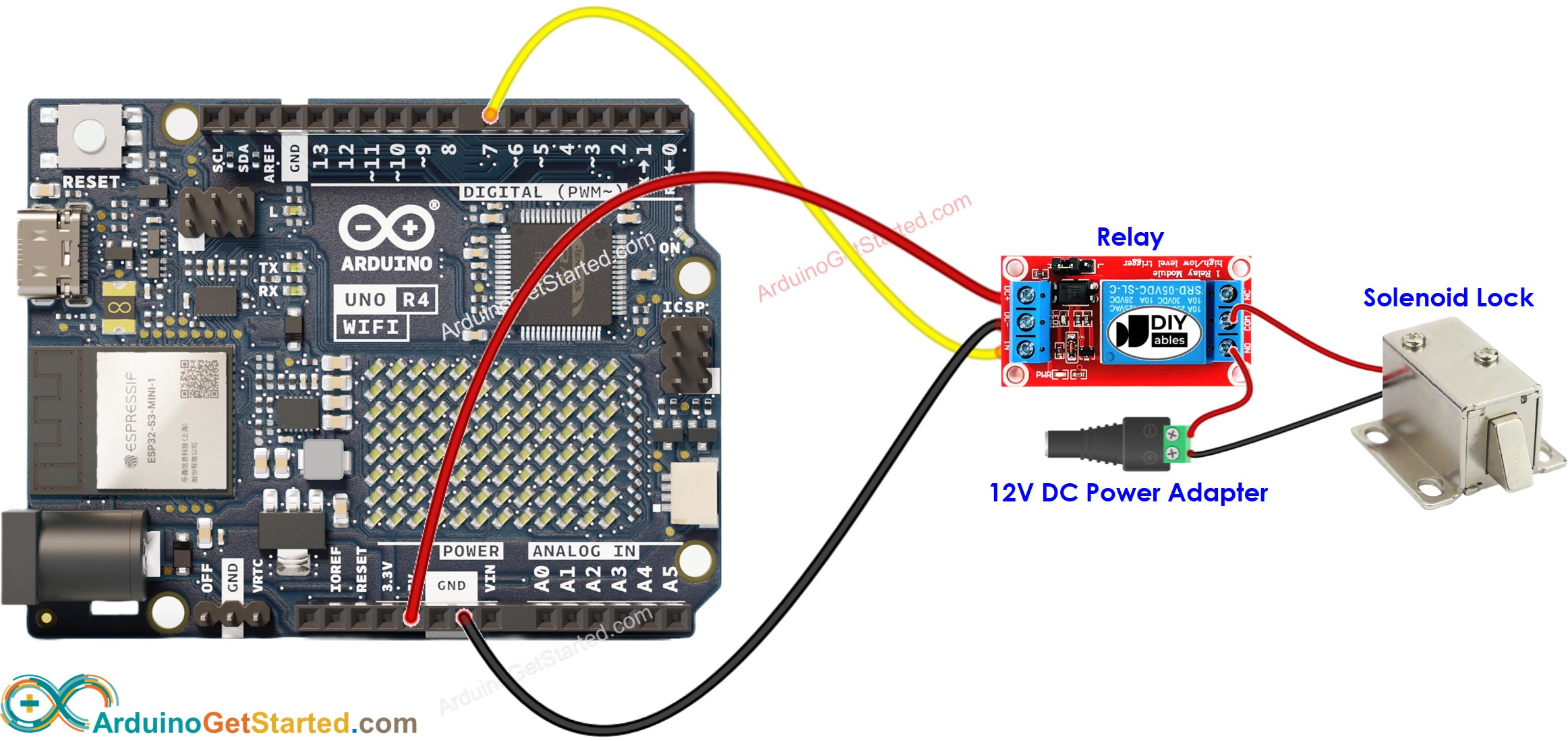
This image is created using Fritzing. Click to enlarge image
Mã Arduino
/*
* Mã Arduino này được phát triển bởi newbiely.vn
* Mã Arduino này được cung cấp để sử dụng công khai, không có ràng buộc.
* Để xem hướng dẫn chi tiết và sơ đồ kết nối, vui lòng truy cập:
* https://newbiely.vn/tutorials/arduino/arduino-controls-door-lock-via-web
*/
#include <UnoR4WiFi_WebServer.h>
#define RELAY_PIN 7 // Arduino pin connected to the solenoid lock via relay
const char HTML_CONTENT[] PROGMEM = R"rawliteral(
<!DOCTYPE HTML>
<html>
<head>
<link rel="icon" href="data:,">
<title>Door Control</title>
</head>
<body>
<h1>Door Control System</h1>
<p>The door is <span style="color: red;">%DOOR_STATUS%</span></p>
<br>
<a href="/door/unlock">UNLOCK</a>
<br><br>
<a href="/door/lock">LOCK</a>
</body>
</html>
)rawliteral";
// WiFi credentials
const char WIFI_SSID[] = "YOUR_WIFI_SSID"; // change your network SSID (name)
const char WIFI_PASSWORD[] = "YOUR_WIFI_PASSWORD"; // change your network password
// Door state
int doorState = LOW;
// Create web server instance
UnoR4WiFi_WebServer server;
// Handler for the main door control page
void sendHTML(WiFiClient& client) {
String status = (doorState == LOW) ? "LOCKED" : "UNLOCKED";
String response = HTML_CONTENT;
response.replace("%DOOR_STATUS%", status);
server.sendResponse(client, response.c_str());
}
void handleDoor(WiFiClient& client, const String& method, const String& request, const QueryParams& params, const String& jsonData) {
sendHTML(client);
}
// Handler for unlock command
void handleUnlock(WiFiClient& client, const String& method, const String& request, const QueryParams& params, const String& jsonData) {
doorState = HIGH;
digitalWrite(RELAY_PIN, doorState);
Serial.println("Unlock the door");
sendHTML(client);
}
// Handler for lock command
void handleLock(WiFiClient& client, const String& method, const String& request, const QueryParams& params, const String& jsonData) {
doorState = LOW;
digitalWrite(RELAY_PIN, doorState);
Serial.println("Lock the door");
sendHTML(client);
}
void setup() {
Serial.begin(9600);
delay(1000);
// Initialize relay pin
pinMode(RELAY_PIN, OUTPUT);
digitalWrite(RELAY_PIN, doorState);
Serial.println("Arduino Uno R4 WiFi - Door Lock Web Control");
// Connect to WiFi
Serial.print("Connecting to ");
Serial.println(WIFI_SSID);
WiFi.begin(WIFI_SSID, WIFI_PASSWORD);
while (WiFi.status() != WL_CONNECTED) {
delay(500);
Serial.print(".");
}
Serial.println(" connected!");
Serial.print("IP address: ");
Serial.println(WiFi.localIP());
// Configure routes
server.addRoute("/", handleDoor);
server.addRoute("/door/unlock", handleUnlock);
server.addRoute("/door/lock", handleLock);
// Start server
server.begin();
Serial.println("\n=== Web Server Ready! ===");
Serial.print("Visit: http://");
Serial.println(WiFi.localIP());
}
void loop() {
server.handleClient();
}
Hướng dẫn từng bước
8
Serial.println("Hello World!");
Message (Enter to send message to 'Arduino Uno' on 'COM15')
New Line
9600 baud
Arduino Uno R4 WiFi - Door Lock Web Control
Connecting to YOUR_WIFI_SSID
connected!
IP address: 192.168.0.254
Starting web server on IP: 192.168.0.254
=== Web Server Ready! ===
Visit: http://192.168.0.254
192.168.0.2
192.168.0.2/door/unlock
192.168.0.2/door/lock
8
Serial.println("Hello World!");
Message (Enter to send message to 'Arduino Uno' on 'COM15')
New Line
9600 baud
Arduino Uno R4 WiFi - Door Lock Web Control
Connecting to YOUR_WIFI_SSID
connected!
IP address: 192.168.0.254
Starting web server on IP: 192.168.0.254
=== Web Server Ready! ===
Visit: http://192.168.0.254
Method: GET
Requested path: /
Client disconnected
Method: GET
Requested path: /door/unlock
Unlock the door
Client disconnected
Method: GET
Requested path: /door/lock
Lock the door
Client disconnected
Nếu bạn muốn nâng cao giao diện người dùng của trang web bằng một giao diện đồ họa ấn tượng (GUI), bạn có thể tham khảo hướng dẫn Arduino - Máy chủ web để lấy cảm hứng và được hướng dẫn.
Bài hướng dẫn liên quan
📱 Ứng dụng đề xuất
 English for KidsHọc tiếng Anh vui nhộn cho trẻ nhỏ.Tải về trênGoogle PlayTải về trênApp Store
 Bubble NoteGhi chú tự xóa — viết như nhắn tin.Tải về trênGoogle PlayTải về trênApp Store
 Tôi Không MuaĐánh bại mua sắm bốc đồng, tiết kiệm hơn.Tải về trênGoogle PlayTải về trênApp Store
 Con Đường Tri ThứcBài thi thử để học mọi thứ.Tải về trênGoogle PlayTải về trênApp Store