
Arduino Cảm biến cửa động cơ servo
Chúng ta sẽ học:
- Nếu cửa đang mở, quay động cơ servo về 90 độ
- Nếu cửa mở lại, quay động cơ servo trở về 0 độ
Quá trình đó được lặp lại.
Phần cứng cần chuẩn bị
| 1 | × | Arduino Uno R3 | Amazon | |
| 1 | × | USB 2.0 cable type A/B (for USB-A PC) | Amazon | |
| 1 | × | USB 2.0 cable type C/B (for USB-C PC) | Amazon | |
| 1 | × | cảm biến cửa | Amazon | |
| 1 | × | động cơ servo | Amazon | |
| 1 | × | dây jumper | Amazon | |
| 1 | × | (Khuyến nghị) Screw Terminal Block Shield for Arduino Uno | Amazon | |
| 1 | × | (Khuyến nghị) Sensors/Servo Expansion Shield for Arduino Uno | Amazon | |
| 1 | × | (Khuyến nghị) Breadboard Shield for Arduino Uno | Amazon | |
| 1 | × | (Khuyến nghị) Enclosure for Arduino Uno | Amazon | |
| 1 | × | (Khuyến nghị) Prototyping Base Plate & Breadboard Kit for Arduino UNO | Amazon |
Or you can buy the following kits:
| 1 | × | DIYables STEM V3 Starter Kit (Arduino included) | Amazon | |
| 1 | × | DIYables Sensor Kit (18 sensors/displays) | Amazon |
Tiết lộ: Một số liên kết trong bài viết này là liên kết tiếp thị Amazon và có thể nhận hoa hồng theo chính sách của chương trình.
Về động cơ Servo và cảm biến cửa
Nếu bạn chưa biết về động cơ servo và cảm biến cửa (bố trí các chân, cách hoạt động, cách lập trình ...), hãy tìm hiểu về chúng trong các bài hướng dẫn sau đây:
Sơ đồ đấu dây
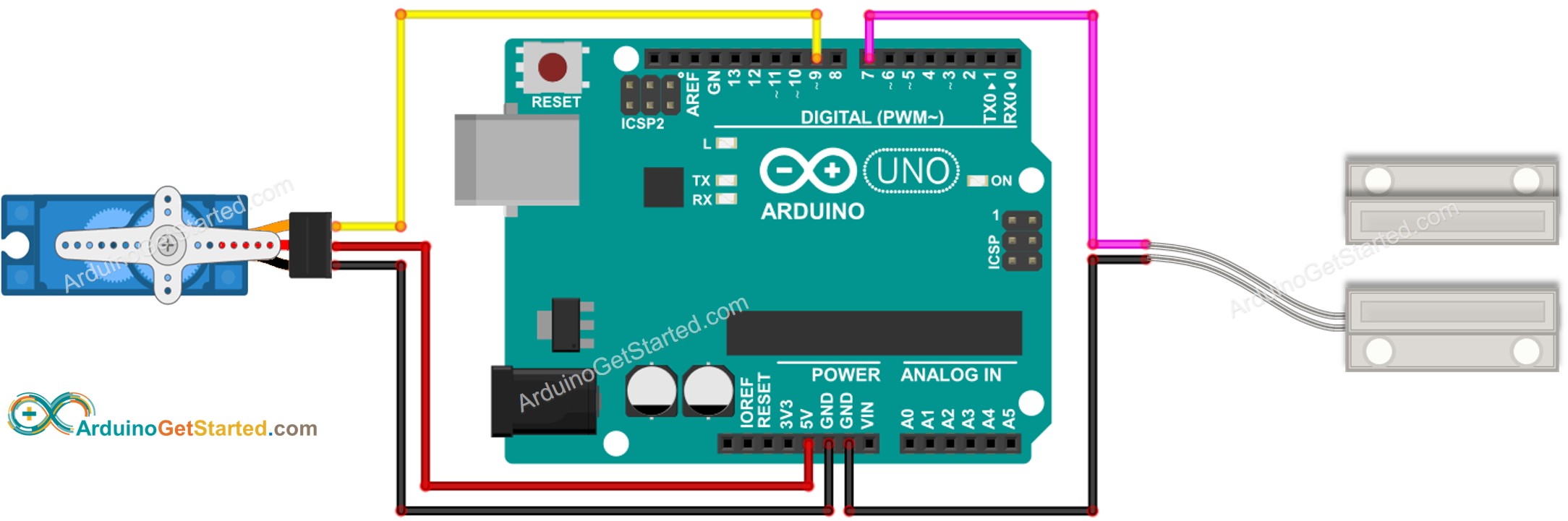
This image is created using Fritzing. Click to enlarge image
Mã Arduino - Cảm biến Cửa Điều khiển Động cơ Servo
/*
* Mã Arduino này được phát triển bởi newbiely.vn
* Mã Arduino này được cung cấp để sử dụng công khai, không có ràng buộc.
* Để xem hướng dẫn chi tiết và sơ đồ kết nối, vui lòng truy cập:
* https://newbiely.vn/tutorials/arduino/arduino-door-sensor-servo-motor
*/
#include <Servo.h>
// constants won't change
const int DOOR_SENSOR_PIN = 7; // Arduino pin connected to door sensor's pin
const int SERVO_PIN = 9; // Arduino pin connected to servo motor's pin
Servo servo; // create servo object to control a servo
// variables will change:
int angle = 0; // the current angle of servo motor
int lastDoorState; // the previous state of door sensor
int currentDoorState; // the current state of door sensor
void setup() {
Serial.begin(9600); // initialize serial
pinMode(DOOR_SENSOR_PIN, INPUT_PULLUP); // set arduino pin to input pull-up mode
servo.attach(SERVO_PIN); // attaches the servo on pin 9 to the servo object
servo.write(angle);
currentDoorState = digitalRead(DOOR_SENSOR_PIN);
}
void loop() {
lastDoorState = currentDoorState; // save the last state
currentDoorState = digitalRead(DOOR_SENSOR_PIN); // read new state
if(lastDoorState == LOW && currentDoorState == HIGH) {
Serial.println("The door-opening event is detected");
// change angle of servo motor
if(angle == 0)
angle = 90;
else
if(angle == 90)
angle = 0;
// control servo motor arccoding to the angle
servo.write(angle);
}
}
Hướng dẫn từng bước
- Kết nối Arduino với máy tính bằng cáp USB
- Mở Arduino IDE, chọn board và cổng phù hợp
- Sao chép mã ở trên và mở bằng Arduino IDE
- Nhấp vào nút Tải lên trên Arduino IDE để tải mã lên Arduino
- Di chuyển nam châm gần công tắc reed và sau đó di chuyển nó xa khỏi công tắc reed. Lặp lại điều này vài lần
- Quan sát sự thay đổi của động cơ servo
Video Tutorial
Việc sản xuất video tốn rất nhiều thời gian. Nếu video hướng dẫn hữu ích cho việc học của bạn, hãy đăng ký kênh YouTube để ủng hộ. Nếu nhu cầu đủ cao, chúng tôi sẽ cố gắng làm thêm nhiều video.
Bài hướng dẫn liên quan
📱 Ứng dụng đề xuất
 English for KidsHọc tiếng Anh vui nhộn cho trẻ nhỏ.Tải về trênGoogle PlayTải về trênApp Store
 Bubble NoteGhi chú tự xóa — viết như nhắn tin.Tải về trênGoogle PlayTải về trênApp Store
 Tôi Không MuaĐánh bại mua sắm bốc đồng, tiết kiệm hơn.Tải về trênGoogle PlayTải về trênApp Store
 Con Đường Tri ThứcBài thi thử để học mọi thứ.Tải về trênGoogle PlayTải về trênApp Store