
Arduino Mạng Ethernet
Bài hướng dẫn này cho bạn biết cách sử dụng Arduino và mô-đun Ethernet để kết nối với Internet hoặc mạng LAN của bạn. Dưới đây là những gì chúng ta sẽ đề cập:
- Kết nối Arduino với mô-đun Ethernet W5500
- Lập trình Arduino để gửi các yêu cầu HTTP qua Ethernet
- Lập trình Arduino để tạo máy chủ web thông qua Ethernet
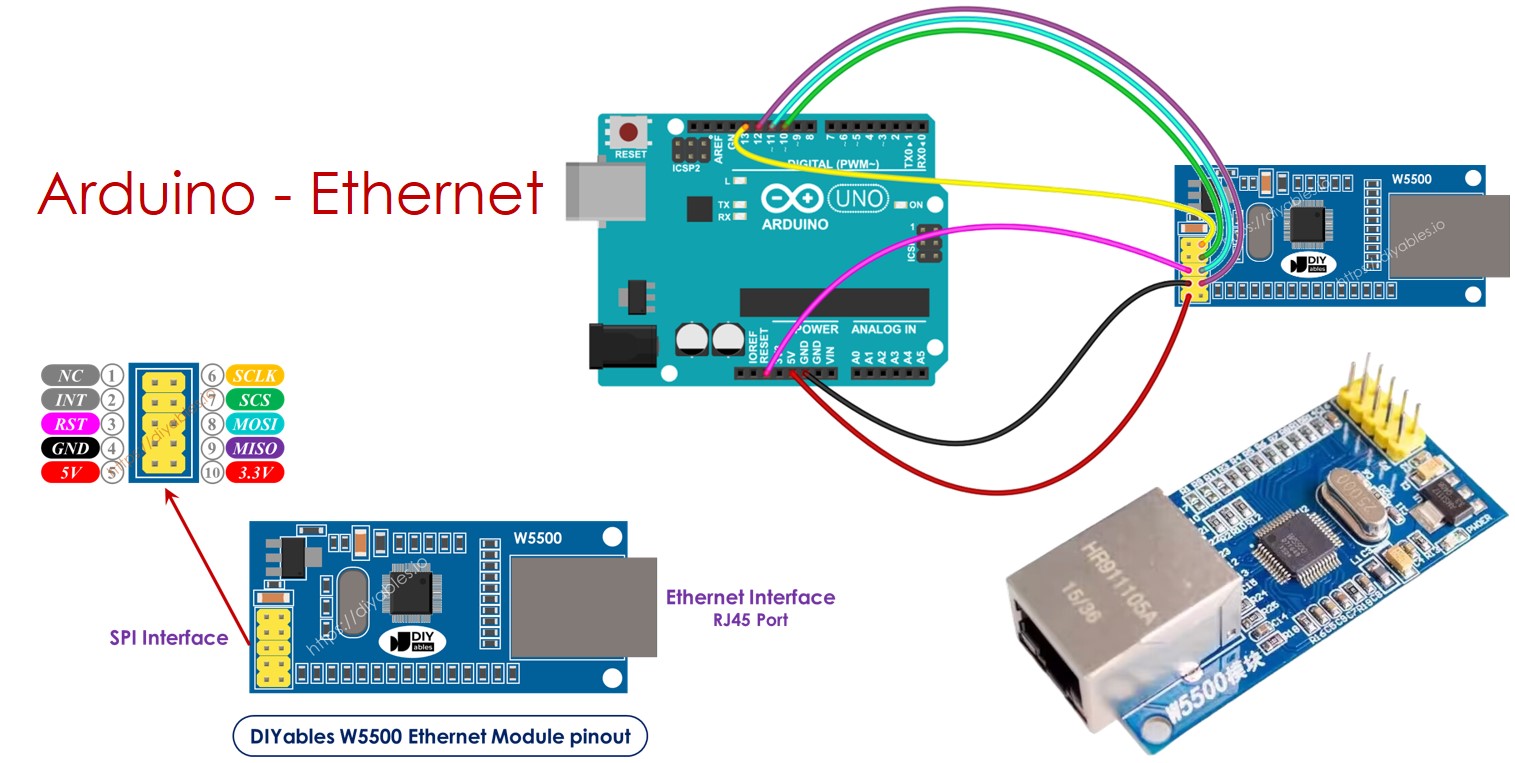
Phần cứng cần chuẩn bị
| 1 | × | Arduino Uno R3 | Amazon | |
| 1 | × | USB 2.0 cable type A/B (for USB-A PC) | Amazon | |
| 1 | × | USB 2.0 cable type C/B (for USB-C PC) | Amazon | |
| 1 | × | W5500 Ethernet Module | Amazon | |
| 1 | × | Ethernet Cable | Amazon | |
| 1 | × | dây jumper | Amazon | |
| 1 | × | breadboard | Amazon | |
| 1 | × | (Khuyến nghị) Screw Terminal Block Shield for Arduino Uno | Amazon | |
| 1 | × | (Khuyến nghị) Sensors/Servo Expansion Shield for Arduino Uno | Amazon | |
| 1 | × | (Khuyến nghị) Breadboard Shield for Arduino Uno | Amazon | |
| 1 | × | (Khuyến nghị) Enclosure for Arduino Uno | Amazon | |
| 1 | × | (Khuyến nghị) Prototyping Base Plate & Breadboard Kit for Arduino UNO | Amazon |
Or you can buy the following kits:
| 1 | × | DIYables STEM V3 Starter Kit (Arduino included) | Amazon | |
| 1 | × | DIYables Sensor Kit (18 sensors/displays) | Amazon |
Tiết lộ: Một số liên kết trong bài viết này là liên kết tiếp thị Amazon và có thể nhận hoa hồng theo chính sách của chương trình.
Về mô-đun Ethernet W5500
Mô-đun Ethernet W5500 có hai cách kết nối:
- Giao diện Ethernet RJ45: Sử dụng một cáp Ethernet để kết nối với bộ định tuyến hoặc bộ chuyển mạch.
- Giao diện SPI: Dùng để kết nối với bo mạch Arduino. Nó có 10 chân. Các chân này cần được kết nối với Arduino như bảng dưới đây:
| Ethenet Module Pins | Arduino Pins |
|---|---|
| NC pin | NOT connected |
| INT pin | NOT connected |
| RST pin | Reset pin |
| GND pin | GND pin |
| 5V pin | 5V pin |
| 3.3V pin | NOT connected |
| MISO pin | 12 (MISO) |
| MOSI pin | 11 (MOSI) |
| SCS pin | 10 (SS) |
| SCLK pin | 13 (SCK) |
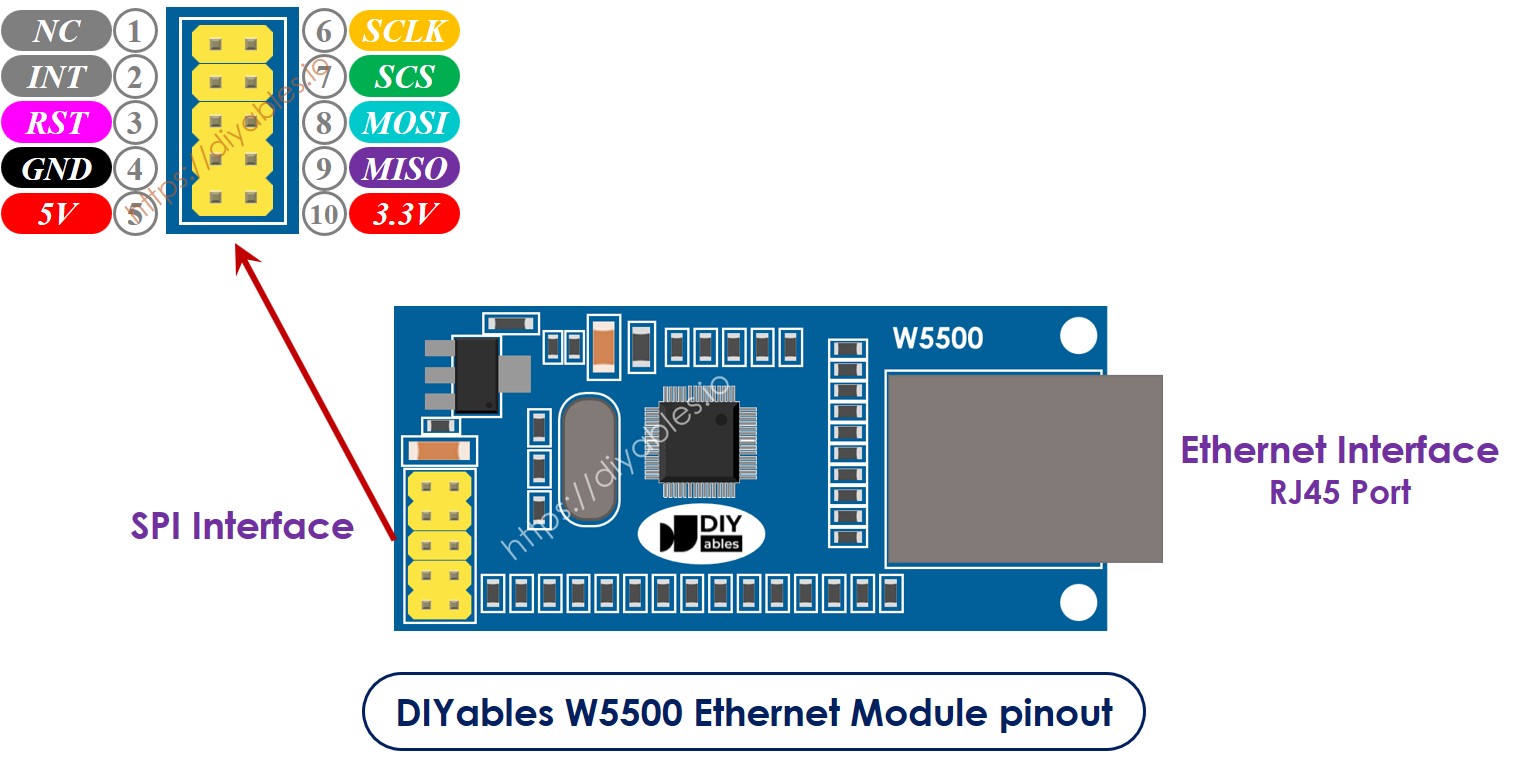
image source: diyables.io
Sơ đồ nối dây giữa Arduino và mô-đun Ethernet W5500
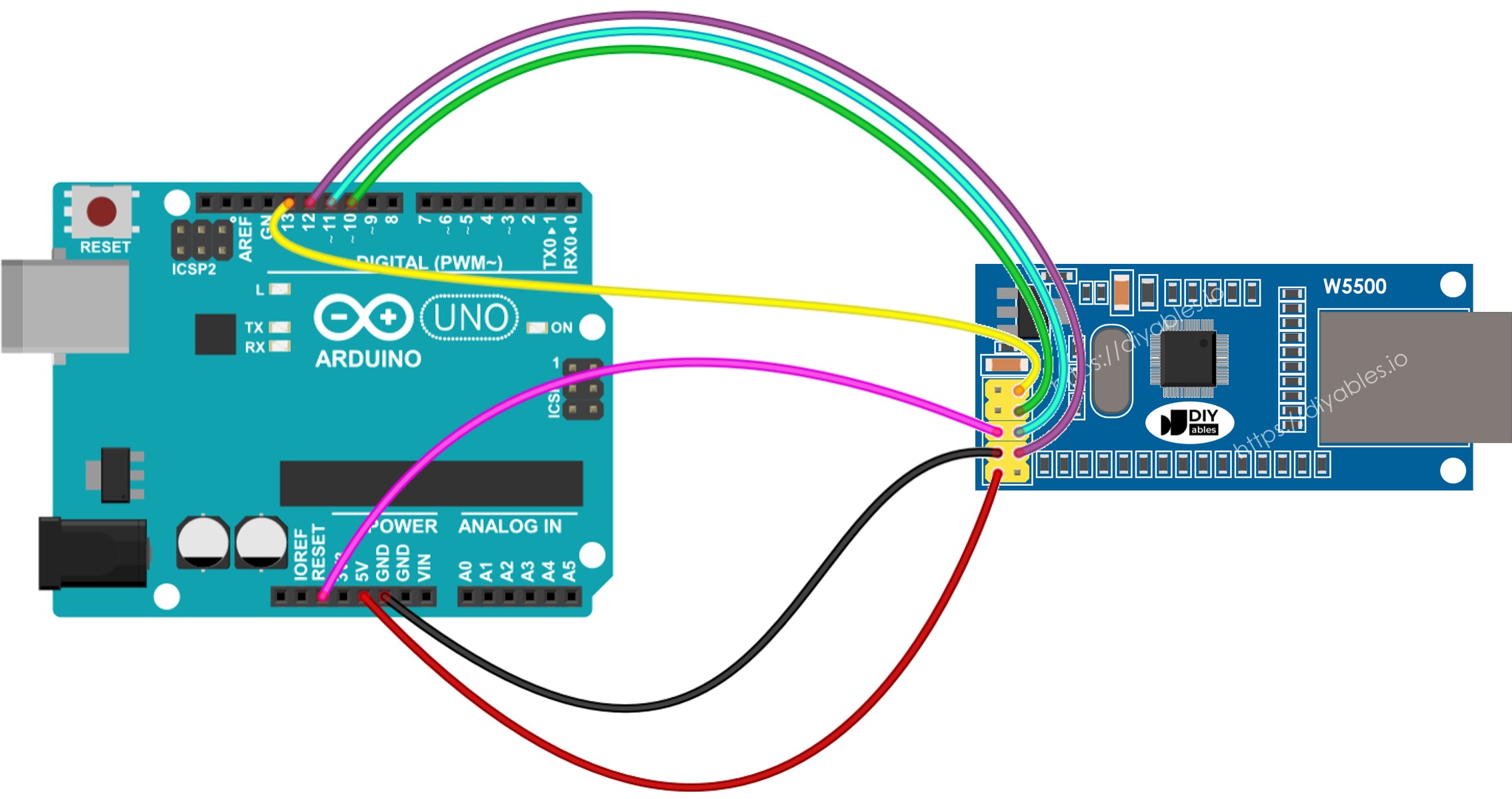
This image is created using Fritzing. Click to enlarge image
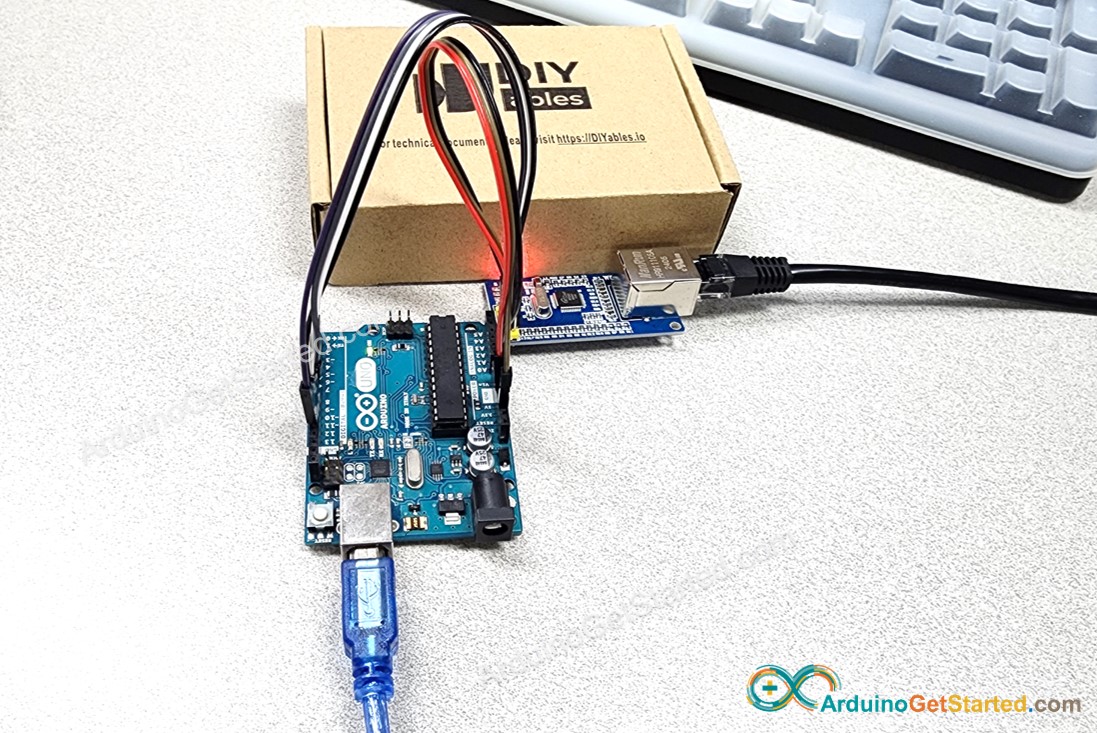
Dưới đây là kết nối thực tế giữa Arduino và mô-đun Ethernet W5500.
Mã Arduino cho mô-đun Ethernet - Gửi yêu cầu HTTP qua Ethernet
Mã này đóng vai trò là một trình khách web. Nó gửi các yêu cầu HTTP tới máy chủ web được đặt tại http://example.com/.
/*
* Mã Arduino này được phát triển bởi newbiely.vn
* Mã Arduino này được cung cấp để sử dụng công khai, không có ràng buộc.
* Để xem hướng dẫn chi tiết và sơ đồ kết nối, vui lòng truy cập:
* https://newbiely.vn/tutorials/arduino/arduino-ethernet-module
*/
#include <SPI.h>
#include <Ethernet.h>
// replace the MAC address below by the MAC address printed on a sticker on the Arduino Shield 2
byte mac[] = { 0xDE, 0xAD, 0xBE, 0xEF, 0xFE, 0xED };
EthernetClient client;
int HTTP_PORT = 80;
String HTTP_METHOD = "GET"; // or POST
char HOST_NAME[] = "example.com";
String PATH_NAME = "/";
void setup() {
Serial.begin(9600);
delay(1000);
Serial.println("Arduino - Ethernet Tutorial");
// initialize the Ethernet shield using DHCP:
if (Ethernet.begin(mac) == 0) {
Serial.println("Failed to obtaining an IP address");
// check for Ethernet hardware present
if (Ethernet.hardwareStatus() == EthernetNoHardware)
Serial.println("Ethernet shield was not found");
// check for Ethernet cable
if (Ethernet.linkStatus() == LinkOFF)
Serial.println("Ethernet cable is not connected.");
while (true)
;
}
// connect to web server on port 80:
if (client.connect(HOST_NAME, HTTP_PORT)) {
// if connected:
Serial.println("Connected to server");
// make a HTTP request:
// send HTTP header
client.println(HTTP_METHOD + " " + PATH_NAME + " HTTP/1.1");
client.println("Host: " + String(HOST_NAME));
client.println("Connection: close");
client.println(); // end HTTP header
while (client.connected()) {
if (client.available()) {
// read an incoming byte from the server and print it to serial monitor:
char c = client.read();
Serial.print(c);
}
}
// the server's disconnected, stop the client:
client.stop();
Serial.println();
Serial.println("disconnected");
} else { // if not connected:
Serial.println("connection failed");
}
}
void loop() {
}
Hướng dẫn từng bước
Vui lòng làm theo các bước này lần lượt:
- Kết nối mô-đun Ethernet với Arduino của bạn như được hiển thị trong sơ đồ đi kèm.
- Sử dụng cáp Ethernet để kết nối mô-đun Ethernet với bộ định tuyến hoặc switch của bạn.
- Sử dụng cáp USB để kết nối bo mạch Arduino với máy tính của bạn.
- Mở Arduino IDE trên máy tính của bạn.
- Chọn bo mạch Arduino phù hợp và cổng COM.
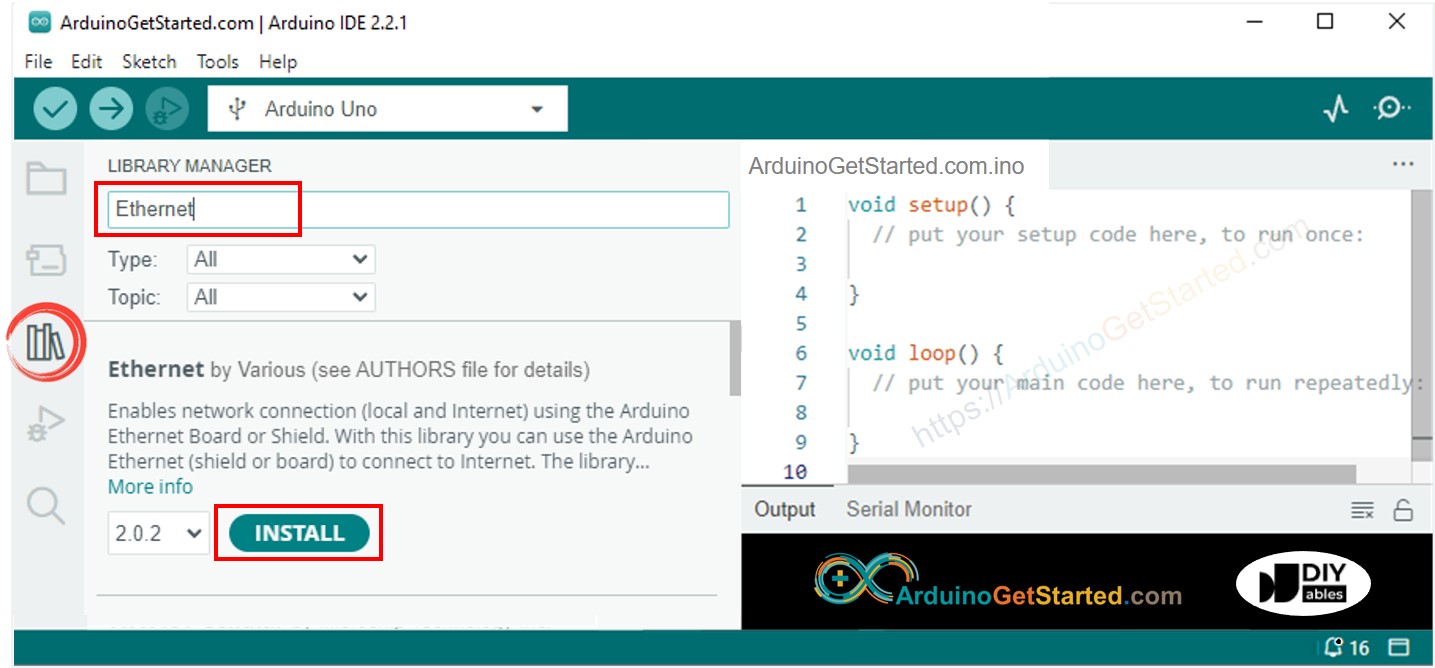
- Nhấp vào biểu tượng Thư viện ở phía bên trái IDE Arduino.
- Trong hộp tìm kiếm, gõ “Ethernet” và tìm thư viện Ethernet do Various phát hành.
- Nhấp vào nút Cài đặt để thêm thư viện Ethernet.
- Mở Serial Monitor trong Arduino IDE.
- Sao chép mã được cung cấp và dán vào Arduino IDE.
- Nhấp vào nút Tải lên trong Arduino IDE để chuyển mã lên Arduino.
- Xem Serial Monitor nơi kết quả sẽ xuất hiện như dưới đây.
8
Serial.println("Hello World!");
Message (Enter to send message to 'Arduino Uno' on 'COM15')
New Line
9600 baud
Arduino - Ethernet Tutorial
Connected to server
HTTP/1.1 200 OK
Accept-Ranges: bytes
Age: 208425
Cache-Control: max-age=604800
Content-Type: text/html; charset=UTF-8
Date: Fri, 12 Jul 2024 07:08:42 GMT
Etag: "3147526947"
Expires: Fri, 19 Jul 2024 07:08:42 GMT
Last-Modified: Thu, 17 Oct 2019 07:18:26 GMT
Server: ECAcc (lac/55B8)
Vary: Accept-Encoding
X-Cache: HIT
Content-Length: 1256
Connection: close
<!doctype html>
<html>
<head>
<title>Example Domain</title>
<meta charset="utf-8" />
<meta http-equiv="Content-type" content="text/html; charset=utf-8" />
<meta name="viewport" content="width=device-width, initial-scale=1" />
</head>
<body>
<div>
<h1>Example Domain</h1>
<p>This domain is for use in illustrative examples in documents. You may use this
domain in literature without prior coordination or asking for permission.</p>
<p><a href="https://www.iana.org/domains/example">More information...</a></p>
</div>
</body>
</html>
disconnected
※ Lưu ý:
Nếu một thiết bị khác trên cùng một mạng có cùng địa chỉ MAC với bạn, có thể sẽ gặp sự cố.
Mã Arduino cho mô-đun Ethernet - Máy chủ Web
Mã dưới đây tạo một máy chủ web trên Arduino. Máy chủ web này gửi một trang web đơn giản tới các trình duyệt web.
/*
* Mã Arduino này được phát triển bởi newbiely.vn
* Mã Arduino này được cung cấp để sử dụng công khai, không có ràng buộc.
* Để xem hướng dẫn chi tiết và sơ đồ kết nối, vui lòng truy cập:
* https://newbiely.vn/tutorials/arduino/arduino-ethernet-module
*/
#include <SPI.h>
#include <Ethernet.h>
// replace the MAC address below by the MAC address printed on a sticker on the Arduino Shield 2
byte mac[] = { 0xDE, 0xAD, 0xBE, 0xEF, 0xFE, 0xED };
EthernetServer server(80);
void setup() {
Serial.begin(9600);
delay(1000);
Serial.println("Arduino - Ethernet Tutorial");
// initialize the Ethernet shield using DHCP:
if (Ethernet.begin(mac) == 0) {
Serial.println("Failed to obtaining an IP address");
// check for Ethernet hardware present
if (Ethernet.hardwareStatus() == EthernetNoHardware)
Serial.println("Ethernet shield was not found");
// check for Ethernet cable
if (Ethernet.linkStatus() == LinkOFF)
Serial.println("Ethernet cable is not connected.");
while (true)
;
}
server.begin();
Serial.print("Arduino - Web Server IP Address: ");
Serial.println(Ethernet.localIP());
}
void loop() {
// listen for incoming clients
EthernetClient client = server.available();
if (client) {
Serial.println("new client");
// an HTTP request ends with a blank line
bool currentLineIsBlank = true;
while (client.connected()) {
if (client.available()) {
char c = client.read();
Serial.write(c);
// if you've gotten to the end of the line (received a newline
// character) and the line is blank, the HTTP request has ended,
// so you can send a reply
if (c == '\n' && currentLineIsBlank) {
// send a standard HTTP response header
client.println("HTTP/1.1 200 OK");
client.println("Content-Type: text/html");
client.println("Connection: close"); // the connection will be closed after completion of the response
client.println();
client.println("<!DOCTYPE HTML>");
client.println("<html>");
client.println("<body>");
client.println("<h1>Arduino - Web Server with Ethernet</h1>");
client.println("</body>");
client.println("</html>");
break;
}
if (c == '\n') {
// you're starting a new line
currentLineIsBlank = true;
} else if (c != '\r') {
// you've gotten a character on the current line
currentLineIsBlank = false;
}
}
}
// give the web browser time to receive the data
delay(1);
// close the connection:
client.stop();
Serial.println("client disconnected");
}
}
Hướng dẫn từng bước
- Sao chép đoạn mã ở trên và dán nó vào Arduino IDE.
- Nhấp vào nút Tải lên trong Arduino IDE để nạp mã lên Arduino.
- Kiểm tra kết quả trên Serial Monitor, nó sẽ hiển thị như sau:
8
Serial.println("Hello World!");
Message (Enter to send message to 'Arduino Uno' on 'COM15')
New Line
9600 baud
Arduino - Ethernet Tutorial
Arduino - Web Server IP Address: 192.168.0.2
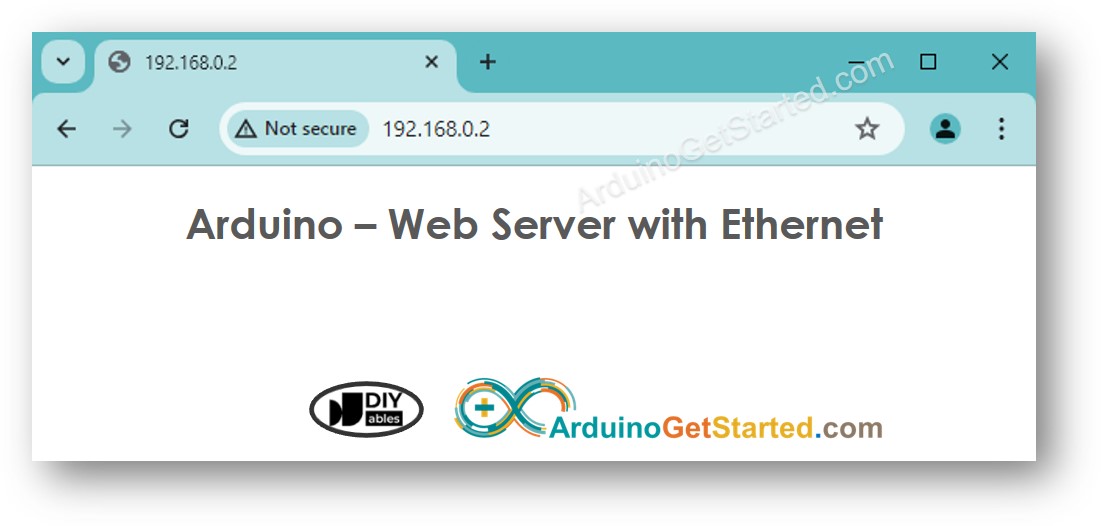
- Sao chép địa chỉ IP được đề cập ở trên và dán nó vào thanh địa chỉ của trình duyệt web của bạn. Bạn sẽ thấy một trang web đơn giản từ Arduino.
Bài hướng dẫn liên quan
📱 Ứng dụng đề xuất
 English for KidsHọc tiếng Anh vui nhộn cho trẻ nhỏ.Tải về trênGoogle PlayTải về trênApp Store
 Bubble NoteGhi chú tự xóa — viết như nhắn tin.Tải về trênGoogle PlayTải về trênApp Store
 Tôi Không MuaĐánh bại mua sắm bốc đồng, tiết kiệm hơn.Tải về trênGoogle PlayTải về trênApp Store
 Con Đường Tri ThứcBài thi thử để học mọi thứ.Tải về trênGoogle PlayTải về trênApp Store