
Cách bắt đầu với Arduino UNO R4
Trong hướng dẫn này, chúng ta sẽ học cách bắt đầu với Arduino Uno R4 Minima/WiFi. Chúng ta sẽ học qua các bước sau:
- Cài đặt gói cho Arduino Uno R4 Minima/WiFi trên Arduino IDE
- Lập trình Arduino Uno R4 Minima/WiFi để in Xin chào thế giới ra Serial Monitor
- Lập trình Arduino Uno R4 WiFi để tạo một máy chủ web rất đơn giản.
Phần cứng cần chuẩn bị
| 1 | × | Arduino UNO R4 Wifi | Amazon | |
| 1 | × | Arduino UNO R4 Minima | Amazon | |
| 1 | × | USB Cable Type-A to Type-C (for USB-A PC) | Amazon | |
| 1 | × | USB Cable Type-C to Type-C (for USB-C PC) | Amazon | |
| 1 | × | (Khuyến nghị) Screw Terminal Block Shield for Arduino UNO R4 | Amazon | |
| 1 | × | (Khuyến nghị) Sensors/Servo Expansion Shield for Arduino UNO R4 | Amazon | |
| 1 | × | (Khuyến nghị) Breadboard Shield for Arduino UNO R4 | Amazon | |
| 1 | × | (Khuyến nghị) Enclosure for Arduino UNO R4 | Amazon | |
| 1 | × | (Khuyến nghị) Power Splitter for Arduino UNO R4 | Amazon | |
| 1 | × | (Khuyến nghị) Prototyping Base Plate & Breadboard Kit for Arduino UNO | Amazon |
Or you can buy the following kits:
| 1 | × | DIYables Sensor Kit (18 sensors/displays) | Amazon |
Tiết lộ: Một số liên kết trong bài viết này là liên kết tiếp thị Amazon và có thể nhận hoa hồng theo chính sách của chương trình.
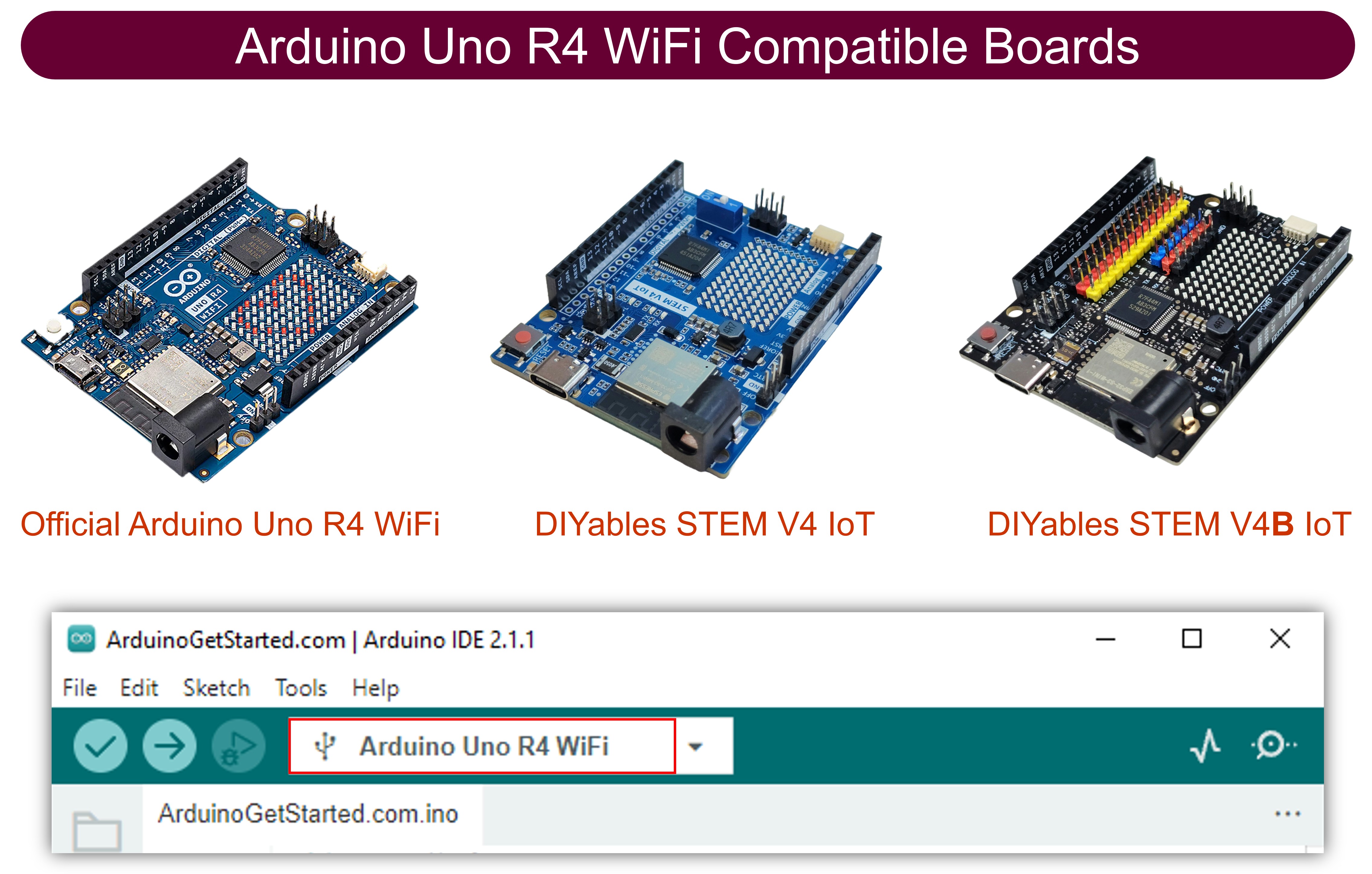
Cài đặt gói Arduino Uno R4
Khác với Arduino Uno R3, để sử dụng Arduino Uno R4 Minima/WiFi với Arduino IDE, bạn cần cài đặt các board Arduino Uno R4 trên Arduino IDE. Vì vậy, trước tiên, hãy làm theo các bước để cài đặt gói Arduino Uno R4 trên Arduino IDE:
- Mở Arduino IDE
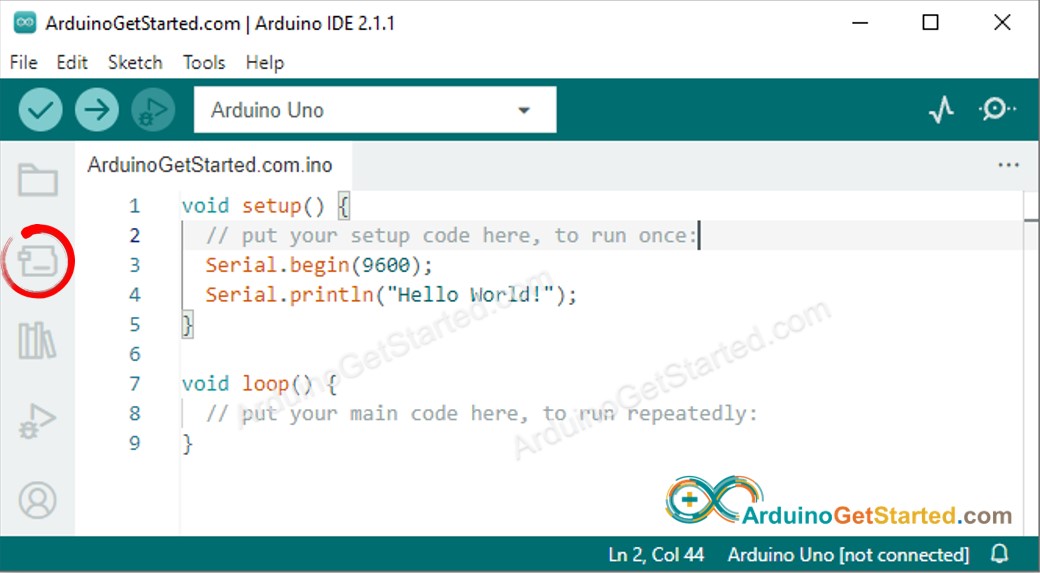
- Điều hướng đến biểu tượng Trình quản lý bo mạch như hình dưới đây:
- Nhập Arduino Uno R4 vào ô tìm kiếm như hình dưới đây:
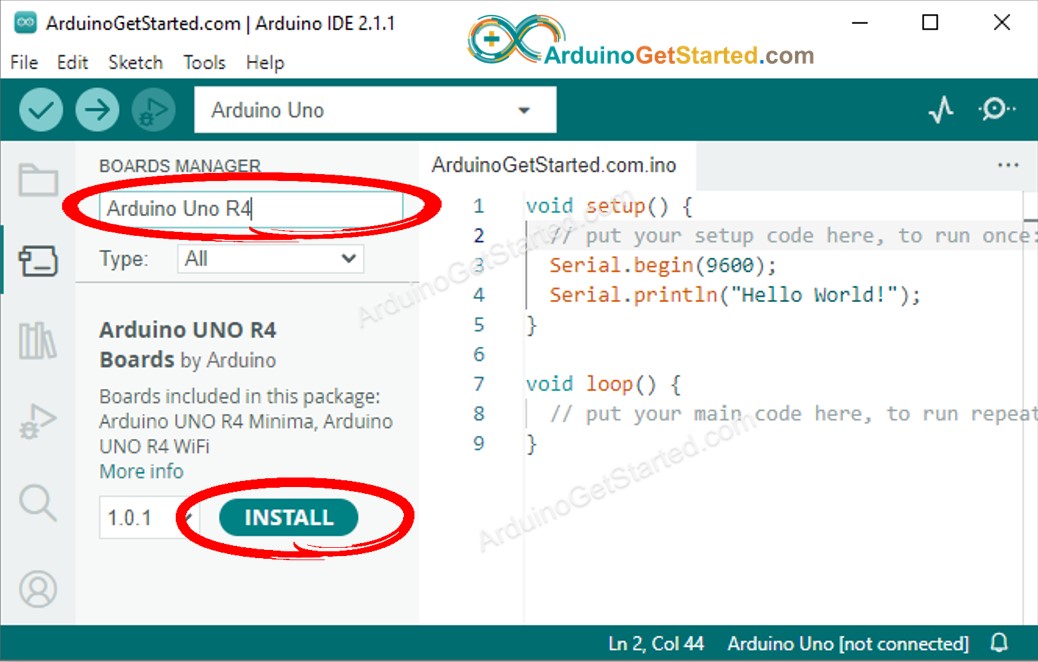
- Nhấn nút Cài đặt.
Quá trình này áp dụng cho cả Arduino Uno R4 Minima và WiFi.
Chương trình Hello World đang chạy
- Kết nối Arduino Uno R4 Minima hoặc WiFi với máy tính của bạn bằng cáp USB Type-C
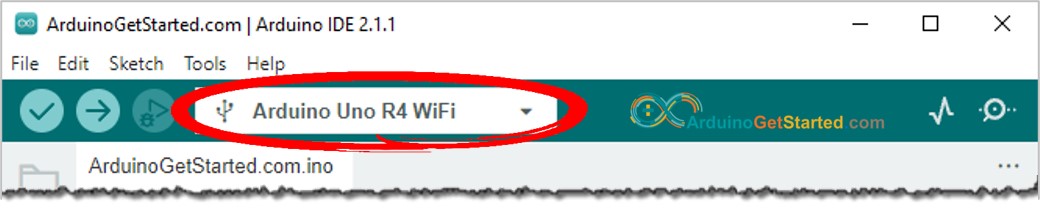
- Trong Arduino IDE, chọn một cổng COM được kết nối với Arduino Uno R4 Minima hoặc WiFi như hình dưới đây
- Sao chép mã dưới đây Hello World và dán nó vào Arduino IDE
/*
* Mã Arduino này được phát triển bởi newbiely.vn
* Mã Arduino này được cung cấp để sử dụng công khai, không có ràng buộc.
* Để xem hướng dẫn chi tiết và sơ đồ kết nối, vui lòng truy cập:
* https://newbiely.vn/tutorials/arduino/how-to-get-started-with-arduino-uno-r4
*/
void setup() {
// put your setup code here, to run once:
Serial.begin(9600);
}
void loop() {
// put your main code here, to run repeatedly:
Serial.println("Hello World!");
delay(1000);
}
- Nhấp vào nút Tải lên trên Arduino IDE để tải mã lên Arduino
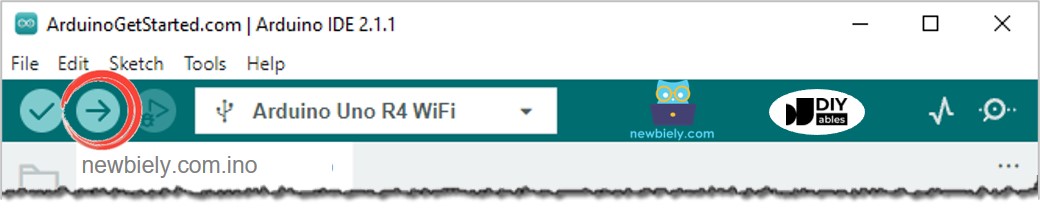
- Mở Serial Monitor bằng cách nhấp vào biểu tượng Serial Monitor
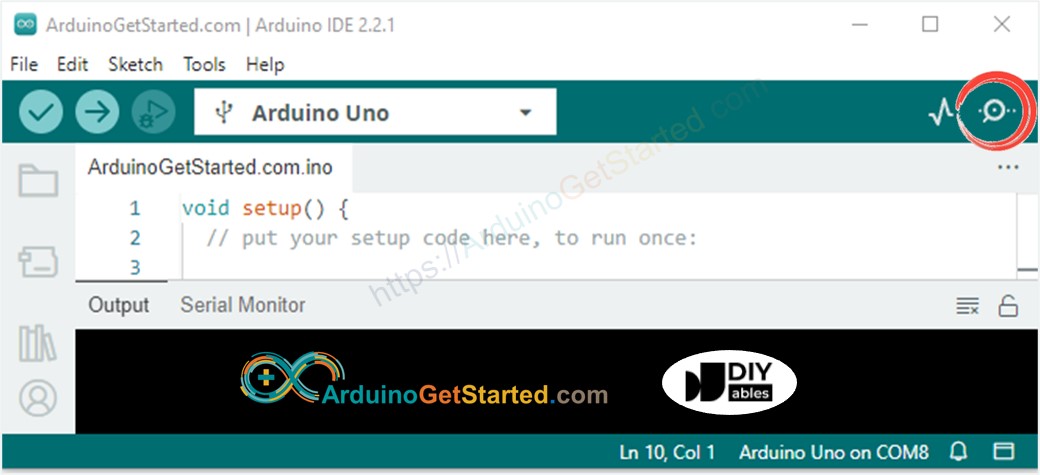
- Xem kết quả trên Serial Monitor, nó trông như sau:
8
Serial.println("Hello World!");
Message (Enter to send message to 'Arduino Uno' on 'COM15')
New Line
9600 baud
Hello World!
Hello World!
Hello World!
Hello World!
Hello World!
Hello World!
Ví dụ về máy chủ web đang chạy cho Arduino Uno R4 Wifi
/*
* Mã Arduino này được phát triển bởi newbiely.vn
* Mã Arduino này được cung cấp để sử dụng công khai, không có ràng buộc.
* Để xem hướng dẫn chi tiết và sơ đồ kết nối, vui lòng truy cập:
* https://newbiely.vn/tutorials/arduino/how-to-get-started-with-arduino-uno-r4
*/
#include "WiFiS3.h"
char ssid[] = "Your_WiFi"; // change your network SSID (name)
char pass[] = "Your_WiFi_password"; // change your network password (use for WPA, or use as key for WEP)
int keyIndex = 0; // your network key index number (needed only for WEP)
int status = WL_IDLE_STATUS;
WiFiServer server(80);
void setup() {
//Initialize serial and wait for port to open:
Serial.begin(9600);
while (!Serial) {
; // wait for serial port to connect. Needed for native USB port only
}
// check for the WiFi module:
if (WiFi.status() == WL_NO_MODULE) {
Serial.println("Communication with WiFi module failed!");
// don't continue
while (true)
;
}
String fv = WiFi.firmwareVersion();
if (fv < WIFI_FIRMWARE_LATEST_VERSION) {
Serial.println("Please upgrade the firmware");
}
// attempt to connect to WiFi network:
while (status != WL_CONNECTED) {
Serial.print("Attempting to connect to SSID: ");
Serial.println(ssid);
// Connect to WPA/WPA2 network. Change this line if using open or WEP network:
status = WiFi.begin(ssid, pass);
// wait 10 seconds for connection:
delay(10000);
}
server.begin();
// you're connected now, so print out the status:
printWifiStatus();
}
void loop() {
// listen for incoming clients
WiFiClient client = server.available();
if (client) {
Serial.println("new client");
// an HTTP request ends with a blank line
boolean currentLineIsBlank = true;
while (client.connected()) {
if (client.available()) {
char c = client.read();
Serial.write(c);
// if you've gotten to the end of the line (received a newline
// character) and the line is blank, the HTTP request has ended,
// so you can send a reply
if (c == '\n' && currentLineIsBlank) {
// send a standard HTTP response header
client.println("HTTP/1.1 200 OK");
client.println("Content-Type: text/html");
client.println("Connection: close"); // the connection will be closed after completion of the response
client.println("Refresh: 5"); // refresh the page automatically every 5 sec
client.println();
client.println("<!DOCTYPE HTML>");
client.println("<html>");
client.print("Hello from Arduino Web Server");
client.println("</html>");
break;
}
if (c == '\n') {
// you're starting a new line
currentLineIsBlank = true;
} else if (c != '\r') {
// you've gotten a character on the current line
currentLineIsBlank = false;
}
}
}
// give the web browser time to receive the data
delay(1);
// close the connection:
client.stop();
Serial.println("client disconnected");
}
}
void printWifiStatus() {
// print your board's IP address:
IPAddress ip = WiFi.localIP();
Serial.print("IP Address: ");
Serial.println(ip);
// print the received signal strength:
long rssi = WiFi.RSSI();
Serial.print("signal strength (RSSI):");
Serial.print(rssi);
Serial.println(" dBm");
}
- Sao chép mã ở trên và mở bằng Arduino IDE
- Thay đổi thông tin wifi (SSID và mật khẩu) trong mã nguồn của bạn
- Nhấn nút Tải lên trên Arduino IDE để tải mã lên Arduino
- Mở Serial Monitor
- Xem kết quả trên Serial Monitor.
8
Serial.println("Hello World!");
Message (Enter to send message to 'Arduino Uno' on 'COM15')
New Line
9600 baud
Attempting to connect to SSID: Your_WiFi
IP Address: 192.168.0.2
signal strength (RSSI):-39 dBm
- Bạn sẽ thấy một địa chỉ IP. Đây là địa chỉ IP của máy chủ web Arduino
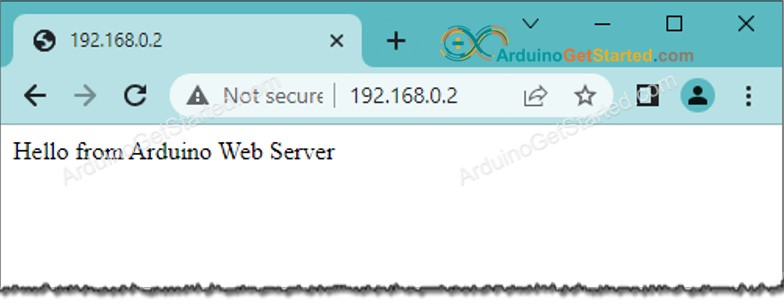
- Sao chép địa chỉ IP và dán nó vào thanh địa chỉ của trình duyệt web.
- Bạn sẽ thấy trang web của bo mạch Arduino trên trình duyệt web như dưới đây
- Bạn cũng sẽ thấy đầu ra dưới đây trong Serial Monitor
8
Serial.println("Hello World!");
Message (Enter to send message to 'Arduino Uno' on 'COM15')
New Line
9600 baud
Attempting to connect to SSID: Your_WiFi
IP Address: 192.168.0.2
signal strength (RSSI):-39 dBm
new client
GET /favicon.ico HTTP/1.1
Host: 192.168.0.2
Connection: keep-alive
User-Agent: Mozilla/5.0 (Windows NT 10.0; Win64; x64) AppleWebKit/537.36 (KHTML, like Gecko) Chrome/114.0.0.0 Safari/537.36
Accept: image/avif,image/webp,image/apng,image/svg+xml,image/*,*/*;q=0.8
Referer: http://192.168.0.2/
Accept-Encoding: gzip, deflate
Accept-Language: en-US,en;q=0.9
client disconnected
Bài hướng dẫn liên quan
📱 Ứng dụng đề xuất
 English for KidsHọc tiếng Anh vui nhộn cho trẻ nhỏ.Tải về trênGoogle PlayTải về trênApp Store
 Bubble NoteGhi chú tự xóa — viết như nhắn tin.Tải về trênGoogle PlayTải về trênApp Store
 Tôi Không MuaĐánh bại mua sắm bốc đồng, tiết kiệm hơn.Tải về trênGoogle PlayTải về trênApp Store
 Con Đường Tri ThứcBài thi thử để học mọi thứ.Tải về trênGoogle PlayTải về trênApp Store