
Arduino Cảm biến chuyển động Trình phát MP3
Trong hướng dẫn này, chúng ta sẽ tìm hiểu cách sử dụng Arduino, cảm biến chuyển động HC-SR501 và một trình phát MP3 để kích hoạt việc phát lại một tệp âm thanh đã được ghi lại khi phát hiện chuyển động. Dự án này mang tính linh hoạt và có thể được tùy chỉnh cho các ứng dụng như tự động phát các chỉ dẫn âm thanh đã ghi hoặc cảnh báo bất cứ khi nào có sự xuất hiện của con người.
Phần cứng cần chuẩn bị
| 1 | × | Arduino Uno R3 | Amazon | |
| 1 | × | USB 2.0 cable type A/B (for USB-A PC) | Amazon | |
| 1 | × | USB 2.0 cable type C/B (for USB-C PC) | Amazon | |
| 1 | × | HC-SR501 Motion Sensor | Amazon | |
| 1 | × | Alternatively, AM312 Mini Motion Sensor | Amazon | |
| 1 | × | Serial MP3 Player Module | Amazon | |
| 1 | × | Micro SD Card | Amazon | |
| 1 | × | 3.5mm Aux Speaker | Amazon | |
| 1 | × | dây jumper | Amazon | |
| 1 | × | (Khuyến nghị) Screw Terminal Block Shield for Arduino Uno | Amazon | |
| 1 | × | (Khuyến nghị) Sensors/Servo Expansion Shield for Arduino Uno | Amazon | |
| 1 | × | (Khuyến nghị) Breadboard Shield for Arduino Uno | Amazon | |
| 1 | × | (Khuyến nghị) Enclosure for Arduino Uno | Amazon | |
| 1 | × | (Khuyến nghị) Prototyping Base Plate & Breadboard Kit for Arduino UNO | Amazon |
Or you can buy the following kits:
| 1 | × | DIYables STEM V3 Starter Kit (Arduino included) | Amazon | |
| 1 | × | DIYables Sensor Kit (18 sensors/displays) | Amazon |
Về Máy nghe nhạc MP3 và Cảm biến chuyển động
Nếu bạn chưa biết về trình phát MP3 và cảm biến chuyển động (bố trí chân, cách hoạt động, cách lập trình ...), hãy tìm hiểu về chúng trong các bài hướng dẫn sau:
Sơ đồ đấu dây
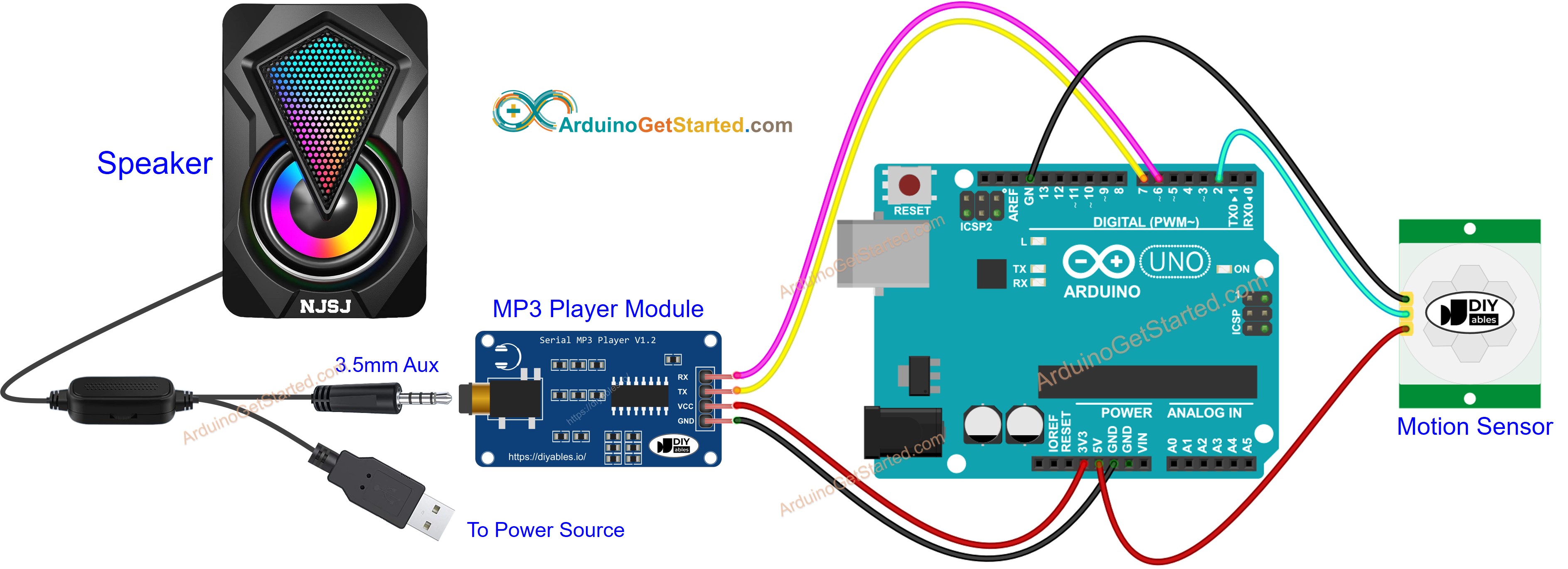
This image is created using Fritzing. Click to enlarge image
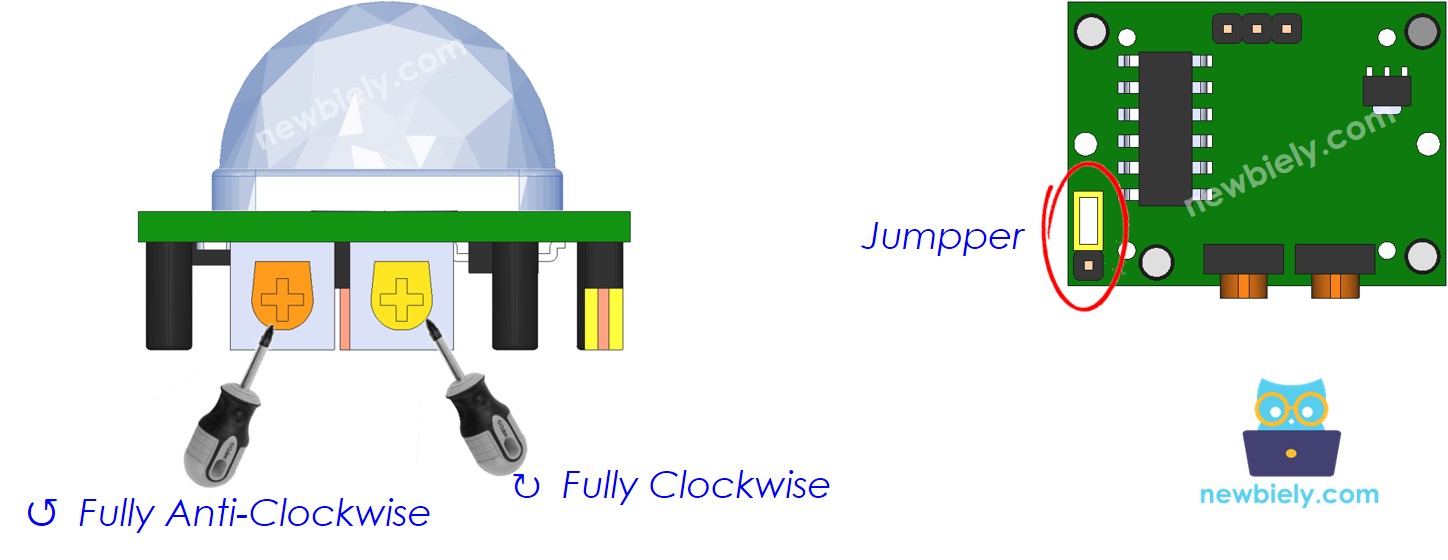
Cài đặt ban đầu của cảm biến chuyển động
| Time Delay Adjuster | Screw it in anti-clockwise direction fully. |
| Detection Range Adjuster | Screw it in clockwise direction fully. |
| Repeat Trigger Selector | Put jumper as shown on the image. |
Chuẩn bị
- Lưu trữ trước tập tin MP3 đã ghi mà chúng ta muốn phát vào thẻ nhớ micro SD.
- Lắp thẻ nhớ micro SD vào module MP3.
- Kết nối module MP3 với Arduino.
- Kết nối loa với module MP3.
- Kết nối loa với nguồn cấp điện.
- Kết nối cảm biến chuyển động với Arduino.
Mã Arduino - Cảm biến chuyển động điều khiển máy nghe nhạc MP3
Hướng dẫn từng bước
- Kết nối Arduino với máy tính bằng cáp USB
- Mở Arduino IDE, chọn board và cổng đúng
- Sao chép mã ở trên và mở bằng Arduino IDE
- Nhấp vào nút Tải lên trên Arduino IDE để tải mã lên cho Arduino
- Di chuyển tay trước cảm biến
- Kiểm tra âm thanh từ máy nghe MP3
Video Tutorial
Việc sản xuất video tốn rất nhiều thời gian. Nếu video hướng dẫn hữu ích cho việc học của bạn, hãy đăng ký kênh YouTube để ủng hộ. Nếu nhu cầu đủ cao, chúng tôi sẽ cố gắng làm thêm nhiều video.
Bài hướng dẫn liên quan
📱 Ứng dụng đề xuất
 English for KidsHọc tiếng Anh vui nhộn cho trẻ nhỏ.Tải về trênGoogle PlayTải về trênApp Store
 Bubble NoteGhi chú tự xóa — viết như nhắn tin.Tải về trênGoogle PlayTải về trênApp Store
 Tôi Không MuaĐánh bại mua sắm bốc đồng, tiết kiệm hơn.Tải về trênGoogle PlayTải về trênApp Store
 Con Đường Tri ThứcBài thi thử để học mọi thứ.Tải về trênGoogle PlayTải về trênApp Store