
ESP32 REST API Server với JSON Hướng Dẫn Đầy Đủ
WebServerJson Example - REST API Server
Tổng Quan
Ví dụ này trình bày cách tạo REST API server trên ESP32 để xử lý JSON requests và responses, hoàn hảo cho các ứng dụng web hiện đại và backend của ứng dụng di động.
Tính Năng
- REST API endpoints với xử lý JSON request/response
- Xử lý POST request với phân tích dữ liệu JSON
- GET endpoints để truy xuất dữ liệu
- JSON responses chuyên nghiệp với HTTP status codes chính xác
- Xử lý lỗi với thông báo lỗi JSON phù hợp
- Hỗ trợ CORS cho cross-origin requests
Phần Cứng Cần Thiết
| 1 | × | 38-pin ESP32 ESP-WROOM-32 Dev Module - Narrow | Amazon | |
| 1 | × | Alternatively, 38-pin ESP32 ESP-WROOM-32 Dev Module - Wide | Amazon | |
| 1 | × | Alternatively, 30-pin ESP32 ESP-WROOM-32 Dev Module - Wide | Amazon | |
| 1 | × | Alternatively, ESP32 Uno-form board | Amazon | |
| 1 | × | Alternatively, ESP32 S3 Uno-form board | Amazon | |
| 1 | × | USB Cable Type-A to Type-C (for USB-A PC) | Amazon | |
| 1 | × | USB Cable Type-C to Type-C (for USB-C PC) | Amazon | |
| 1 | × | (Khuyến nghị) Screw Terminal Expansion Board for ESP32 | Amazon | |
| 1 | × | (Khuyến nghị) Breakout Expansion Board for ESP32 | Amazon | |
| 1 | × | (Khuyến nghị) Power Splitter for ESP32 | Amazon |
Or you can buy the following kits:
| 1 | × | DIYables ESP32 Starter Kit (ESP32 included) | Amazon | |
| 1 | × | DIYables Sensor Kit (18 sensors/displays) | Amazon |
Cài Đặt Thư Viện
Làm theo hướng dẫn từng bước:
- Nếu đây là lần đầu tiên bạn sử dụng ESP32, hãy tham khảo hướng dẫn thiết lập môi trường cho ESP32 trong Arduino IDE.
- Kết nối bo mạch ESP32 với máy tính của bạn bằng cáp USB.
- Khởi động Arduino IDE trên máy tính của bạn.
- Chọn bo mạch ESP32 phù hợp (ví dụ: ESP32) và cổng COM.
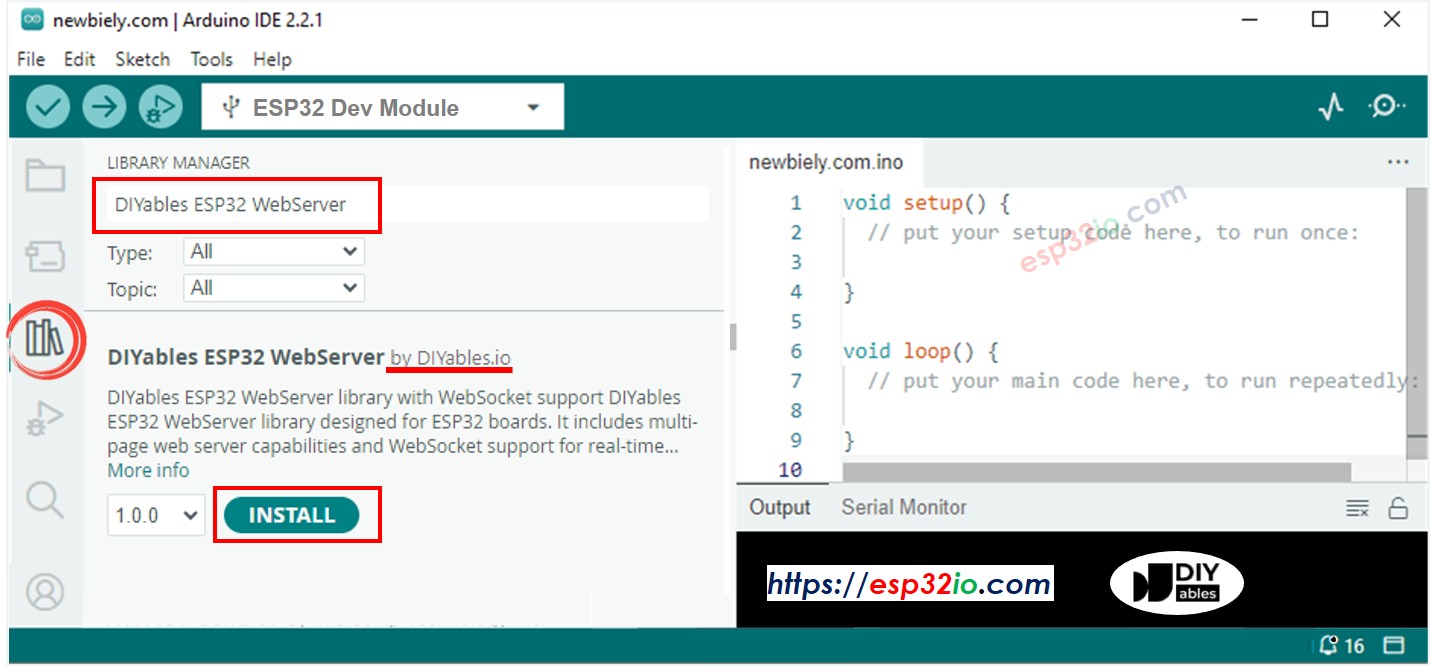
- Mở Library Manager bằng cách nhấp vào biểu tượng Library Manager ở phía bên trái của Arduino IDE.
- Tìm kiếm Web Server for ESP32 và tìm mWebSockets của DIYables.
- Nhấp vào nút Install để thêm thư viện mWebSockets.
Ví Dụ Web Server Json
- Trên Arduino IDE, đi tới File Examples Web Server for ESP32 WebServerJson để mở code ví dụ
API Endpoints
GET /api/data
Trả về thông báo thành công với timestamp theo định dạng JSON.
Response:
Giá trị timestamp biểu thị mili giây kể từ khi ESP32 khởi động (từ hàm millis()).
POST /api/data
Nhận dữ liệu JSON và trả về giá trị key đã nhận.
Request:
Response:
Hướng Dẫn Thiết Lập
1. Cấu Hình Mạng
Chỉnh sửa thông tin đăng nhập WiFi trong file WebServerJson.ino:
2. Upload Code và Theo Dõi Output
- Kết nối ESP32 với máy tính của bạn
- Chọn đúng bo mạch và cổng trong Arduino IDE
- Upload sketch WebServerJson.ino
- Mở Serial Monitor (9600 baud)
- Đợi kết nối WiFi
- Ghi chú địa chỉ IP được hiển thị
- Nếu bạn không thấy địa chỉ IP trong Serial monitor, hãy nhấn nút reset trên bo mạch ESP32
Sử Dụng
Test với cURL
Thay thế your-esp32-ip bằng địa chỉ IP thực tế được hiển thị trong Serial Monitor của bạn.
Test GET Request
Kết Quả Mong Đợi:
Timestamp hiển thị mili giây kể từ khi ESP32 khởi động.
Test POST Request với Dữ Liệu JSON
Kết Quả Mong Đợi:
Test POST Request với Dữ Liệu Khác
Kết Quả Mong Đợi:
Test JSON Không Hợp Lệ (Error Response)
Kết Quả Mong Đợi:
Test Thiếu JSON Body (Error Response)
Kết Quả Mong Đợi:
Test Method Không Được Hỗ Trợ (Error Response)
Kết Quả Mong Đợi:
Test Endpoint Không Tồn Tại (404 Error)
Kết Quả Mong Đợi:
Test với Postman
Test GET Request
- Tạo GET request mới
- Đặt URL thành http://your-esp32-ip/api/data
- Gửi request
- Xác minh response chứa status, message và timestamp
Test POST Request
- Tạo POST request mới
- Đặt URL thành http://your-esp32-ip/api/data
- Thêm header: Content-Type: application/json
- Thêm JSON body: {"key": "test_value"}
- Gửi request
- Xác minh response hiển thị giá trị key đã nhận
Test Error Responses
Test xử lý lỗi bằng cách gửi các request không hợp lệ như được hiển thị trong code ví dụ:
Thiếu Dữ Liệu JSON
Mong Đợi: {"status": "error","message": "No JSON data received"}
Định Dạng JSON Không Hợp Lệ
Mong Đợi: {"status": "error","message": "Invalid JSON"}
Thiếu Trường Key
Mong Đợi: Key sẽ mặc định là "none" như trong code ví dụ: doc["key"] | "none"
HTTP Method Không Được Hỗ Trợ
Mong Đợi: {"status": "error","message": "Method not allowed"}
Giải Thích Code
Cấu Hình Route
Cấu Trúc Handler Function
Tất cả handler functions phải tuân theo cấu trúc này:
Phát Hiện Method và Xử Lý JSON
Ví Dụ Tích Hợp
JavaScript Frontend
Python Client
Control LED
Get status
Usage
Xử Lý Lỗi
HTTP Status Codes
- 200: Thành công
- 400: Bad Request (JSON không hợp lệ, thiếu tham số)
- 404: Endpoint không tìm thấy
- 405: Method không được phép
- 500: Lỗi máy chủ nội bộ
Định Dạng Error Response
Dựa trên code ví dụ thực tế, các lỗi khác nhau trả về thông báo cụ thể:
Lỗi Thiếu Dữ Liệu JSON
Trả về khi: POST request được gửi mà không có JSON body
Lỗi Định Dạng JSON Không Hợp Lệ
Trả về khi: Dữ liệu JSON không thể phân tích được (lỗi cú pháp)
Lỗi Method Không Được Phép
Trả về khi: Sử dụng HTTP methods không được hỗ trợ (PUT, DELETE, PATCH, v.v.)
Lỗi 404 Not Found
Trả về khi: Truy cập endpoints không tồn tại
Tùy Chỉnh
Thêm Handler Functions Mới
JSON Responses Dựa Trên Template
Ví dụ sử dụng template strings để định dạng JSON nhất quán:
Xử Lý Sự Cố
Vấn Đề Thường Gặp
Vấn Đề Kết Nối
Nếu bạn không thể kết nối với API endpoints:
- Xác minh ESP32 của bạn đã kết nối với WiFi (kiểm tra Serial Monitor)
- Đảm bảo client và ESP32 của bạn cùng trên một mạng
- Kiểm tra địa chỉ IP có chính xác không
- Xác minh ESP32 chưa reset (điều này sẽ thay đổi IP)
Lỗi Phân Tích JSON
Nếu bạn nhận được responses "Invalid JSON":
- Đảm bảo Content-Type header được đặt thành application/json
- Xác minh cú pháp JSON của bạn hợp lệ
- Kiểm tra các ký tự đặc biệt được escape đúng cách
- Đảm bảo JSON payload không quá lớn (giới hạn hiện tại: 200 bytes)
Vấn Đề POST Request
Nếu POST requests trả về "No JSON data received":
- Xác minh bạn đang gửi JSON body với request
- Kiểm tra Content-Length header được đặt đúng
- Đảm bảo HTTP method thực sự là POST
- Test với JSON đơn giản như {"key": "test"}
Vấn Đề Memory
Nếu ESP32 trở nên không phản hồi:
- Theo dõi việc sử dụng memory - StaticJsonDocument sử dụng 200 bytes
- Giảm kích thước JSON_RESPONSE template nếu cần
- Cân nhắc sử dụng DynamicJsonDocument cho dữ liệu có kích thước biến đổi
- Kiểm tra memory leaks trong custom handler functions
Mẹo Tối Ưu Hiệu Suất
Tối Ưu Xử Lý JSON
Xử Lý Response Hiệu Quả
Bước Tiếp Theo
- Khám phá WebServerQueryStrings.ino để xử lý URL parameters
- Thử WebServerWithWebSocket.ino cho giao tiếp thời gian thực
- Cân nhắc tích hợp với databases hoặc cloud services
Tài Nguyên Học Tập
Bài hướng dẫn liên quan
📱 Ứng dụng đề xuất
 English for KidsHọc tiếng Anh vui nhộn cho trẻ nhỏ.Tải về trênGoogle PlayTải về trênApp Store
 Bubble NoteGhi chú tự xóa — viết như nhắn tin.Tải về trênGoogle PlayTải về trênApp Store
 Tôi Không MuaĐánh bại mua sắm bốc đồng, tiết kiệm hơn.Tải về trênGoogle PlayTải về trênApp Store
 Con Đường Tri ThứcBài thi thử để học mọi thứ.Tải về trênGoogle PlayTải về trênApp Store