
ESP32 Thẻ SD
Trong hướng dẫn này, chúng ta sẽ khám phá cách sử dụng thẻ Micro SD Card với ESP32. Chúng ta sẽ tìm hiểu các chủ đề sau:
- Cách mở một file trên thẻ Micro SD Card bằng ESP32, và cách tạo file mới nếu file đó chưa tồn tại.
- Cách ghi dữ liệu vào file trên thẻ Micro SD Card bằng ESP32.
- Cách đọc file trên thẻ Micro SD Card từng ký tự một bằng ESP32.
- Cách đọc file trên thẻ Micro SD Card từng dòng một bằng ESP32.
- Cách thêm nội dung vào file đã tồn tại trên thẻ Micro SD Card bằng ESP32.
- Cách thay thế nội dung của file trên thẻ Micro SD Card bằng ESP32.
Linh Kiện Cần Thiết
| 1 | × | 38-pin ESP32 ESP-WROOM-32 Dev Module - Narrow | Amazon | |
| 1 | × | Alternatively, 38-pin ESP32 ESP-WROOM-32 Dev Module - Wide | Amazon | |
| 1 | × | Alternatively, 30-pin ESP32 ESP-WROOM-32 Dev Module - Wide | Amazon | |
| 1 | × | Alternatively, ESP32 Uno-form board | Amazon | |
| 1 | × | Alternatively, ESP32 S3 Uno-form board | Amazon | |
| 1 | × | Cáp USB Type-C | Amazon | |
| 1 | × | Thẻ Micro SD Card | Amazon | |
| 1 | × | Module Thẻ Micro SD Card | Amazon | |
| 1 | × | Dây Jumper | Amazon | |
| 1 | × | breadboard (bo mạch thí nghiệm) | Amazon | |
| 1 | × | Đầu Đọc Thẻ SD USB 3.0 | Amazon | |
| 1 | × | (Khuyến nghị) Screw Terminal Expansion Board for ESP32 | Amazon | |
| 1 | × | (Khuyến nghị) Breakout Expansion Board for ESP32 | Amazon | |
| 1 | × | (Khuyến nghị) Power Splitter for ESP32 | Amazon |
Or you can buy the following kits:
| 1 | × | DIYables ESP32 Starter Kit (ESP32 included) | Amazon | |
| 1 | × | DIYables Sensor Kit (18 sensors/displays) | Amazon |
Về Module Thẻ Micro SD Card
Module Thẻ Micro SD Card có thể giao tiếp với ESP32 và có thể chứa một thẻ Micro SD Card. Nói cách khác, Module Thẻ Micro SD Card là cầu nối giữa ESP32 và thẻ Micro SD Card.
Sơ Đồ Chân
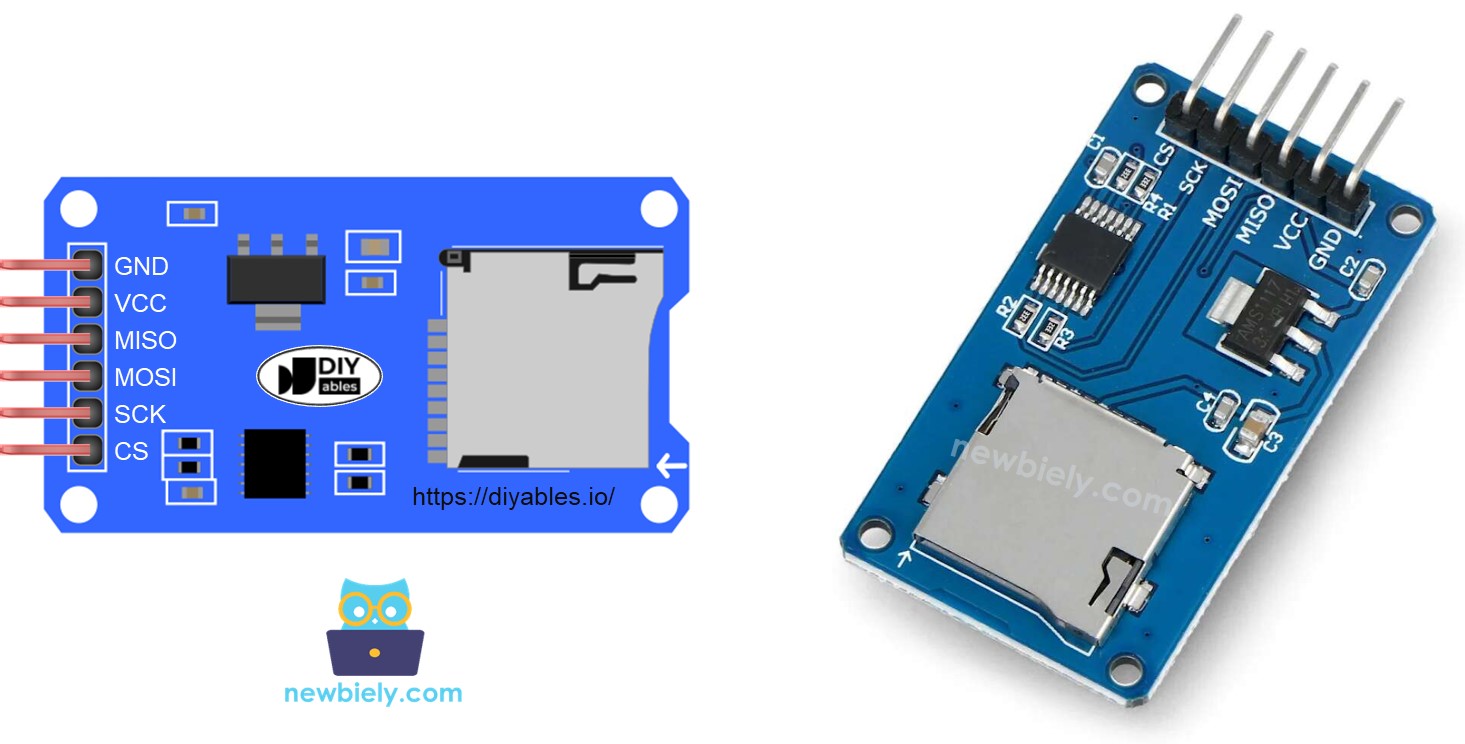
Module Thẻ Micro SD Card bao gồm 6 chân:
- Chân VCC: kết nối với chân 5V của ESP32.
- Chân GND: kết nối chân này với GND của ESP32.
- Chân MISO: (Master In Slave Out) kết nối chân này với chân MISO của ESP32.
- Chân MOSI: (Master Out Slave In) kết nối chân này với chân MOSI của ESP32.
- Chân SCK: kết nối chân này với chân SCK của ESP32.
- Chân SS: (Slave Select) kết nối chân này với chân được chỉ định trong code ESP32 làm chân SS.
Chuẩn Bị
- Kết nối thẻ Micro SD Card với PC qua đầu đọc thẻ SD USB 3.0
- Đảm bảo rằng thẻ Micro SD Card được định dạng FAT16 hoặc FAT32 (Google để tìm hiểu cách thực hiện)
Sơ Đồ Đấu Nối
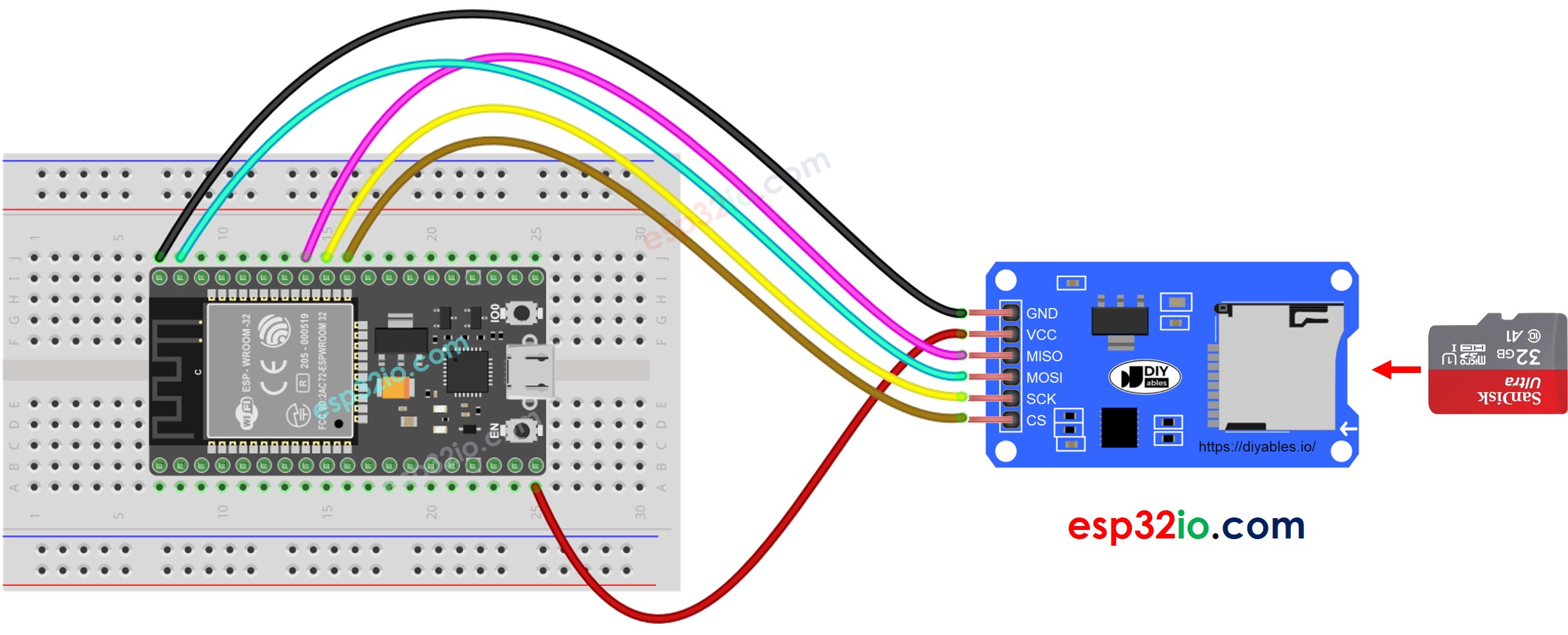
This image is created using Fritzing. Click to enlarge image
Nếu bạn chưa rõ cách cấp nguồn cho ESP32 và các linh kiện khác, xem: Cách Cung Cấp Nguồn Điện Cho ESP32.
※ Lưu ý:
Nếu bạn sử dụng shield Ethernet hoặc bất kỳ shield nào có khe cắm thẻ Micro SD Card, bạn không cần sử dụng Module Thẻ Micro SD Card. Bạn chỉ cần chèn thẻ Micro SD Card vào khe cắm thẻ Micro SD Card trên shield.
ESP32 - Cách mở file trên thẻ Micro SD Card và tạo mới nếu chưa tồn tại
Code ESP32
Các Bước Thực Hiện
- Nếu đây là lần đầu tiên bạn sử dụng ESP32, hãy xem ESP32 - Cài Đặt Phần Mềm.
- Mở Arduino IDE trên PC của bạn.
- Chọn đúng board ESP32 (ví dụ: ESP32 Dev Module) và cổng COM.
- Chèn thẻ Micro SD Card vào module thẻ Micro SD Card
- Thực hiện đấu nối giữa module thẻ Micro SD Card và ESP32 theo sơ đồ đấu nối ở trên
- Kết nối ESP32 với PC qua cáp USB
- Mở Serial Monitor trên Arduino IDE
- Copy code ở trên và paste vào Arduino IDE
- Click nút Upload trên Arduino IDE để upload code lên ESP32
- Kết quả trên Serial Monitor cho lần chạy đầu tiên
- Kết quả trên Serial Monitor cho các lần chạy tiếp theo
※ Lưu ý:
Bạn có thể KHÔNG thấy kết quả trên Serial Monitor cho lần chạy đầu tiên nếu việc upload hoàn thành trước khi mở Serial Monitor.
- Tháo thẻ Micro SD Card ra khỏi module
- Chèn thẻ Micro SD Card vào đầu đọc thẻ SD USB
- Kết nối đầu đọc thẻ SD USB với PC
- Kiểm tra xem file có tồn tại hay không
ESP32 - Cách ghi/đọc dữ liệu từ/đến file trên thẻ Micro SD Card
Code dưới đây thực hiện:
- Ghi dữ liệu vào file
- Đọc nội dung của file từng ký tự một và in ra Serial Monitor
- Serial Monitor hiển thị nội dung của file
※ Lưu ý:
Dữ liệu sẽ được thêm vào cuối file theo mặc định. Nếu bạn khởi động lại ESP32 với code ở trên, văn bản sẽ được thêm vào file một lần nữa ⇒ Serial Monitor sẽ hiển thị thêm dòng như dưới đây:
Bạn cũng có thể tháo thẻ Micro SD Card ra khỏi module và mở nó trên PC để kiểm tra nội dung (cần đầu đọc thẻ SD USB)
ESP32 - Cách đọc file trên thẻ Micro SD Card từng dòng một
- Kết quả trên Serial Monitor
※ Lưu ý:
Bạn có thể thấy thêm dòng trên Serial Monitor nếu nội dung của file không được xóa trước đó.
ESP32 - Cách ghi đè file trên thẻ Micro SD Card
Theo mặc định, nội dung sẽ được thêm vào cuối file. Cách đơn giản nhất để ghi đè file là: xóa file hiện tại và tạo file mới với cùng tên
- Kết quả trên Serial Monitor
- Khởi động lại ESP32
- Kiểm tra xem nội dung của file trên Serial Monitor có được thêm vào hay không.
Bạn cũng có thể tháo thẻ Micro SD Card ra khỏi module và mở nó trên PC để kiểm tra nội dung (cần đầu đọc thẻ SD USB)
Video Tutorial
Việc sản xuất video tốn rất nhiều thời gian. Nếu video hướng dẫn hữu ích cho việc học của bạn, hãy đăng ký kênh YouTube để ủng hộ. Nếu nhu cầu đủ cao, chúng tôi sẽ cố gắng làm thêm nhiều video.
Tham Khảo Hàm
Bình Luận
Bài hướng dẫn liên quan
📱 Ứng dụng đề xuất
 English for KidsHọc tiếng Anh vui nhộn cho trẻ nhỏ.Tải về trênGoogle PlayTải về trênApp Store
 Bubble NoteGhi chú tự xóa — viết như nhắn tin.Tải về trênGoogle PlayTải về trênApp Store
 Tôi Không MuaĐánh bại mua sắm bốc đồng, tiết kiệm hơn.Tải về trênGoogle PlayTải về trênApp Store
 Con Đường Tri ThứcBài thi thử để học mọi thứ.Tải về trênGoogle PlayTải về trênApp Store