ESP32 Bluetooth Digital Pins Hướng Dẫn Điều Khiển và Giám Sát Pin
Tổng Quan
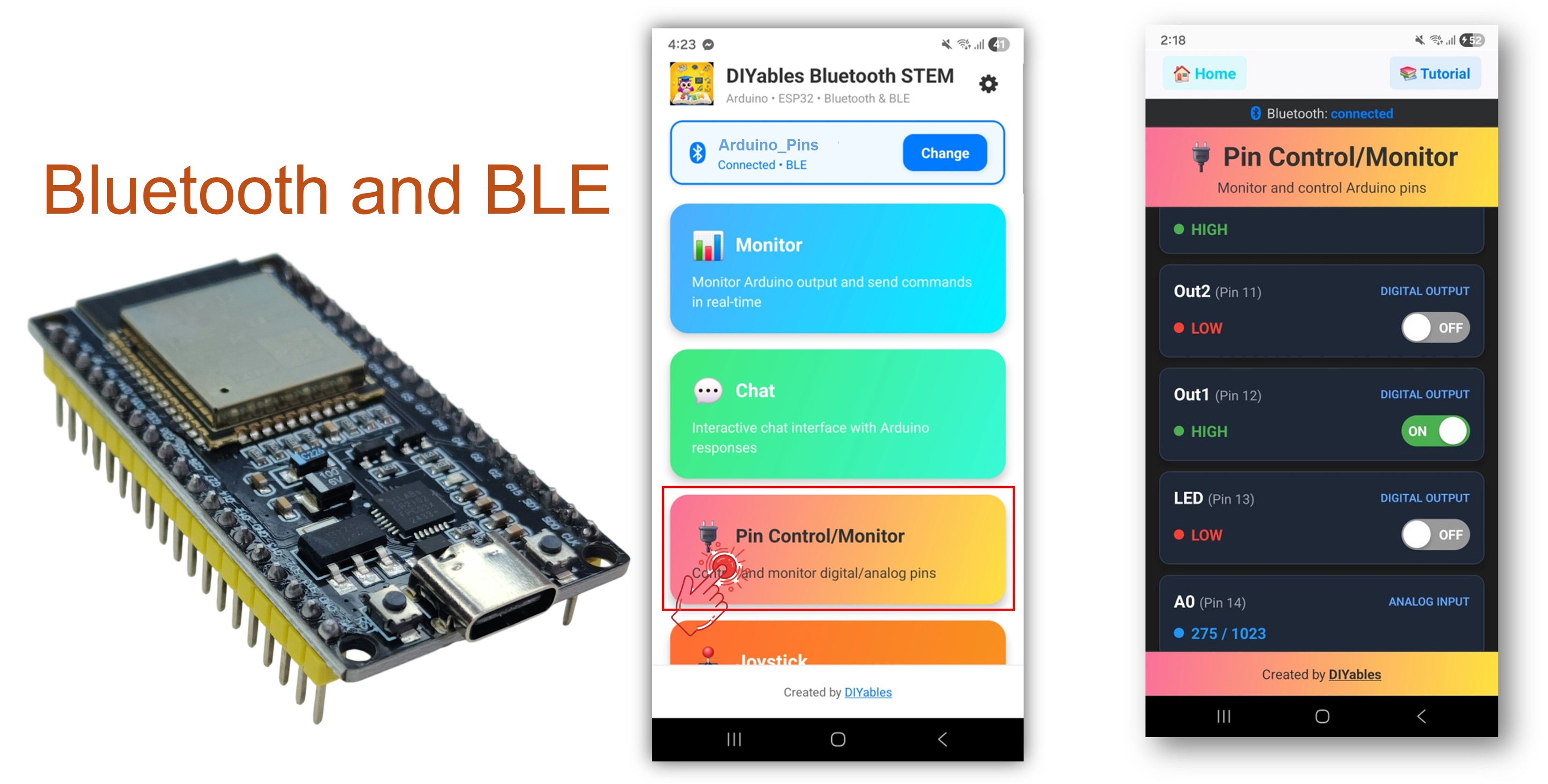
Ví dụ Bluetooth Digital Pins cung cấp khả năng điều khiển và giám sát các chân GPIO của ESP32 từ xa thông qua ứng dụng DIYables Bluetooth STEM. Được thiết kế cho board ESP32 với hỗ trợ cả kết nối BLE (Bluetooth Low Energy) và Classic Bluetooth. Cấu hình các chân làm đầu vào hoặc đầu ra, bật/tắt các chân đầu ra, đọc trạng thái đầu vào digital và analog, và nhận thông báo thay đổi trạng thái pin theo thời gian thực — hoàn hảo cho tự động hóa nhà thông minh, điều khiển relay, giám sát nút nhấn và đọc cảm biến.
Ví dụ này hỗ trợ hai chế độ Bluetooth:
ESP32 BLE (Bluetooth Low Energy): Hoạt động trên cả Android và iOS
ESP32 Classic Bluetooth: Chỉ hoạt động trên Android. iOS không hỗ trợ Classic Bluetooth. Sử dụng BLE nếu bạn cần hỗ trợ iOS.
Tính Năng
Điều Khiển Pin Đầu Ra: Bật/tắt các chân đầu ra digital HIGH/LOW từ ứng dụng
Giám Sát Pin Đầu Vào: Đọc trạng thái các chân đầu vào digital và analog
Tên Pin Tùy Chỉnh: Gán tên thân thiện cho mỗi chân (ví dụ: "LED", "Btn1", "A34")
Cập Nhật Theo Thời Gian Thực: Thông báo tự động khi trạng thái pin đầu vào thay đổi
Tối Đa 16 Pin: Hỗ trợ tối đa 16 pin có thể cấu hình đồng thời
Chế Độ Hỗn Hợp: Kết hợp các pin đầu vào và đầu ra trong cùng một thiết lập
BLE & Classic Bluetooth: Chọn chế độ Bluetooth phù hợp với dự án của bạn
Đa Nền Tảng: Chế độ BLE hoạt động trên cả Android và iOS; Classic Bluetooth hoạt động trên Android
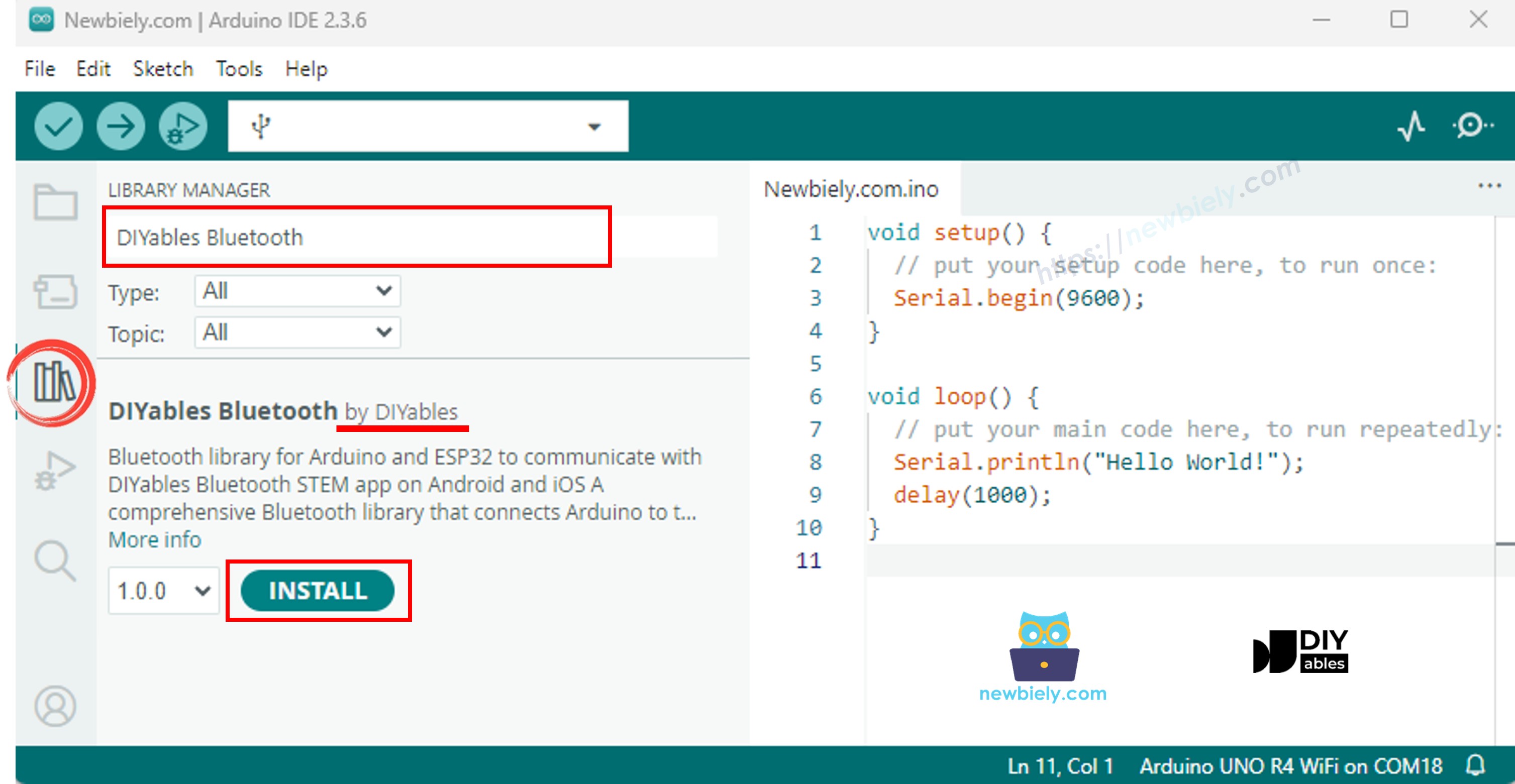
Điều hướng đến biểu tượng Libraries trên thanh bên trái của Arduino IDE.
Tìm kiếm "DIYables Bluetooth", sau đó tìm thư viện DIYables Bluetooth của DIYables
Nhấp nút Install để cài đặt thư viện.
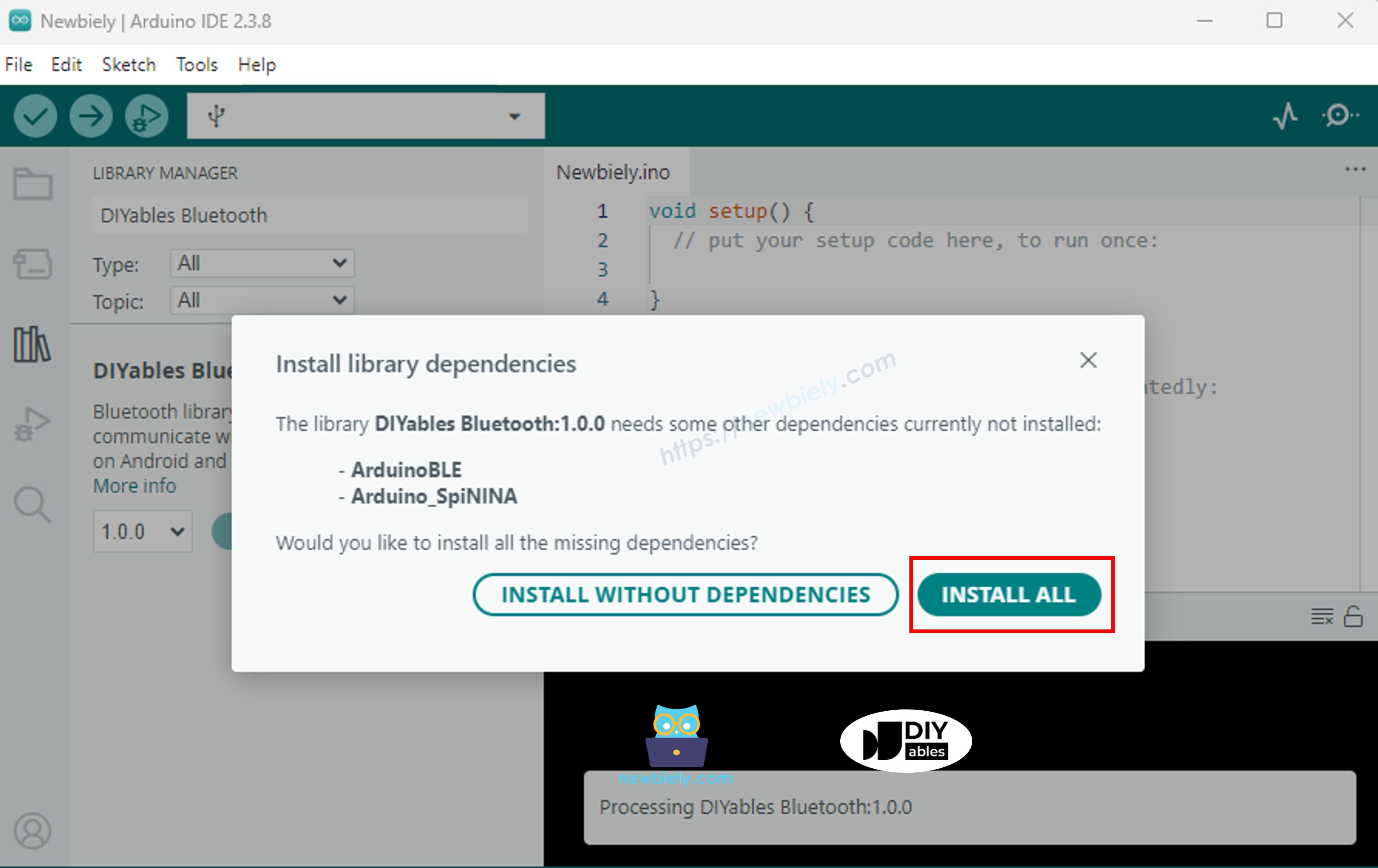
Bạn sẽ được yêu cầu cài đặt một số thư viện phụ thuộc khác
Nhấp nút Install All để cài đặt tất cả thư viện phụ thuộc.
Chọn một trong hai chế độ Bluetooth dưới đây tùy theo nhu cầu của bạn:
Code ESP32 Classic Bluetooth (chỉ hoạt động với ứng dụng trên Android)
Lưu ý: Classic Bluetooth KHÔNG được hỗ trợ trên iOS. Nếu bạn cần hỗ trợ iOS, hãy sử dụng code BLE bên dưới.
Trên Arduino IDE, đi đến File Examples DIYables Bluetooth Esp32Bluetooth_PinControl ví dụ, hoặc sao chép code trên và dán vào editor của Arduino IDE
/* * DIYables Bluetooth Library - ESP32 Classic Bluetooth Pin Control Example * Works with DIYables Bluetooth STEM app on Android * Note: Classic Bluetooth is NOT supported on iOS. Use BLE examples for iOS support. * * This example demonstrates the Bluetooth Pin Control/Monitor feature: * - Control digital output pins via Bluetooth * - Monitor digital input pins * - Monitor analog input pins * - Configure pin modes (INPUT/OUTPUT) * * Compatible Boards: * - ESP32 (all variants with Classic Bluetooth) * - ESP32-WROOM-32 * - ESP32-DevKitC * - ESP32-WROVER * * Note: Select "Huge APP (3MB No OTA/1MB SPIFFS)" partition scheme * in Arduino IDE: Tools > Partition Scheme * * Setup: * 1. Upload the sketch to your ESP32 * 2. Open Serial Monitor (115200 baud) to see connection status * 3. Use DIYables Bluetooth App to connect and control pins * * Tutorial: https://diyables.io/bluetooth-app * Author: DIYables */#include <DIYables_BluetoothServer.h>#include <DIYables_BluetoothPinControl.h>#include <platforms/DIYables_Esp32Bluetooth.h>// Create Bluetooth instancesDIYables_Esp32Bluetooth bluetooth("ESP32_Pins");DIYables_BluetoothServer bluetoothServer(bluetooth);// Create Pin Control/Monitor app instanceDIYables_BluetoothPinControl bluetoothPins;// Pin configuration (adjust for your ESP32 board)constint LED_PIN = 2; // Built-in LED on most ESP32 boardsconstint OUTPUT_PIN_1 = 16;constint OUTPUT_PIN_2 = 17;constint INPUT_PIN_1 = 18;constint INPUT_PIN_2 = 19;constint ANALOG_PIN_1 = 34; // ESP32 ADC1 pins (input only)constint ANALOG_PIN_2 = 35;voidsetup() {Serial.begin(115200);delay(1000);Serial.println("DIYables Bluetooth - ESP32 Pin Control/Monitor Example");// Initialize pinspinMode(LED_PIN, OUTPUT);pinMode(OUTPUT_PIN_1, OUTPUT);pinMode(OUTPUT_PIN_2, OUTPUT);pinMode(INPUT_PIN_1, INPUT_PULLUP);pinMode(INPUT_PIN_2, INPUT_PULLUP);// Initialize Bluetooth server with platform-specific implementation bluetoothServer.begin();// Add digital pins app to server bluetoothServer.addApp(&bluetoothPins);// Configure which pins are accessible via Bluetooth with custom names bluetoothPins.enablePin(LED_PIN, BT_PIN_OUTPUT, "LED"); bluetoothPins.enablePin(OUTPUT_PIN_1, BT_PIN_OUTPUT, "Out1"); bluetoothPins.enablePin(OUTPUT_PIN_2, BT_PIN_OUTPUT, "Out2"); bluetoothPins.enablePin(INPUT_PIN_1, BT_PIN_INPUT, "Btn1"); bluetoothPins.enablePin(INPUT_PIN_2, BT_PIN_INPUT, "Btn2"); bluetoothPins.enablePin(ANALOG_PIN_1, BT_PIN_INPUT, "A34"); bluetoothPins.enablePin(ANALOG_PIN_2, BT_PIN_INPUT, "A35");// Set up connection event callbacks bluetoothServer.setOnConnected([]() {Serial.println("Bluetooth connected!"); }); bluetoothServer.setOnDisconnected([]() {Serial.println("Bluetooth disconnected!"); });// Set up callback for pin write commands bluetoothPins.onPinWrite([](int pin, int state) {digitalWrite(pin, state);Serial.print("Pin ");Serial.print(pin);Serial.print(" set to ");Serial.println(state ? "HIGH" : "LOW"); });// Set up callback for pin read commands bluetoothPins.onPinRead([](int pin) -> int {// Read analog pins with analogRead, digital pins with digitalReadint state;if (pin == ANALOG_PIN_1 || pin == ANALOG_PIN_2) { state = analogRead(pin);Serial.print("Analog pin ");Serial.print(pin);Serial.print(" read: ");Serial.println(state); } else { state = digitalRead(pin);Serial.print("Digital pin ");Serial.print(pin);Serial.print(" read: ");Serial.println(state ? "HIGH" : "LOW"); }return state; });// Set up callback for pin mode changes bluetoothPins.onPinModeChange([](int pin, int mode) {pinMode(pin, mode == BT_PIN_OUTPUT ? OUTPUT : INPUT_PULLUP);Serial.print("Pin ");Serial.print(pin);Serial.print(" mode changed to ");Serial.println(mode == BT_PIN_OUTPUT ? "OUTPUT" : "INPUT"); });Serial.println("Waiting for Bluetooth connection...");Serial.print("Enabled pins: ");Serial.println(bluetoothPins.getEnabledPinCount());}voidloop() {// Handle Bluetooth server communications bluetoothServer.loop();// Optional: Monitor input pins and send updatesstaticunsignedlong lastInputCheck = 0;staticint lastInputState1 = HIGH;staticint lastInputState2 = HIGH;staticint lastAnalogState1 = 0;staticint lastAnalogState2 = 0;if (millis() - lastInputCheck >= 100) { lastInputCheck = millis();// Check digital input pin 1int currentState1 = digitalRead(INPUT_PIN_1);if (currentState1 != lastInputState1) { lastInputState1 = currentState1; bluetoothPins.updatePinState(INPUT_PIN_1, currentState1);Serial.print("Input pin ");Serial.print(INPUT_PIN_1);Serial.print(" changed to ");Serial.println(currentState1 ? "HIGH" : "LOW"); }// Check digital input pin 2int currentState2 = digitalRead(INPUT_PIN_2);if (currentState2 != lastInputState2) { lastInputState2 = currentState2; bluetoothPins.updatePinState(INPUT_PIN_2, currentState2);Serial.print("Input pin ");Serial.print(INPUT_PIN_2);Serial.print(" changed to ");Serial.println(currentState2 ? "HIGH" : "LOW"); }// Check analog input 1 (send update if changed by more than 50 - ESP32 has 12-bit ADC)int currentAnalog1 = analogRead(ANALOG_PIN_1);if (abs(currentAnalog1 - lastAnalogState1) > 50) { lastAnalogState1 = currentAnalog1; bluetoothPins.updatePinState(ANALOG_PIN_1, currentAnalog1);Serial.print("Analog pin ");Serial.print(ANALOG_PIN_1);Serial.print(" changed to ");Serial.println(currentAnalog1); }// Check analog input 2 (send update if changed by more than 50)int currentAnalog2 = analogRead(ANALOG_PIN_2);if (abs(currentAnalog2 - lastAnalogState2) > 50) { lastAnalogState2 = currentAnalog2; bluetoothPins.updatePinState(ANALOG_PIN_2, currentAnalog2);Serial.print("Analog pin ");Serial.print(ANALOG_PIN_2);Serial.print(" changed to ");Serial.println(currentAnalog2); } }delay(10);}
Nhấp nút Upload trên Arduino IDE để tải code lên ESP32
Mở Serial Monitor
Kiểm tra kết quả trên Serial Monitor. Nó trông như sau:
Newbiely | Arduino IDE 2.3.8
──
☐
✕
File
Edit
Sketch
Tools
Help
ESP32 Dev Module
Newbiely.ino
···
8Serial.println("Hello World!");
Output
Serial Monitor
Message (Enter to send message to 'ESP32 Dev Module' on 'COM15')
New Line
9600 baud
DIYables Bluetooth - ESP32 Pin Control/Monitor Example
Waiting for Bluetooth connection...
Enabled pins: 7
Ln 11, Col 1
ESP32 Dev Module on COM15
2
Code ESP32 BLE (hoạt động với ứng dụng trên cả Android và iOS)
Trên Arduino IDE, đi đến File Examples DIYables Bluetooth Esp32BLE_PinControl ví dụ, hoặc sao chép code trên và dán vào editor của Arduino IDE
/* * DIYables Bluetooth Library - ESP32 BLE Pin Control/Monitor Example * Works with DIYables Bluetooth STEM app on Android and iOS * * This example demonstrates the Bluetooth Pin Control/Monitor feature: * - Control digital output pins via Bluetooth * - Monitor digital input pins * - Monitor analog input pins * - Configure pin modes (INPUT/OUTPUT) * * Compatible Boards: * - ESP32-WROOM-32 * - ESP32-DevKitC * - ESP32-WROVER * - ESP32-S3 * - ESP32-C3 * - Any ESP32 board supporting BLE * * Note: Select "Huge APP (3MB No OTA/1MB SPIFFS)" partition scheme * in Arduino IDE: Tools > Partition Scheme * * Setup: * 1. Upload the sketch to your ESP32 * 2. Open Serial Monitor (115200 baud) to see connection status * 3. Use DIYables Bluetooth App to connect and control pins * * Tutorial: https://diyables.io/bluetooth-app * Author: DIYables */#include <DIYables_BluetoothServer.h>#include <DIYables_BluetoothPinControl.h>#include <platforms/DIYables_Esp32BLE.h>// BLE Configurationconst char* DEVICE_NAME = "ESP32BLE_Pins";const char* SERVICE_UUID = "19B10000-E8F2-537E-4F6C-D104768A1214";const char* TX_UUID = "19B10001-E8F2-537E-4F6C-D104768A1214";const char* RX_UUID = "19B10002-E8F2-537E-4F6C-D104768A1214";// Create Bluetooth instancesDIYables_Esp32BLE bluetooth(DEVICE_NAME, SERVICE_UUID, TX_UUID, RX_UUID);DIYables_BluetoothServer bluetoothServer(bluetooth);// Create Pin Control/Monitor app instanceDIYables_BluetoothPinControl bluetoothPins;// Pin configuration (ESP32 GPIOs)constint LED_PIN = 2; // Built-in LEDconstint OUTPUT_PIN_1 = 16;constint OUTPUT_PIN_2 = 17;constint INPUT_PIN_1 = 25;constint INPUT_PIN_2 = 26;constint ANALOG_PIN_1 = 34; // Input-only ADC pinconstint ANALOG_PIN_2 = 35; // Input-only ADC pinvoidsetup() {Serial.begin(115200);delay(1000);Serial.println("DIYables Bluetooth - ESP32 BLE Pin Control/Monitor Example");// Initialize pinspinMode(LED_PIN, OUTPUT);pinMode(OUTPUT_PIN_1, OUTPUT);pinMode(OUTPUT_PIN_2, OUTPUT);pinMode(INPUT_PIN_1, INPUT_PULLUP);pinMode(INPUT_PIN_2, INPUT_PULLUP);// Initialize Bluetooth server with platform-specific implementation bluetoothServer.begin();// Add digital pins app to server bluetoothServer.addApp(&bluetoothPins);// Configure which pins are accessible via Bluetooth with custom names bluetoothPins.enablePin(LED_PIN, BT_PIN_OUTPUT, "LED"); bluetoothPins.enablePin(OUTPUT_PIN_1, BT_PIN_OUTPUT, "Out1"); bluetoothPins.enablePin(OUTPUT_PIN_2, BT_PIN_OUTPUT, "Out2"); bluetoothPins.enablePin(INPUT_PIN_1, BT_PIN_INPUT, "Btn1"); bluetoothPins.enablePin(INPUT_PIN_2, BT_PIN_INPUT, "Btn2"); bluetoothPins.enablePin(ANALOG_PIN_1, BT_PIN_INPUT, "A34"); bluetoothPins.enablePin(ANALOG_PIN_2, BT_PIN_INPUT, "A35");// Set up connection event callbacks bluetoothServer.setOnConnected([]() {Serial.println("Bluetooth connected!"); }); bluetoothServer.setOnDisconnected([]() {Serial.println("Bluetooth disconnected!"); });// Set up callback for pin write commands bluetoothPins.onPinWrite([](int pin, int state) {digitalWrite(pin, state);Serial.print("Pin ");Serial.print(pin);Serial.print(" set to ");Serial.println(state ? "HIGH" : "LOW"); });// Set up callback for pin read commands bluetoothPins.onPinRead([](int pin) -> int {int state;if (pin == ANALOG_PIN_1 || pin == ANALOG_PIN_2) { state = analogRead(pin);Serial.print("Analog pin ");Serial.print(pin);Serial.print(" read: ");Serial.println(state); } else { state = digitalRead(pin);Serial.print("Digital pin ");Serial.print(pin);Serial.print(" read: ");Serial.println(state ? "HIGH" : "LOW"); }return state; });// Set up callback for pin mode changes bluetoothPins.onPinModeChange([](int pin, int mode) {pinMode(pin, mode == BT_PIN_OUTPUT ? OUTPUT : INPUT_PULLUP);Serial.print("Pin ");Serial.print(pin);Serial.print(" mode changed to ");Serial.println(mode == BT_PIN_OUTPUT ? "OUTPUT" : "INPUT"); });Serial.println("Waiting for Bluetooth connection...");Serial.print("Enabled pins: ");Serial.println(bluetoothPins.getEnabledPinCount());}voidloop() { bluetoothServer.loop();staticunsignedlong lastInputCheck = 0;staticint lastInputState1 = HIGH;staticint lastInputState2 = HIGH;staticint lastAnalogState1 = 0;staticint lastAnalogState2 = 0;if (millis() - lastInputCheck >= 100) { lastInputCheck = millis();int currentState1 = digitalRead(INPUT_PIN_1);if (currentState1 != lastInputState1) { lastInputState1 = currentState1; bluetoothPins.updatePinState(INPUT_PIN_1, currentState1);Serial.print("Input pin ");Serial.print(INPUT_PIN_1);Serial.print(" changed to ");Serial.println(currentState1 ? "HIGH" : "LOW"); }int currentState2 = digitalRead(INPUT_PIN_2);if (currentState2 != lastInputState2) { lastInputState2 = currentState2; bluetoothPins.updatePinState(INPUT_PIN_2, currentState2);Serial.print("Input pin ");Serial.print(INPUT_PIN_2);Serial.print(" changed to ");Serial.println(currentState2 ? "HIGH" : "LOW"); }// ESP32 has 12-bit ADC (0-4095)int currentAnalog1 = analogRead(ANALOG_PIN_1);if (abs(currentAnalog1 - lastAnalogState1) > 40) { // ~1% of 4095 lastAnalogState1 = currentAnalog1; bluetoothPins.updatePinState(ANALOG_PIN_1, currentAnalog1);Serial.print("Analog pin ");Serial.print(ANALOG_PIN_1);Serial.print(" changed to ");Serial.println(currentAnalog1); }int currentAnalog2 = analogRead(ANALOG_PIN_2);if (abs(currentAnalog2 - lastAnalogState2) > 40) { lastAnalogState2 = currentAnalog2; bluetoothPins.updatePinState(ANALOG_PIN_2, currentAnalog2);Serial.print("Analog pin ");Serial.print(ANALOG_PIN_2);Serial.print(" changed to ");Serial.println(currentAnalog2); } }delay(10);}
Nhấp nút Upload trên Arduino IDE để tải code lên ESP32
Mở Serial Monitor
Kiểm tra kết quả trên Serial Monitor. Nó trông như sau:
Newbiely | Arduino IDE 2.3.8
──
☐
✕
File
Edit
Sketch
Tools
Help
ESP32 Dev Module
Newbiely.ino
···
8Serial.println("Hello World!");
Output
Serial Monitor
Message (Enter to send message to 'ESP32 Dev Module' on 'COM15')
New Line
9600 baud
DIYables Bluetooth - ESP32 BLE Pin Control/Monitor Example
Waiting for Bluetooth connection...
Enabled pins: 7
Ln 11, Col 1
ESP32 Dev Module on COM15
2
Ứng Dụng Di Động
Cài đặt ứng dụng DIYables Bluetooth trên smartphone của bạn: Android | iOS
Nếu bạn đang sử dụng code ESP32 Classic Bluetooth, bạn cần ghép nối ESP32 với điện thoại Android trước khi mở ứng dụng:
Vào Settings > Bluetooth của điện thoại
Đảm bảo Bluetooth được bật
Điện thoại sẽ quét các thiết bị có sẵn
Tìm và chạm vào "ESP32_Pins" trong danh sách thiết bị có sẵn
Xác nhận yêu cầu ghép nối (không cần PIN)
Đợi cho đến khi hiển thị "Paired" dưới tên thiết bị
Nếu bạn đang sử dụng code ESP32 BLE, không cần ghép nối. Chỉ cần tiếp tục bước tiếp theo.
Mở ứng dụng DIYables Bluetooth
Khi mở ứng dụng lần đầu, nó sẽ yêu cầu quyền truy cập. Vui lòng cấp các quyền sau:
Quyền Nearby Devices (Android 12+) / quyền Bluetooth (iOS) - cần thiết để quét và kết nối với thiết bị Bluetooth
Quyền Location (chỉ Android 11 trở xuống) - cần thiết cho các phiên bản Android cũ để quét thiết bị BLE
Đảm bảo Bluetooth được bật trên điện thoại của bạn
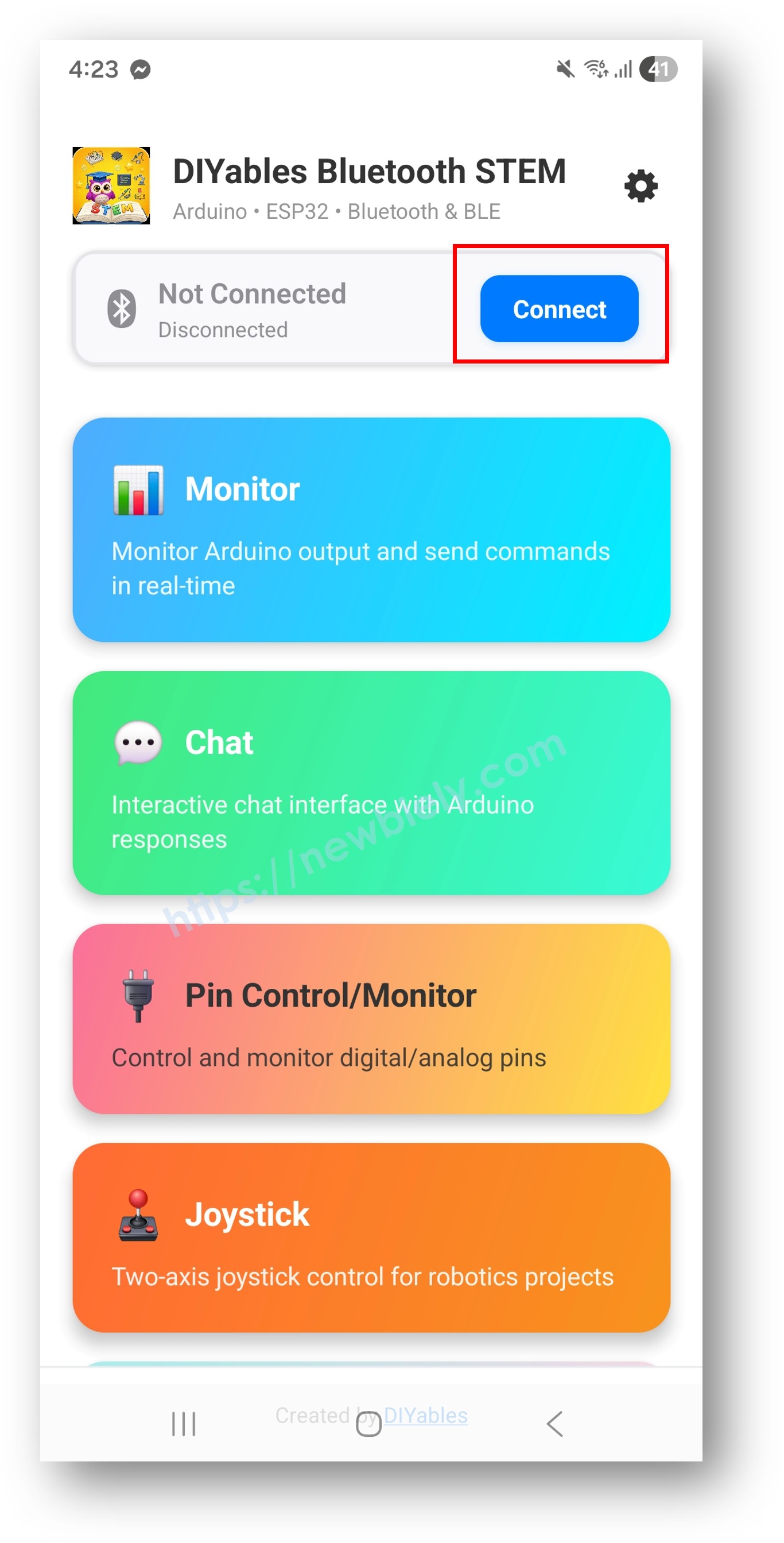
Trên màn hình chính, chạm nút Connect. Ứng dụng sẽ quét cả thiết bị BLE và Classic Bluetooth.
Tìm và chạm vào thiết bị của bạn trong kết quả quét để kết nối:
Cho Classic Bluetooth: chạm "ESP32_Pins"
Cho BLE: chạm "ESP32BLE_Pins"
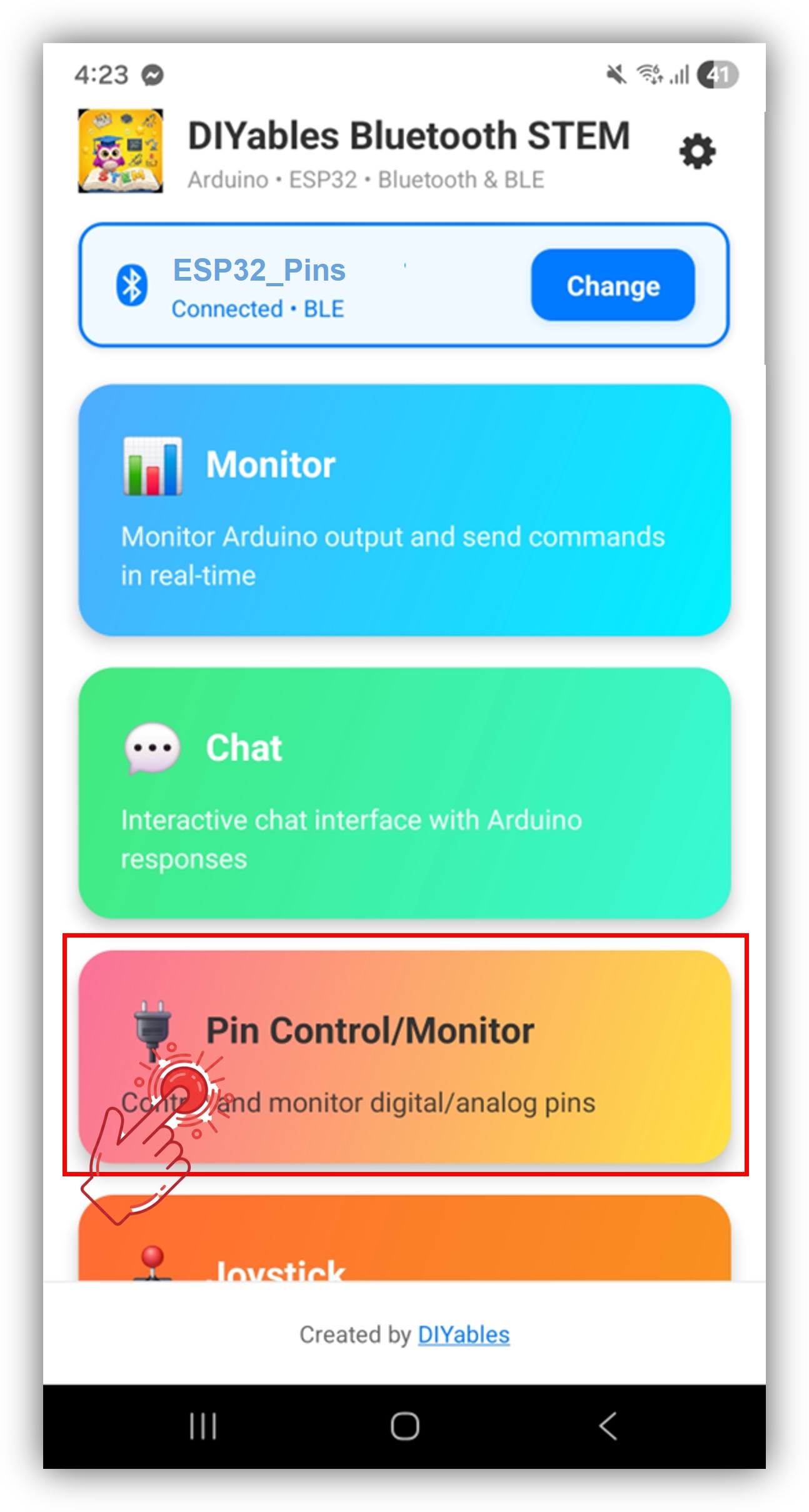
Sau khi kết nối, ứng dụng tự động quay về màn hình chính. Chọn ứng dụng Digital Pins từ menu ứng dụng.
Lưu ý: Bạn có thể chạm vào biểu tượng cài đặt trên màn hình chính để ẩn/hiện các ứng dụng trên màn hình chính. Để biết thêm chi tiết, xem Hướng Dẫn Sử Dụng Ứng Dụng DIYables Bluetooth.
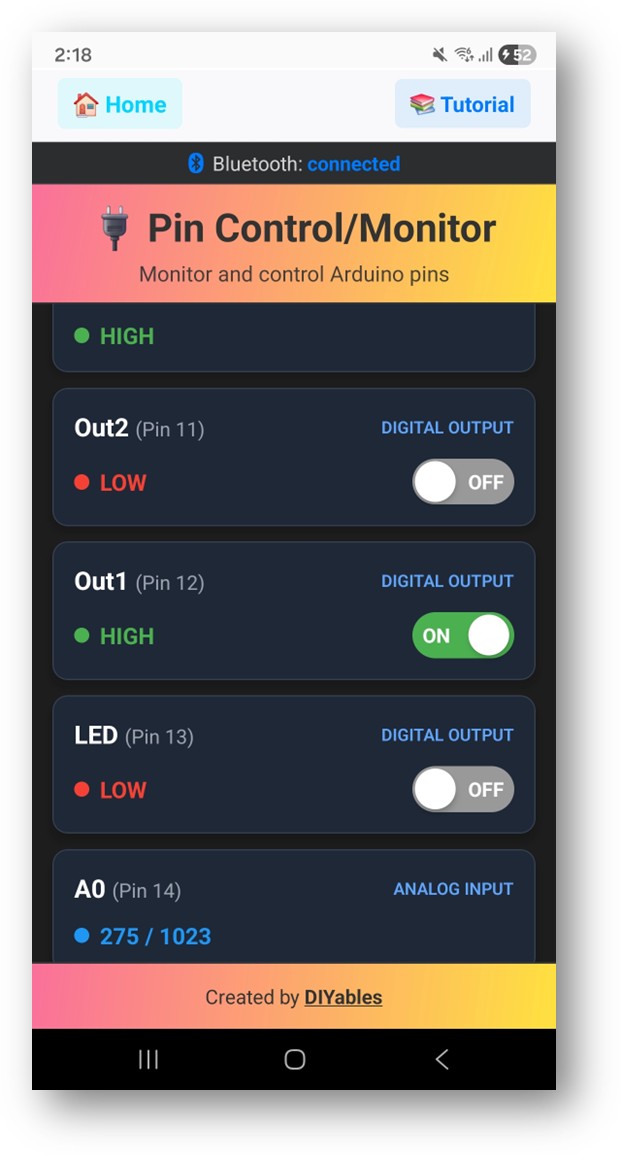
Bật/tắt các pin đầu ra bằng cách chạm vào chúng, và xem các pin đầu vào cập nhật theo thời gian thực
Bây giờ hãy nhìn lại Serial Monitor trên Arduino IDE. Bạn sẽ thấy:
Newbiely | Arduino IDE 2.3.8
──
☐
✕
File
Edit
Sketch
Tools
Help
ESP32 Dev Module
Newbiely.ino
···
8Serial.println("Hello World!");
Output
Serial Monitor
Message (Enter to send message to 'ESP32 Dev Module' on 'COM15')
New Line
9600 baud
Bluetooth connected!
Pin 2 set to HIGH
Pin 16 set to LOW
Input pin 18 changed to LOW
Analog pin 34 changed to 2048
Ln 11, Col 1
ESP32 Dev Module on COM15
2
Bật/tắt các pin trong ứng dụng và xem phản hồi theo thời gian thực trong Serial Monitor
Tùy Chỉnh Sáng Tạo - Điều Chỉnh Code Cho Dự Án Của Bạn
Cấu Hình Pin
Kích hoạt pin với tên tùy chỉnh và chế độ:
// Kích hoạt từng pin với chế độ và tên tùy chỉnhbluetoothPins.enablePin(2, BT_PIN_OUTPUT, "LED"); // LED tích hợpbluetoothPins.enablePin(16, BT_PIN_OUTPUT, "Relay1"); // Điều khiển relaybluetoothPins.enablePin(17, BT_PIN_OUTPUT, "Relay2"); // Điều khiển relaybluetoothPins.enablePin(18, BT_PIN_INPUT, "Button"); // Đầu vào nút nhấnbluetoothPins.enablePin(34, BT_PIN_INPUT, "Sensor"); // Cảm biến analog// Vô hiệu hóa một pin cụ thểbluetoothPins.disablePin(17);// Kiểm tra trạng thái pinbool isEnabled = bluetoothPins.isPinEnabled(2);int mode = bluetoothPins.getPinMode(2);int count = bluetoothPins.getEnabledPinCount();
Xử Lý Lệnh Ghi Pin
Sử dụng callback onPinWrite() để điều khiển phần cứng khi ứng dụng bật/tắt pin:
bluetoothPins.onPinWrite([](int pin, int state) {digitalWrite(pin, state);Serial.print("Pin ");Serial.print(pin);Serial.print(" set to ");Serial.println(state ? "HIGH" : "LOW");});
Xử Lý Lệnh Đọc Pin
Sử dụng callback onPinRead() để trả về trạng thái pin cho ứng dụng:
bluetoothPins.onPinRead([](int pin) -> int {if (pin == 34 || pin == 35) {// Đọc giá trị analog cho pin ADCreturnanalogRead(pin); } else {// Đọc giá trị digital cho pin khácreturndigitalRead(pin); }});
Xử Lý Thay Đổi Chế Độ Pin
Sử dụng callback onPinModeChange() để thay đổi chế độ pin động:
Đẩy thay đổi trạng thái pin cho ứng dụng từ code của bạn:
// Phát hiện thay đổi đầu vào và gửi cập nhậtint currentState = digitalRead(18);if (currentState != lastState) { lastState = currentState; bluetoothPins.updatePinState(18, currentState);}// Gửi cập nhật giá trị analogint analogValue = analogRead(34);if (abs(analogValue - lastAnalogValue) > 50) { lastAnalogValue = analogValue; bluetoothPins.updatePinState(34, analogValue);}
Xử Lý Sự Kiện Kết Nối
bluetoothServer.setOnConnected([]() {Serial.println("Bluetooth connected!");});bluetoothServer.setOnDisconnected([]() {Serial.println("Bluetooth disconnected!");// An toàn: tắt tất cả đầu ra khi ngắt kết nốidigitalWrite(2, LOW);digitalWrite(16, LOW);digitalWrite(17, LOW);});
Cách Sử Dụng Digital Pins
Điều Khiển Giao Diện Ứng Dụng
Giao diện digital pins trong ứng dụng DIYables Bluetooth cung cấp:
Danh Sách Pin: Hiển thị tất cả pin được kích hoạt với tên và trạng thái hiện tại
Nút Bật/Tắt: Chạm pin đầu ra để bật/tắt HIGH/LOW
Hiển Thị Đầu Vào: Hiển thị trạng thái pin đầu vào theo thời gian thực
Giá Trị Analog: Hiển thị giá trị analog thô cho pin ADC
Chế Độ Pin
BT_PIN_OUTPUT (0): Điều khiển đầu ra digital — bật/tắt từ ứng dụng
BT_PIN_INPUT (1): Giám sát đầu vào digital hoặc analog — hiển thị trạng thái hiện tại
constint BUTTON_PINS[] = {18, 19, 21, 22};const char* BUTTON_NAMES[] = {"Btn1", "Btn2", "Btn3", "Btn4"};constint NUM_BUTTONS = 4;int lastButtonStates[4] = {HIGH, HIGH, HIGH, HIGH};voidsetup() {for (int i = 0; i < NUM_BUTTONS; i++) {pinMode(BUTTON_PINS[i], INPUT_PULLUP); bluetoothPins.enablePin(BUTTON_PINS[i], BT_PIN_INPUT, BUTTON_NAMES[i]); } bluetoothPins.onPinRead([](int pin) -> int {returndigitalRead(pin); });}voidloop() { bluetoothServer.loop();// Kiểm tra thay đổi trạng thái nút nhấnfor (int i = 0; i < NUM_BUTTONS; i++) {int state = digitalRead(BUTTON_PINS[i]);if (state != lastButtonStates[i]) { lastButtonStates[i] = state; bluetoothPins.updatePinState(BUTTON_PINS[i], state); } }delay(10);}
Hệ Thống Đầu Vào/Đầu Ra Hỗn Hợp
voidsetup() {// Pin đầu ra cho actuator bluetoothPins.enablePin(2, BT_PIN_OUTPUT, "LED"); bluetoothPins.enablePin(16, BT_PIN_OUTPUT, "Relay");// Pin đầu vào digital cho cảm biến bluetoothPins.enablePin(18, BT_PIN_INPUT, "Motion"); bluetoothPins.enablePin(19, BT_PIN_INPUT, "Door");// Pin đầu vào analog cho cảm biến bluetoothPins.enablePin(34, BT_PIN_INPUT, "Light"); bluetoothPins.enablePin(35, BT_PIN_INPUT, "Temp");// Thiết lập phần cứngpinMode(2, OUTPUT);pinMode(16, OUTPUT);pinMode(18, INPUT_PULLUP);pinMode(19, INPUT_PULLUP); bluetoothPins.onPinWrite([](int pin, int state) {digitalWrite(pin, state); }); bluetoothPins.onPinRead([](int pin) -> int {if (pin == 34 || pin == 35) returnanalogRead(pin);returndigitalRead(pin); });}
Kỹ Thuật Lập Trình Nâng Cao
Khóa An Toàn
bool safetyEnabled = true;bluetoothPins.onPinWrite([](int pin, int state) {// Kiểm tra an toàn: không cho phép đầu ra xung độtif (pin == 16 && state == HIGH) {// Kiểm tra nếu khóa an toàn cho phép điều nàyif (digitalRead(18) == LOW) { // Công tắc an toàn phải được bật bluetoothPins.updatePinState(16, 0); // Từ chối lệnhSerial.println("SAFETY: Operation blocked - safety switch off");return; } }digitalWrite(pin, state);});
Tự Động Tắt Theo Thời Gian
unsignedlong pinTimers[16] = {0};unsignedlong PIN_TIMEOUT = 300000; // 5 phútbluetoothPins.onPinWrite([](int pin, int state) {digitalWrite(pin, state);if (state == HIGH) { pinTimers[pin] = millis(); // Bắt đầu hẹn giờ } else { pinTimers[pin] = 0; // Xóa hẹn giờ }});voidloop() { bluetoothServer.loop();// Kiểm tra timeout tự động tắtfor (int i = 0; i < 16; i++) {if (pinTimers[i] > 0 && millis() - pinTimers[i] >= PIN_TIMEOUT) {digitalWrite(i, LOW); pinTimers[i] = 0; bluetoothPins.updatePinState(i, 0);Serial.print("Auto-off: Pin ");Serial.println(i); } }delay(10);}
BLE so với Classic Bluetooth - Nên Chọn Cái Nào?
Tính Năng
BLE (Esp32BLE_PinControl)
Classic Bluetooth (Esp32Bluetooth_PinControl)
Hỗ Trợ iOS
? Có
? Không
Hỗ Trợ Android
? Có
? Có
Tiêu Thụ Năng Lượng
Thấp
Cao hơn
Phạm Vi
~30-100m
~10-100m
Tốc Độ Dữ Liệu
Thấp hơn
Cao hơn
Cần Ghép Nối
Không (tự động kết nối)
Có (ghép nối thủ công)
Tốt Nhất Cho
Pin, đa nền tảng
Thông lượng cao, chỉ Android
Khắc Phục Sự Cố
Vấn Đề Thường Gặp
1. Không thể tìm thấy thiết bị trong ứng dụng
Đảm bảo ESP32 được bật nguồn và sketch đã được tải lên
Cho BLE: Đảm bảo Bluetooth và Location của điện thoại được bật
Cho Classic Bluetooth: Ghép nối thiết bị trước trong cài đặt Bluetooth của điện thoại
Kiểm tra rằng partition scheme đúng được chọn (Huge APP)
2. Pin không xuất hiện trong ứng dụng
Đảm bảo enablePin() được gọi trước kết nối Bluetooth
Kiểm tra getEnabledPinCount() trong Serial Monitor
Xác minh số pin nằm trong khoảng 0 đến 15
3. Pin đầu ra không bật/tắt
Xác minh callback onPinWrite() gọi digitalWrite()
Kiểm tra rằng pin được cấu hình là BT_PIN_OUTPUT
Xác minh kết nối phần cứng
4. Giá trị đầu vào không cập nhật
Đảm bảo updatePinState() được gọi khi trạng thái thay đổi
Kiểm tra khoảng thời gian polling trong loop
Cho pin analog, điều chỉnh ngưỡng thay đổi
5. Quá nhiều pin gây lỗi
Tối đa 16 pin được hỗ trợ (0-15)
Giữ tên pin ngắn để tránh truncate tin nhắn
Sử dụng tên ngắn hơn nếu bạn gặp cảnh báo truncation
6. Sketch quá lớn / không đủ dung lượng
Trong Arduino IDE, đi đến Tools > Partition Scheme và chọn "Huge APP (3MB No OTA/1MB SPIFFS)" hoặc "No OTA (Large APP)"
Partition scheme mặc định chỉ cung cấp ~1.2MB cho app code, không đủ cho thư viện Bluetooth
Cài đặt này cung cấp ~3MB bằng cách hy sinh partition OTA (over-the-air update)

 English for KidsHọc tiếng Anh vui nhộn cho trẻ nhỏ.Tải về trênGoogle PlayTải về trênApp Store
 Bubble NoteGhi chú tự xóa — viết như nhắn tin.Tải về trênGoogle PlayTải về trênApp Store
 Tôi Không MuaĐánh bại mua sắm bốc đồng, tiết kiệm hơn.Tải về trênGoogle PlayTải về trênApp Store
 Con Đường Tri ThứcBài thi thử để học mọi thứ.Tải về trênGoogle PlayTải về trênApp Store