
ESP32 Bluetooth Rotator Example Hướng dẫn Giao diện Điều khiển Đĩa/Núm xoay được
Tổng quan
Ví dụ Bluetooth Rotator cung cấp điều khiển đĩa/núm xoay được thông qua ứng dụng DIYables Bluetooth STEM. Thiết kế cho bo mạch ESP32 hỗ trợ cả kết nối BLE (Bluetooth Low Energy) và Classic Bluetooth. Rotator gửi giá trị góc độ và hỗ trợ chế độ góc liên tục (0-360°) hoặc giới hạn phạm vi góc — hoàn hảo cho điều khiển servo, hiển thị la bàn, núm âm lượng và mọi ứng dụng cần đầu vào xoay.
Ví dụ này hỗ trợ hai chế độ Bluetooth:
- ESP32 BLE (Bluetooth Low Energy): Hoạt động trên cả Android và iOS
- ESP32 Classic Bluetooth: Chỉ hoạt động trên Android. iOS không hỗ trợ Classic Bluetooth. Sử dụng BLE nếu bạn cần hỗ trợ iOS.
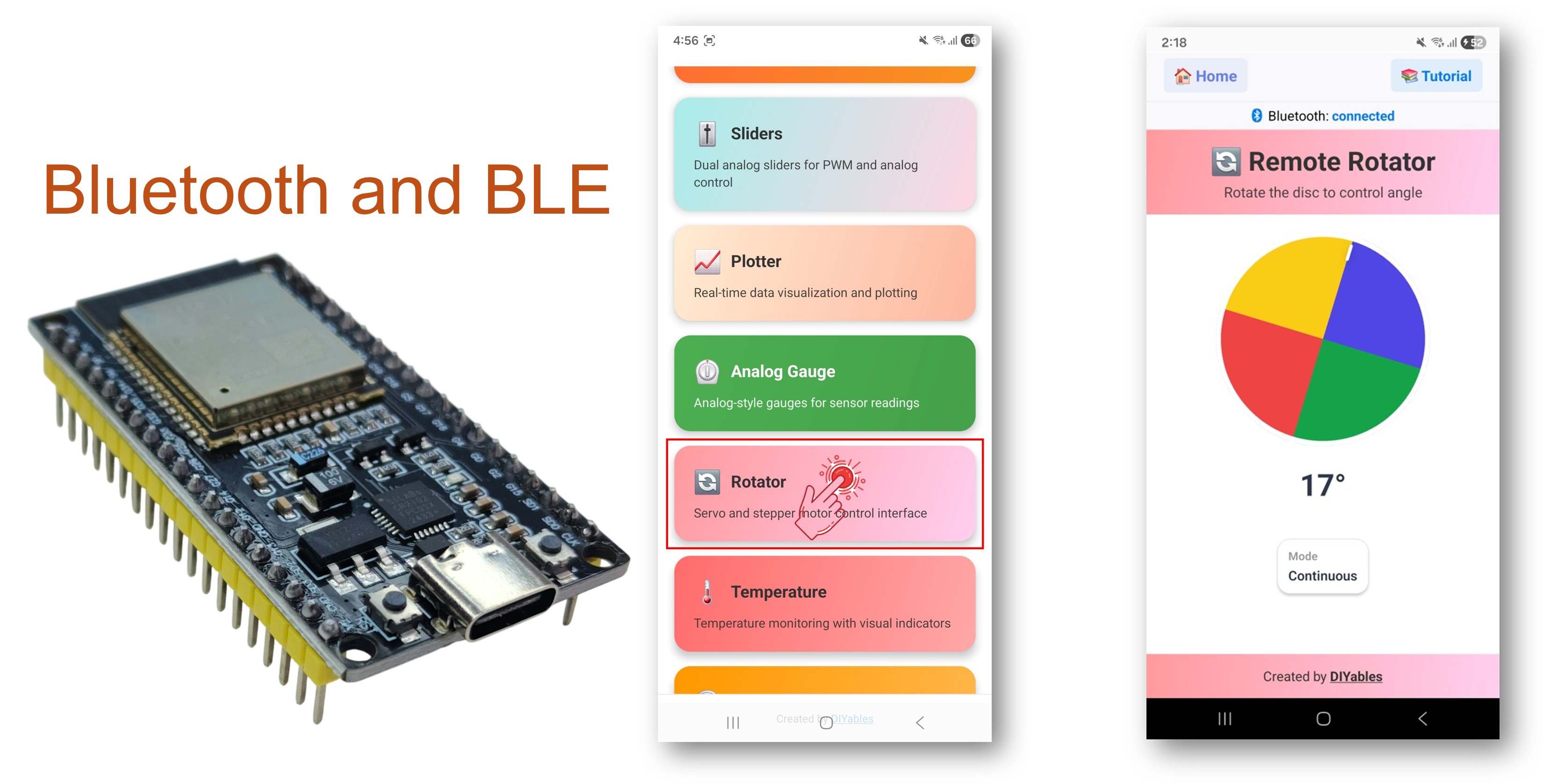
Tính năng
- Núm xoay được: Chạm và kéo để xoay đĩa trên màn hình
- Chế độ liên tục: Xoay 360° đầy đủ không giới hạn
- Chế độ giới hạn: Phạm vi góc bị ràng buộc (ví dụ: 0-180° cho servo)
- Đầu ra góc độ: Giá trị góc float được gửi theo thời gian thực
- Tương thích servo: Ánh xạ trực tiếp đến góc servo (0-180°)
- BLE & Classic Bluetooth: Chọn chế độ Bluetooth phù hợp với dự án của bạn
- Đa nền tảng: Chế độ BLE hoạt động trên cả Android và iOS; Classic Bluetooth hoạt động trên Android
- Tùy chọn tiết kiệm năng lượng: Chế độ BLE tiêu thụ ít năng lượng hơn Classic Bluetooth
Phần cứng cần thiết
| 1 | × | 38-pin ESP32 ESP-WROOM-32 Dev Module - Narrow | Amazon | |
| 1 | × | Alternatively, 38-pin ESP32 ESP-WROOM-32 Dev Module - Wide | Amazon | |
| 1 | × | Alternatively, 30-pin ESP32 ESP-WROOM-32 Dev Module - Wide | Amazon | |
| 1 | × | Alternatively, ESP32 Uno-form board | Amazon | |
| 1 | × | Alternatively, ESP32 S3 Uno-form board | Amazon | |
| 1 | × | USB Cable Type-A to Type-C (for USB-A PC) | Amazon | |
| 1 | × | USB Cable Type-C to Type-C (for USB-C PC) | Amazon | |
| 1 | × | breadboard (bo mạch thí nghiệm) | Amazon | |
| 1 | × | dây jumper (dây nối) | Amazon | |
| 1 | × | (Khuyến nghị) Screw Terminal Expansion Board for ESP32 | Amazon | |
| 1 | × | (Khuyến nghị) Breakout Expansion Board for ESP32 | Amazon | |
| 1 | × | (Khuyến nghị) Power Splitter for ESP32 | Amazon |
Or you can buy the following kits:
| 1 | × | DIYables ESP32 Starter Kit (ESP32 included) | Amazon | |
| 1 | × | DIYables Sensor Kit (18 sensors/displays) | Amazon |
Code ESP32
Các bước nhanh
Thực hiện theo hướng dẫn từng bước:
- Mới sử dụng ESP32? Hãy bắt đầu với hướng dẫn ESP32 - Cài Đặt Phần Mềm để học các kiến thức cơ bản trước.
- Kết nối bo mạch ESP32 với máy tính bằng cáp USB.
- Khởi chạy Arduino IDE trên máy tính.
- Chọn bo mạch ESP32 và cổng COM thích hợp.
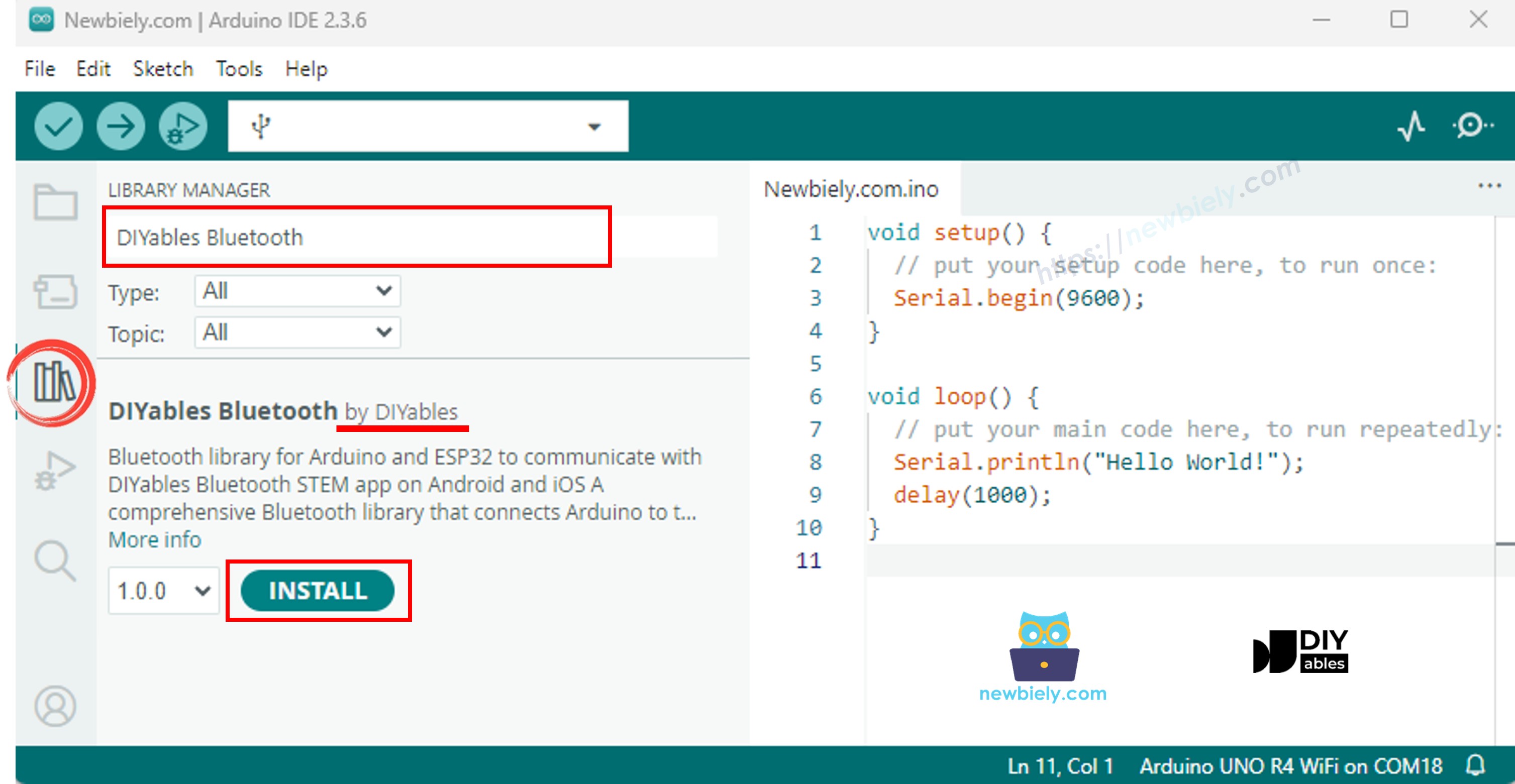
- Điều hướng đến biểu tượng Libraries trên thanh bên trái của Arduino IDE.
- Tìm kiếm "DIYables Bluetooth", sau đó tìm thư viện DIYables Bluetooth của DIYables
- Nhấp nút Install để cài đặt thư viện.
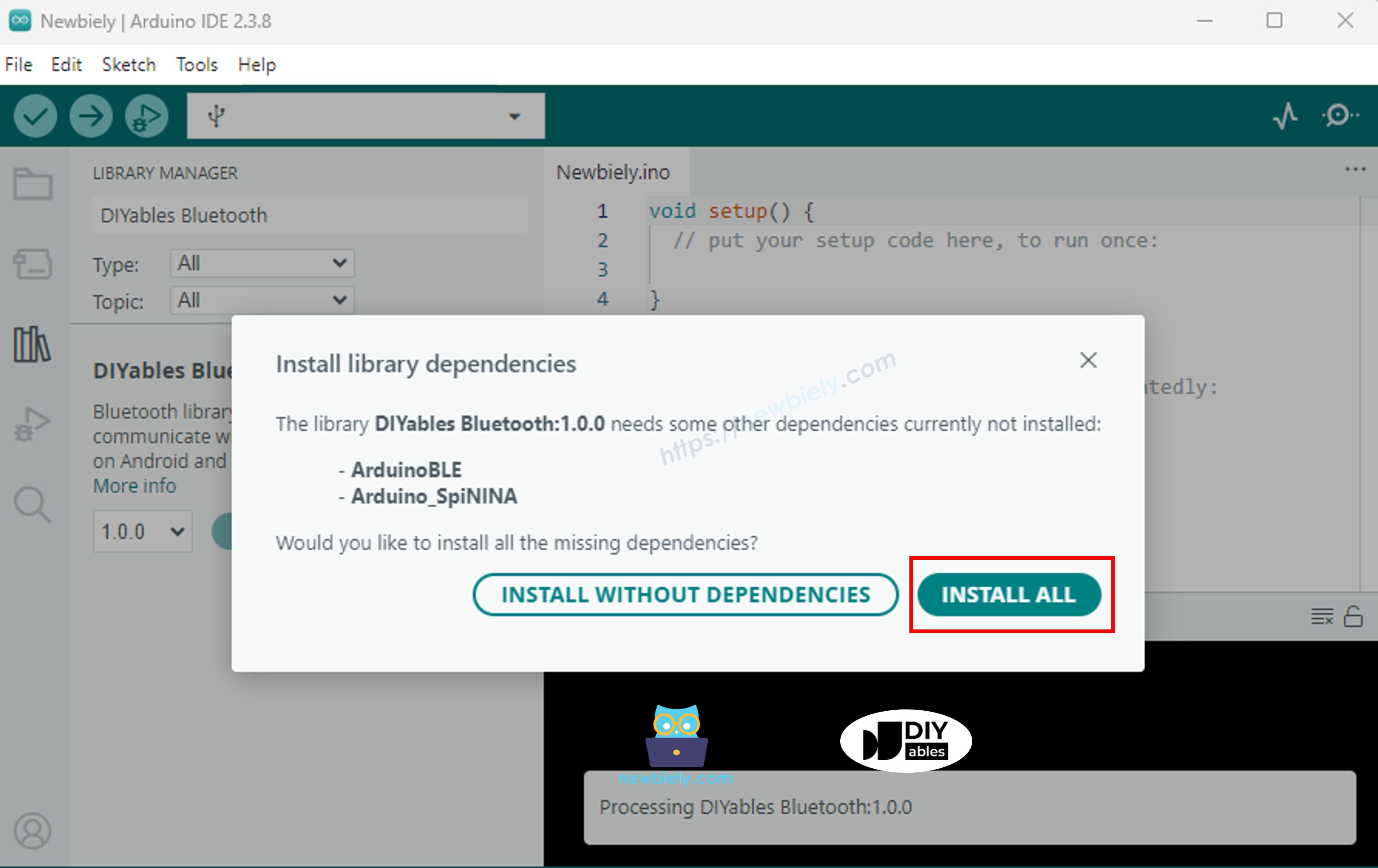
- Bạn sẽ được yêu cầu cài đặt một số thư viện phụ thuộc khác
- Nhấp nút Install All để cài đặt tất cả các thư viện phụ thuộc.
Chọn một trong hai chế độ Bluetooth dưới đây tùy theo nhu cầu của bạn:
Code ESP32 Classic Bluetooth (chỉ hoạt động với app trên Android)
Lưu ý: Classic Bluetooth KHÔNG được hỗ trợ trên iOS. Nếu bạn cần hỗ trợ iOS, hãy sử dụng code BLE bên dưới.
- Trên Arduino IDE, vào File Examples DIYables Bluetooth Esp32Bluetooth_Rotator example, hoặc sao chép code trên và dán vào editor của Arduino IDE
- Nhấp nút Upload trên Arduino IDE để tải code lên ESP32
- Mở Serial Monitor
- Kiểm tra kết quả trên Serial Monitor. Nó trông như thế này:
Code ESP32 BLE (hoạt động với app trên cả Android và iOS)
- Trên Arduino IDE, vào File Examples DIYables Bluetooth Esp32BLE_Rotator example, hoặc sao chép code trên và dán vào editor của Arduino IDE
- Nhấp nút Upload trên Arduino IDE để tải code lên ESP32
- Mở Serial Monitor
- Kiểm tra kết quả trên Serial Monitor. Nó trông như thế này:
Ứng dụng di động
- Nếu bạn đang sử dụng code ESP32 Classic Bluetooth, bạn cần ghép nối ESP32 với điện thoại Android trước khi mở app:
- Vào Settings > Bluetooth của điện thoại
- Đảm bảo Bluetooth được bật
- Điện thoại sẽ quét các thiết bị khả dụng
- Tìm và chạm "ESP32_Rotator" trong danh sách thiết bị khả dụng
- Xác nhận yêu cầu ghép nối (không cần PIN)
- Đợi cho đến khi hiển thị "Paired" dưới tên thiết bị
- Nếu bạn đang sử dụng code ESP32 BLE, không cần ghép nối. Chỉ cần tiếp tục bước tiếp theo.
- Mở ứng dụng DIYables Bluetooth
- Khi mở app lần đầu, nó sẽ yêu cầu quyền. Vui lòng cấp những quyền sau:
- Quyền Nearby Devices (Android 12+) / quyền Bluetooth (iOS) - cần thiết để quét và kết nối với thiết bị Bluetooth
- Quyền Location (chỉ Android 11 trở xuống) - được yêu cầu bởi các phiên bản Android cũ để quét thiết bị BLE
- Đảm bảo Bluetooth được bật trên điện thoại
- Trên màn hình chính, chạm nút Connect. App sẽ quét cả thiết bị BLE và Classic Bluetooth.
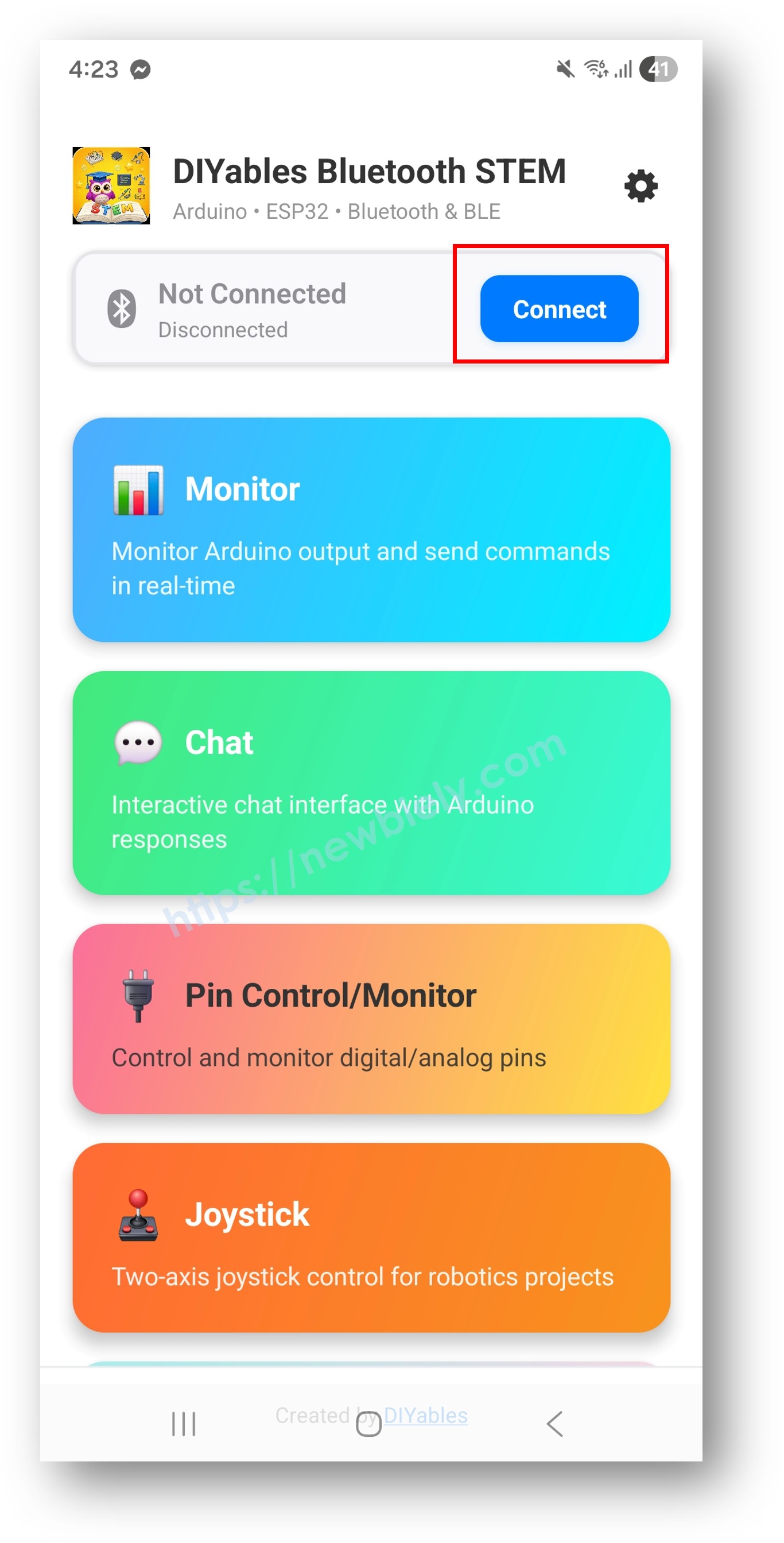
- Tìm và chạm thiết bị của bạn trong kết quả quét để kết nối:
- Đối với Classic Bluetooth: chạm "ESP32_Rotator"
- Đối với BLE: chạm "ESP32BLE_Rotator"
- Sau khi kết nối, app tự động quay về màn hình chính. Chọn app Rotator từ menu app.
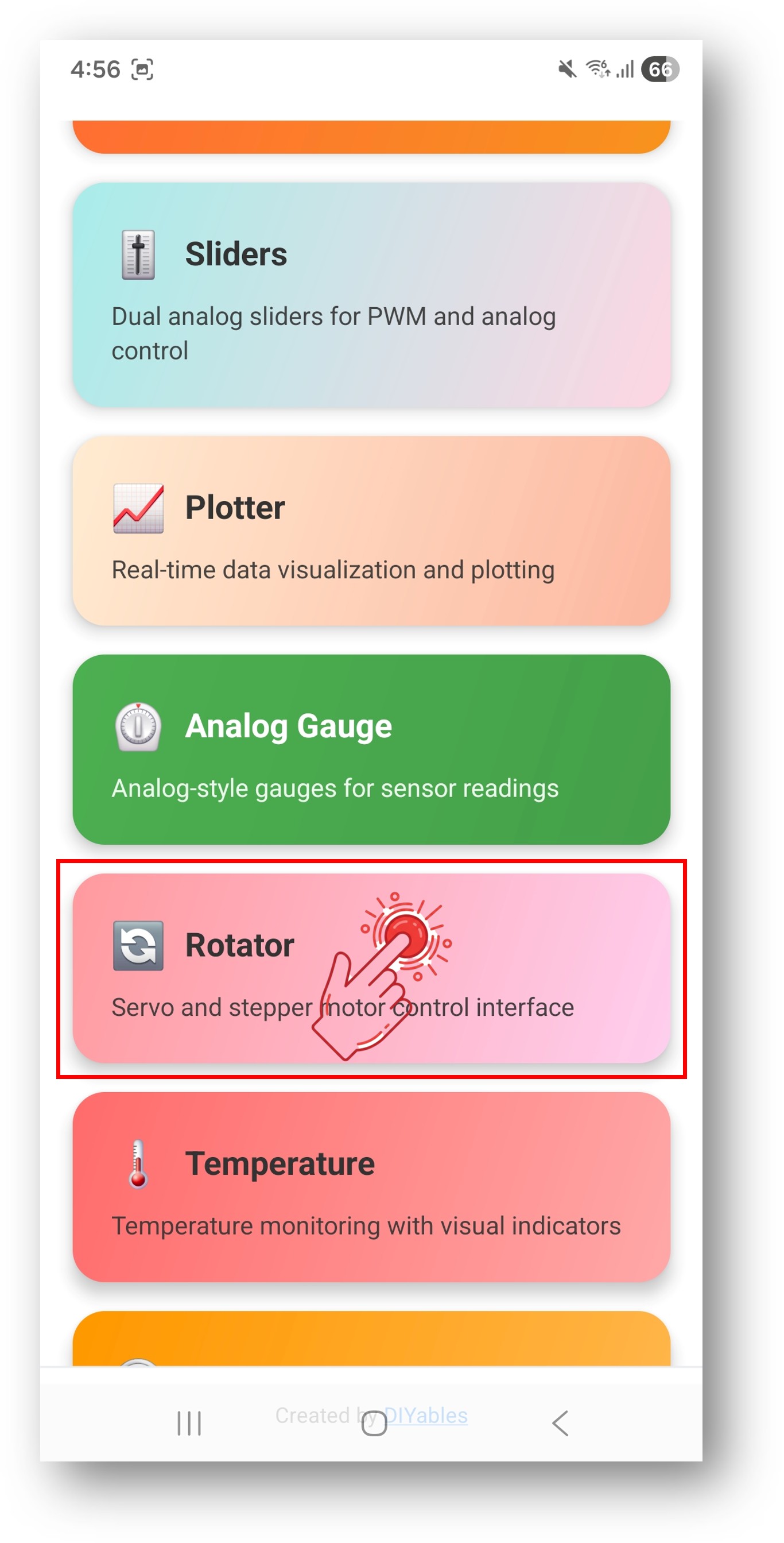
Lưu ý: Bạn có thể chạm biểu tượng cài đặt trên màn hình chính để ẩn/hiện app trên màn hình chính. Để biết thêm chi tiết, xem Hướng dẫn sử dụng DIYables Bluetooth App.
- Kéo núm rotator để thay đổi góc độ
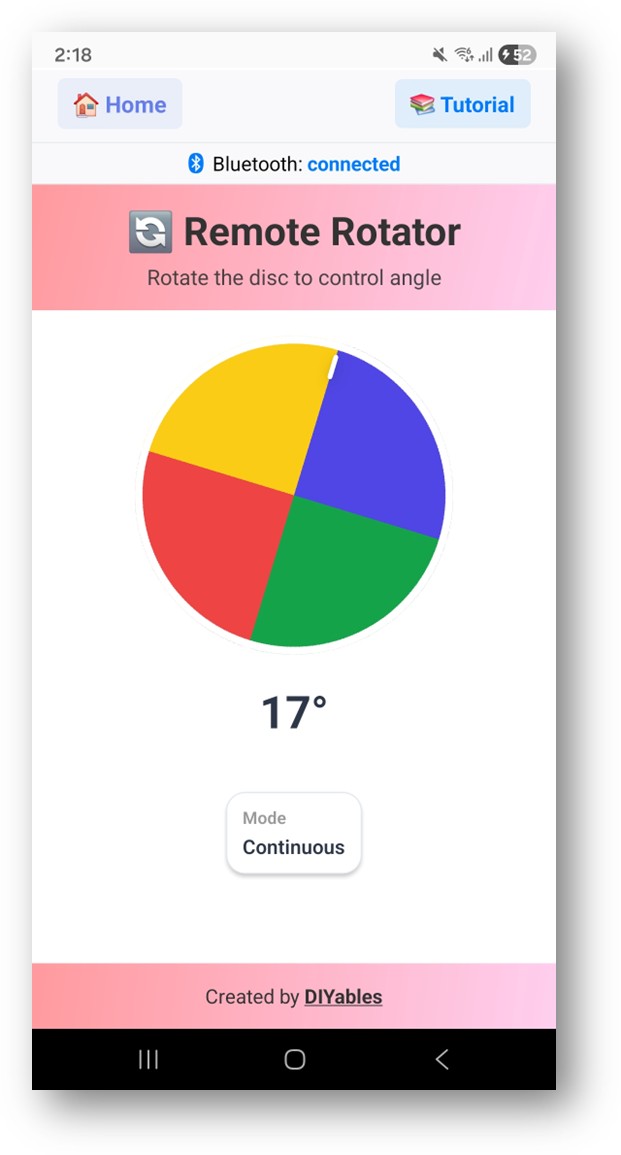
Giờ hãy nhìn lại Serial Monitor trên Arduino IDE. Bạn sẽ thấy:
- Xoay núm trong app và xem các giá trị góc thời gian thực trong Serial Monitor
Tùy chỉnh sáng tạo - Điều chỉnh Code cho dự án của bạn
Cấu hình chế độ Rotator
Đặt chế độ liên tục hoặc giới hạn:
Xử lý thay đổi góc độ
Sử dụng callback onRotatorAngle() để nhận giá trị góc:
Xử lý yêu cầu cấu hình từ App
Gửi góc độ đến App
Bạn có thể cập nhật vị trí rotator từ ESP32:
Xử lý sự kiện kết nối
Cách sử dụng Rotator
Điều khiển giao diện App
Giao diện rotator trong ứng dụng DIYables Bluetooth cung cấp:
- Đĩa xoay được: Chạm và kéo để xoay
- Hiển thị góc độ: Hiển thị giá trị góc hiện tại
- Chỉ báo trực quan: Đánh dấu vị trí xoay hiện tại
Các chế độ Rotator
- ROTATOR_MODE_CONTINUOUS (0): Xoay 360° đầy đủ, quay vòng
- ROTATOR_MODE_LIMITED (1): Bị ràng buộc trong phạm vi góc min/max
Ví dụ lập trình
Điều khiển Servo
Núm âm lượng/độ sáng
Hiển thị la bàn
Điều khiển Stepper Motor
Kỹ thuật lập trình nâng cao
Snap góc theo từng khoảng
Điều khiển dựa trên vùng
BLE vs Classic Bluetooth - Nên chọn loại nào?
| Tính năng | BLE (Esp32BLE_Rotator) | Classic Bluetooth (Esp32Bluetooth_Rotator) |
|---|---|---|
| Hỗ trợ iOS | ✓ Có | ✗ Không |
| Hỗ trợ Android | ✓ Có | ✓ Có |
| Tiêu thụ năng lượng | Thấp | Cao hơn |
| Phạm vi | ~30-100m | ~10-100m |
| Tốc độ dữ liệu | Thấp hơn | Cao hơn |
| Yêu cầu ghép nối | Không (tự động kết nối) | Có (ghép nối thủ công) |
| Tốt nhất cho | Chạy pin, đa nền tảng | Thông lượng cao, chỉ Android |
Khắc phục sự cố
Các vấn đề thường gặp
1. Không thể tìm thấy thiết bị trong app
- Đảm bảo ESP32 được cấp nguồn và sketch đã được tải lên
- Đối với BLE: Đảm bảo Bluetooth và Location của điện thoại được bật
- Đối với Classic Bluetooth: Ghép nối thiết bị trước trong cài đặt Bluetooth của điện thoại
- Kiểm tra đã chọn đúng partition scheme (Huge APP)
2. Rotator không phản hồi
- Kiểm tra trạng thái kết nối Bluetooth trong app
- Xác minh kết nối trong Serial Monitor
- Thử ngắt kết nối và kết nối lại
3. Giá trị góc có vẻ không chính xác
- Kiểm tra cấu hình chế độ rotator (liên tục vs giới hạn)
- Xác minh cài đặt góc min/max với getMinAngle() và getMaxAngle()
- Kiểm tra Serial Monitor để xem giá trị góc thực tế nhận được
4. Servo giật ở một số góc nhất định
- Thêm bộ lọc dead zone nhỏ cho thay đổi góc
- Sử dụng nguồn điện riêng cho servo
- Thêm tụ điện qua chân nguồn servo
5. Kết nối rớt thường xuyên
- Di chuyển gần ESP32 hơn (giảm khoảng cách)
- Đối với BLE: Kiểm tra nhiễu từ thiết bị BLE khác
- Đối với Classic Bluetooth: Đảm bảo nguồn điện ổn định cho ESP32
6. Sketch quá lớn / không đủ chỗ
- Trong Arduino IDE, vào Tools > Partition Scheme và chọn "Huge APP (3MB No OTA/1MB SPIFFS)" hoặc "No OTA (Large APP)"
- Partition scheme mặc định chỉ cung cấp ~1.2MB cho app code, không đủ cho thư viện Bluetooth
- Cài đặt này cung cấp ~3MB bằng cách hy sinh phân vùng OTA (cập nhật qua mạng)
Mẹo debug
Thêm debug toàn diện:
Ý tưởng dự án
Điều khiển động cơ
- Núm vị trí servo
- Bộ chọn góc stepper motor
- Mặt số tốc độ động cơ
- Điều khiển khớp cánh tay robot
Dự án hiển thị
- Hiển thị hướng la bàn
- Kim đồng hồ analog
- Chỉ báo hướng gió
- Mô phỏng đồng hồ đo dial
Dự án âm thanh
- Núm điều khiển âm lượng
- Bộ chọn tần số âm
- Điều khiển dải equalizer
- Mặt số điều chỉnh radio
Dự án chiếu sáng
- Điều khiển vị trí vòng LED
- Bánh xe màu (bộ chọn hue)
- Điều khiển hướng đèn spotlight
- Góc chiếu sáng sân khấu
Tích hợp với App Bluetooth khác
Kết hợp với Bluetooth Slider
Sử dụng rotator cho góc và slider cho tốc độ/cường độ:
Kết hợp với Bluetooth Table
Hiển thị dữ liệu rotator trong bảng có cấu trúc:
Bước tiếp theo
Sau khi thành thạo ví dụ Bluetooth Rotator, hãy thử:
- Bluetooth Joystick - Cho điều khiển hướng 2D
- Bluetooth Slider - Cho điều khiển giá trị tuyến tính
- Bluetooth Analog Gauge - Cho hiển thị phản hồi kiểu đồng hồ đo
- Nhiều App Bluetooth - Kết hợp rotator với các điều khiển khác
Hỗ trợ
Để được trợ giúp thêm:
- Kiểm tra tài liệu API Reference
- Truy cập hướng dẫn DIYables
- Diễn đàn cộng đồng Arduino
Bài hướng dẫn liên quan
📱 Ứng dụng đề xuất
 English for KidsHọc tiếng Anh vui nhộn cho trẻ nhỏ.Tải về trênGoogle PlayTải về trênApp Store
 Bubble NoteGhi chú tự xóa — viết như nhắn tin.Tải về trênGoogle PlayTải về trênApp Store
 Tôi Không MuaĐánh bại mua sắm bốc đồng, tiết kiệm hơn.Tải về trênGoogle PlayTải về trênApp Store
 Con Đường Tri ThứcBài thi thử để học mọi thứ.Tải về trênGoogle PlayTải về trênApp Store