
ESP32 Button Long Press Short Press

Tutorial này hướng dẫn bạn cách sử dụng ESP32 để phát hiện nhấn giữ lâu và nhấn ngắn. Cụ thể, chúng ta sẽ học:

Phần Cứng Cần Thiết

1×mô-đun phát triển ESP-WROOM-32
1×Alternatively, ESP32 Uno-form board
1×Alternatively, ESP32 S3 Uno-form board
1×USB Cable Type-A to Type-C (for USB-A PC)
1×USB Cable Type-C to Type-C (for USB-C PC)
1×breadboard-mount Button with Cap
1×breadboard-mount Button Kit
1×Panel-mount Push Button
1×mô-đun nút nhấn
1×breadboard
1×dây jumper
1×(Tùy chọn) DC Power Jack
1×(Khuyến nghị) Screw Terminal Expansion Board for ESP32
1×(Khuyến nghị) Breakout Expansion Board for ESP32
1×(Khuyến nghị) Power Splitter for ESP32

Or you can buy the following kits:

1×DIYables ESP32 Starter Kit (ESP32 included)
1×DIYables Sensor Kit (30 sensors/displays)
1×DIYables Sensor Kit (18 sensors/displays)

Về Button

Chúng tôi có các tutorial riêng về button. Mỗi tutorial chứa thông tin chi tiết và hướng dẫn từng bước về chân kết nối phần cứng, nguyên lý hoạt động, kết nối với ESP32, code ESP32... Tìm hiểu thêm tại các liên kết sau:

Sơ Đồ Kết Nối

  • Sơ đồ kết nối giữa ESP32 và PCB-mount button
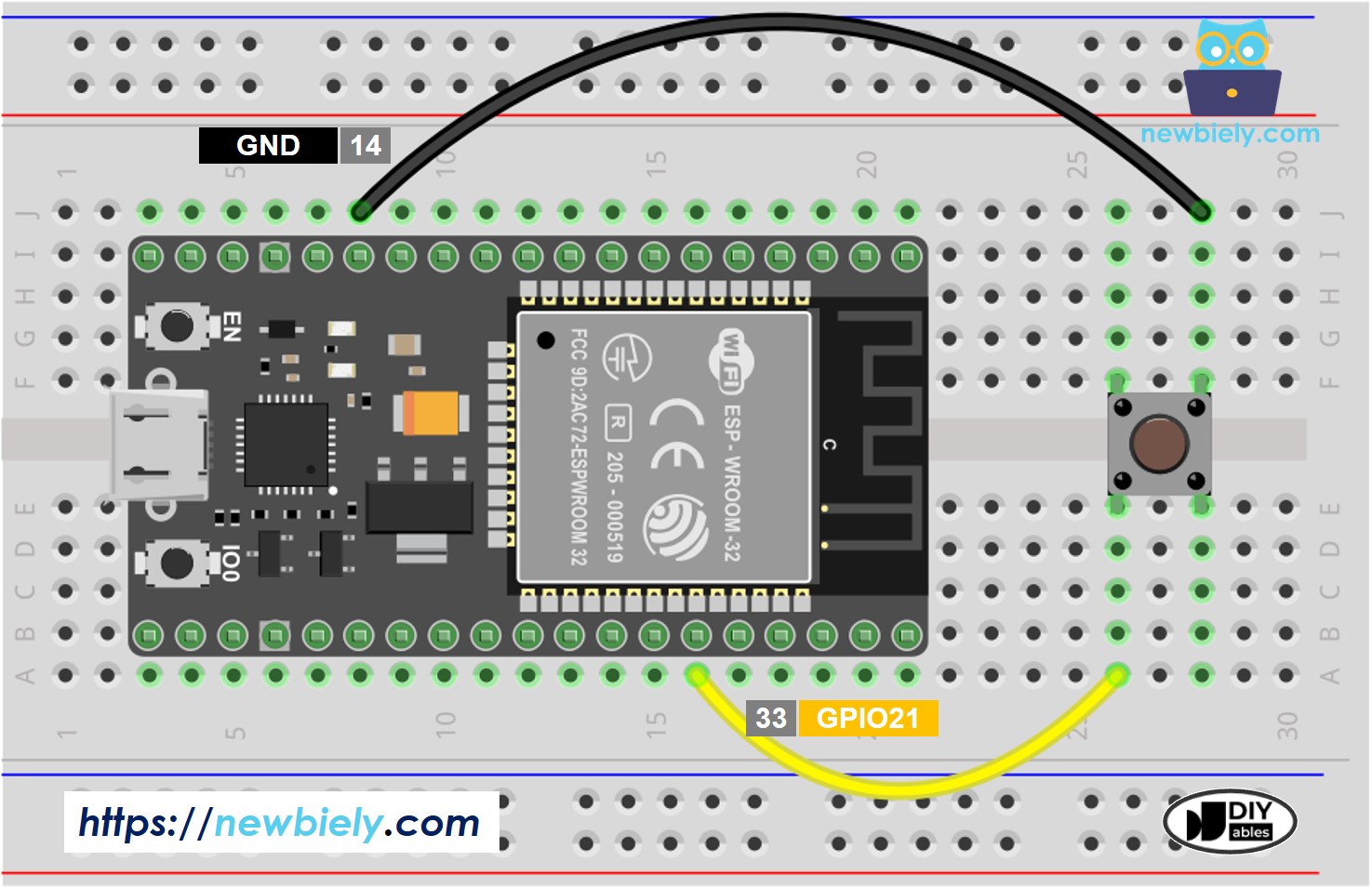
ESP32 nút nhấn sơ đồ đấu dây

This image is created using Fritzing. Click to enlarge image

Nếu bạn chưa rõ cách cấp nguồn cho ESP32 và các linh kiện khác, xem: Cách Cung Cấp Nguồn Điện Cho ESP32.

  • Sơ đồ kết nối giữa ESP32 và panel-mount button
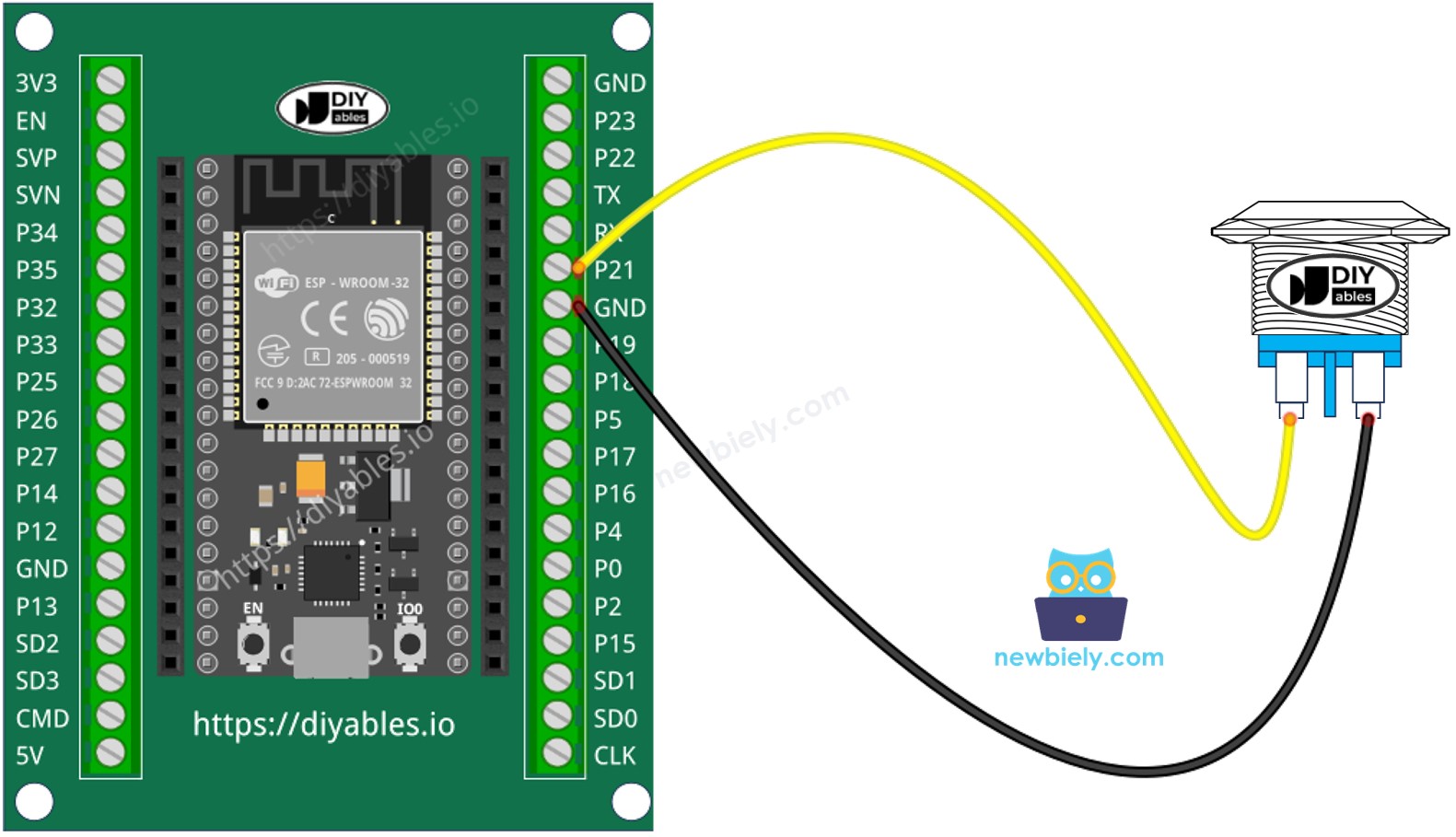
ESP32 two-pin push nút nhấn sơ đồ đấu dây

This image is created using Fritzing. Click to enlarge image

Tutorial này sẽ sử dụng điện trở pull-up nội. Trạng thái của button là HIGH khi bình thường và LOW khi được nhấn.

Cách Phát Hiện Nhấn Ngắn

  • Đo thời gian giữa sự kiện nhấn và thả.
  • Nếu thời gian ngắn hơn thời gian được định nghĩa trước, sự kiện nhấn ngắn được phát hiện.

Hãy xem từng bước:

  • Định nghĩa thời gian tối đa cho nhấn ngắn
#define SHORT_PRESS_TIME 500 // 500 milliseconds
  • Phát hiện button được nhấn và lưu thời điểm nhấn
if(lastState == HIGH && currentState == LOW) pressedTime = millis();
  • Phát hiện button được thả và lưu thời điểm thả
if(lastState == LOW && currentState == HIGH) releasedTime = millis();
  • Tính thời gian nhấn và
long pressDuration = releasedTime - pressedTime;
  • Xác định nhấn ngắn bằng cách so sánh thời gian nhấn với thời gian nhấn ngắn đã định nghĩa.
if( pressDuration < SHORT_PRESS_TIME ) Serial.println("A short press is detected");

Code ESP32 để phát hiện nhấn ngắn

/* * Mã ESP32 này được phát triển bởi newbiely.vn * Mã ESP32 này được cung cấp để sử dụng công khai, không có ràng buộc. * Để xem hướng dẫn chi tiết và sơ đồ kết nối, vui lòng truy cập: * https://newbiely.vn/tutorials/esp32/esp32-button-long-press-short-press */ #define BUTTON_PIN 21 // GPIO21 pin connected to button #define SHORT_PRESS_TIME 500 // 500 milliseconds // Variables will change: int lastState = LOW; // the previous state from the input pin int currentState; // the current reading from the input pin unsigned long pressedTime = 0; unsigned long releasedTime = 0; void setup() { Serial.begin(9600); pinMode(BUTTON_PIN, INPUT_PULLUP); } void loop() { // read the state of the switch/button: currentState = digitalRead(BUTTON_PIN); if (lastState == HIGH && currentState == LOW) // button is pressed pressedTime = millis(); else if (lastState == LOW && currentState == HIGH) { // button is released releasedTime = millis(); long pressDuration = releasedTime - pressedTime; if ( pressDuration < SHORT_PRESS_TIME ) Serial.println("A short press is detected"); } // save the the last state lastState = currentState; }

Các Bước Nhanh

  • Nếu đây là lần đầu bạn sử dụng ESP32, xem ESP32 - Cài Đặt Phần Mềm.
  • Upload code trên lên ESP32 qua Arduino IDE
  • Nhấn ngắn button nhiều lần.
  • Xem kết quả trên Serial Monitor. Nó sẽ như sau:
COM6
Send
A short press is detected
Autoscroll Show timestamp
Clear output
9600 baud  
Newline  

※ Lưu ý:

Serial Monitor có thể in ra nhiều lần nhấn ngắn cho một lần nhấn. Đây là hành vi bình thường của button. Hành vi này được gọi là "hiện tượng chattering". Chúng ta sẽ học cách loại bỏ vấn đề này sau trong tutorial này.

Cách Phát Hiện Nhấn Giữ Lâu

Có hai trường hợp sử dụng để phát hiện nhấn giữ lâu.

  • Sự kiện nhấn giữ lâu được phát hiện ngay sau khi button được thả
  • Sự kiện nhấn giữ lâu được phát hiện trong khi button đang được nhấn.

Trong trường hợp đầu:

  • Đo thời gian giữa sự kiện nhấn và thả.
  • Nếu thời gian dài hơn thời gian được định nghĩa trước, sự kiện nhấn giữ lâu được phát hiện.

Trong trường hợp thứ hai: trong thời gian button đang được nhấn, thực hiện quá trình sau đây lặp đi lặp lại:

  • Đo thời gian nhấn.
  • Nếu thời gian dài hơn thời gian được định nghĩa trước, sự kiện nhấn giữ lâu được phát hiện.
  • Ngược lại, lặp lại quá trình cho đến khi button được thả

Code ESP32 để phát hiện nhấn giữ lâu khi thả

/* * Mã ESP32 này được phát triển bởi newbiely.vn * Mã ESP32 này được cung cấp để sử dụng công khai, không có ràng buộc. * Để xem hướng dẫn chi tiết và sơ đồ kết nối, vui lòng truy cập: * https://newbiely.vn/tutorials/esp32/esp32-button-long-press-short-press */ #define BUTTON_PIN 21 // GPIO21 pin connected to button #define LONG_PRESS_TIME 1000 // 1000 milliseconds // Variables will change: int lastState = LOW; // the previous state from the input pin int currentState; // the current reading from the input pin unsigned long pressedTime = 0; unsigned long releasedTime = 0; void setup() { Serial.begin(9600); pinMode(BUTTON_PIN, INPUT_PULLUP); } void loop() { // read the state of the switch/button: currentState = digitalRead(BUTTON_PIN); if(lastState == HIGH && currentState == LOW) // button is pressed pressedTime = millis(); else if(lastState == LOW && currentState == HIGH) { // button is released releasedTime = millis(); long pressDuration = releasedTime - pressedTime; if( pressDuration > LONG_PRESS_TIME ) Serial.println("A long press is detected"); } // save the the last state lastState = currentState; }

Các Bước Nhanh

  • Nếu đây là lần đầu bạn sử dụng ESP32, xem ESP32 - Cài Đặt Phần Mềm.
  • Upload code trên lên ESP32 qua Arduino IDE
  • Nhấn và thả button sau một giây.
  • Xem kết quả trên Serial Monitor. Nó sẽ như sau:
COM6
Send
A long press is detected
Autoscroll Show timestamp
Clear output
9600 baud  
Newline  

Code ESP32 để phát hiện nhấn giữ lâu trong khi nhấn

/* * Mã ESP32 này được phát triển bởi newbiely.vn * Mã ESP32 này được cung cấp để sử dụng công khai, không có ràng buộc. * Để xem hướng dẫn chi tiết và sơ đồ kết nối, vui lòng truy cập: * https://newbiely.vn/tutorials/esp32/esp32-button-long-press-short-press */ #define BUTTON_PIN 21 // GPIO21 pin connected to button #define LONG_PRESS_TIME 1000 // 1000 milliseconds // Variables will change: int lastState = LOW; // the previous state from the input pin int currentState; // the current reading from the input pin unsigned long pressedTime = 0; bool isPressing = false; bool isLongDetected = false; void setup() { Serial.begin(9600); pinMode(BUTTON_PIN, INPUT_PULLUP); } void loop() { // read the state of the switch/button: currentState = digitalRead(BUTTON_PIN); if(lastState == HIGH && currentState == LOW) { // button is pressed pressedTime = millis(); isPressing = true; isLongDetected = false; } else if(lastState == LOW && currentState == HIGH) { // button is released isPressing = false; } if(isPressing == true && isLongDetected == false) { long pressDuration = millis() - pressedTime; if( pressDuration > LONG_PRESS_TIME ) { Serial.println("A long press is detected"); isLongDetected = true; } } // save the the last state lastState = currentState; }

Các Bước Nhanh

  • Nếu đây là lần đầu bạn sử dụng ESP32, xem ESP32 - Cài Đặt Phần Mềm.
  • Upload code trên lên ESP32 qua Arduino IDE
  • Nhấn và thả button sau vài giây.
  • Xem kết quả trên Serial Monitor. Nó sẽ như sau:
COM6
Send
A long press is detected
Autoscroll Show timestamp
Clear output
9600 baud  
Newline  

Cách Phát Hiện Cả Nhấn Giữ Lâu và Nhấn Ngắn

Nhấn Ngắn và Nhấn Giữ Lâu sau khi thả

/* * Mã ESP32 này được phát triển bởi newbiely.vn * Mã ESP32 này được cung cấp để sử dụng công khai, không có ràng buộc. * Để xem hướng dẫn chi tiết và sơ đồ kết nối, vui lòng truy cập: * https://newbiely.vn/tutorials/esp32/esp32-button-long-press-short-press */ #define BUTTON_PIN 21 // GPIO21 pin connected to button #define SHORT_PRESS_TIME 1000 // 1000 milliseconds #define LONG_PRESS_TIME 1000 // 1000 milliseconds // Variables will change: int lastState = LOW; // the previous state from the input pin int currentState; // the current reading from the input pin unsigned long pressedTime = 0; unsigned long releasedTime = 0; void setup() { Serial.begin(9600); pinMode(BUTTON_PIN, INPUT_PULLUP); } void loop() { // read the state of the switch/button: currentState = digitalRead(BUTTON_PIN); if (lastState == HIGH && currentState == LOW) // button is pressed pressedTime = millis(); else if (lastState == LOW && currentState == HIGH) { // button is released releasedTime = millis(); long pressDuration = releasedTime - pressedTime; if ( pressDuration < SHORT_PRESS_TIME ) Serial.println("A short press is detected"); if ( pressDuration > LONG_PRESS_TIME ) Serial.println("A long press is detected"); } // save the the last state lastState = currentState; }

Các Bước Nhanh

  • Nếu đây là lần đầu bạn sử dụng ESP32, xem ESP32 - Cài Đặt Phần Mềm.
  • Upload code trên lên ESP32 qua Arduino IDE
  • Nhấn ngắn và nhấn giữ lâu button.
  • Xem kết quả trên Serial Monitor. Nó sẽ như sau:

※ Lưu ý:

Serial Monitor có thể hiển thị nhiều lần phát hiện nhấn ngắn khi nhấn giữ lâu. Đây là hành vi bình thường của button. Hành vi này được gọi là "hiện tượng chattering". Vấn đề sẽ được giải quyết trong phần cuối của tutorial này.

Nhấn Ngắn và Nhấn Giữ Lâu Trong khi nhấn

/* * Mã ESP32 này được phát triển bởi newbiely.vn * Mã ESP32 này được cung cấp để sử dụng công khai, không có ràng buộc. * Để xem hướng dẫn chi tiết và sơ đồ kết nối, vui lòng truy cập: * https://newbiely.vn/tutorials/esp32/esp32-button-long-press-short-press */ #define BUTTON_PIN 21 // GPIO21 pin connected to button #define SHORT_PRESS_TIME 1000 // 1000 milliseconds #define LONG_PRESS_TIME 1000 // 1000 milliseconds // Variables will change: int lastState = LOW; // the previous state from the input pin int currentState; // the current reading from the input pin unsigned long pressedTime = 0; unsigned long releasedTime = 0; bool isPressing = false; bool isLongDetected = false; void setup() { Serial.begin(9600); pinMode(BUTTON_PIN, INPUT_PULLUP); } void loop() { // read the state of the switch/button: currentState = digitalRead(BUTTON_PIN); if (lastState == HIGH && currentState == LOW) { // button is pressed pressedTime = millis(); isPressing = true; isLongDetected = false; } else if (lastState == LOW && currentState == HIGH) { // button is released isPressing = false; releasedTime = millis(); long pressDuration = releasedTime - pressedTime; if ( pressDuration < SHORT_PRESS_TIME ) Serial.println("A short press is detected"); } if (isPressing == true && isLongDetected == false) { long pressDuration = millis() - pressedTime; if ( pressDuration > LONG_PRESS_TIME ) { Serial.println("A long press is detected"); isLongDetected = true; } } // save the the last state lastState = currentState; }

Các Bước Nhanh

  • Nếu đây là lần đầu bạn sử dụng ESP32, xem ESP32 - Cài Đặt Phần Mềm.
  • Upload code trên lên ESP32 qua Arduino IDE
  • Nhấn ngắn và nhấn giữ lâu button.
  • Xem kết quả trên Serial Monitor. Nó sẽ như sau:

Nhấn Giữ Lâu và Nhấn Ngắn với Debouncing

Việc debounce button rất quan trọng trong nhiều ứng dụng.

Debouncing hơi phức tạp, đặc biệt khi sử dụng nhiều button. Để làm cho nó đơn giản cho người mới bắt đầu, chúng tôi đã tạo ra một thư viện, được gọi là ezButton.

Chúng ta sẽ sử dụng thư viện này trong các code bên dưới

Nhấn Ngắn và Nhấn Giữ Lâu với debouncing sau khi thả

/* * Mã ESP32 này được phát triển bởi newbiely.vn * Mã ESP32 này được cung cấp để sử dụng công khai, không có ràng buộc. * Để xem hướng dẫn chi tiết và sơ đồ kết nối, vui lòng truy cập: * https://newbiely.vn/tutorials/esp32/esp32-button-long-press-short-press */ #include <ezButton.h> #define SHORT_PRESS_TIME 1000 // 1000 milliseconds #define LONG_PRESS_TIME 1000 // 1000 milliseconds ezButton button(21); // create ezButton object that attach to pin GPIO21 unsigned long pressedTime = 0; unsigned long releasedTime = 0; void setup() { Serial.begin(9600); button.setDebounceTime(50); // set debounce time to 50 milliseconds } void loop() { button.loop(); // MUST call the loop() function first if (button.isPressed()) pressedTime = millis(); if (button.isReleased()) { releasedTime = millis(); long pressDuration = releasedTime - pressedTime; if ( pressDuration < SHORT_PRESS_TIME ) Serial.println("A short press is detected"); if ( pressDuration > LONG_PRESS_TIME ) Serial.println("A long press is detected"); } }

Các Bước Nhanh

  • Nếu đây là lần đầu bạn sử dụng ESP32, xem ESP32 - Cài Đặt Phần Mềm.
  • Cài đặt thư viện ezButton. Xem Cách Thực Hiện
  • Upload code trên lên ESP32 qua Arduino IDE
  • Nhấn ngắn và nhấn giữ lâu button.
  • Xem kết quả trên Serial Monitor. Nó sẽ như sau:

Nhấn Ngắn và Nhấn Giữ Lâu với debouncing Trong Khi Nhấn

/* * Mã ESP32 này được phát triển bởi newbiely.vn * Mã ESP32 này được cung cấp để sử dụng công khai, không có ràng buộc. * Để xem hướng dẫn chi tiết và sơ đồ kết nối, vui lòng truy cập: * https://newbiely.vn/tutorials/esp32/esp32-button-long-press-short-press */ #include <ezButton.h> #define SHORT_PRESS_TIME 1000 // 1000 milliseconds #define LONG_PRESS_TIME 1000 // 1000 milliseconds ezButton button(21); // create ezButton object that attach to pin GPIO21 unsigned long pressedTime = 0; unsigned long releasedTime = 0; bool isPressing = false; bool isLongDetected = false; void setup() { Serial.begin(9600); button.setDebounceTime(50); // set debounce time to 50 milliseconds } void loop() { button.loop(); // MUST call the loop() function first if (button.isPressed()) { pressedTime = millis(); isPressing = true; isLongDetected = false; } if (button.isReleased()) { isPressing = false; releasedTime = millis(); long pressDuration = releasedTime - pressedTime; if ( pressDuration < SHORT_PRESS_TIME ) Serial.println("A short press is detected"); } if (isPressing == true && isLongDetected == false) { long pressDuration = millis() - pressedTime; if ( pressDuration > LONG_PRESS_TIME ) { Serial.println("A long press is detected"); isLongDetected = true; } } }

Các Bước Nhanh

  • Nếu đây là lần đầu bạn sử dụng ESP32, xem ESP32 - Cài Đặt Phần Mềm.
  • Cài đặt thư viện ezButton. Xem Cách Thực Hiện
  • Upload code trên lên ESP32 qua Arduino IDE
  • Nhấn ngắn và nhấn giữ lâu button.
  • Xem kết quả trên Serial Monitor. Nó sẽ như sau:

Video Tutorial

Việc sản xuất video tốn rất nhiều thời gian. Nếu video hướng dẫn hữu ích cho việc học của bạn, hãy đăng ký kênh YouTube để ủng hộ. Nếu nhu cầu đủ cao, chúng tôi sẽ cố gắng làm thêm nhiều video.

Tại Sao Cần Nhấn Giữ Lâu và Nhấn Ngắn

  • Để tiết kiệm số lượng button và chân digital input. Một button có thể có hai hoặc nhiều chức năng. Ví dụ, nhấn ngắn để bật đèn, nhấn giữ lâu để bật quạt.
  • Sử dụng nhấn giữ lâu thay vì nhấn ngắn để tránh nhấn nhầm. Ví dụ, một số loại thiết bị sử dụng button để factory reset. Nếu button được nhấn nhầm, sẽ rất nguy hiểm.