ESP32 Bluetooth Multiple Apps Example Kết Hợp Tất Cả Bluetooth Apps Trong Một Dự Án Tutorial
Tổng Quan
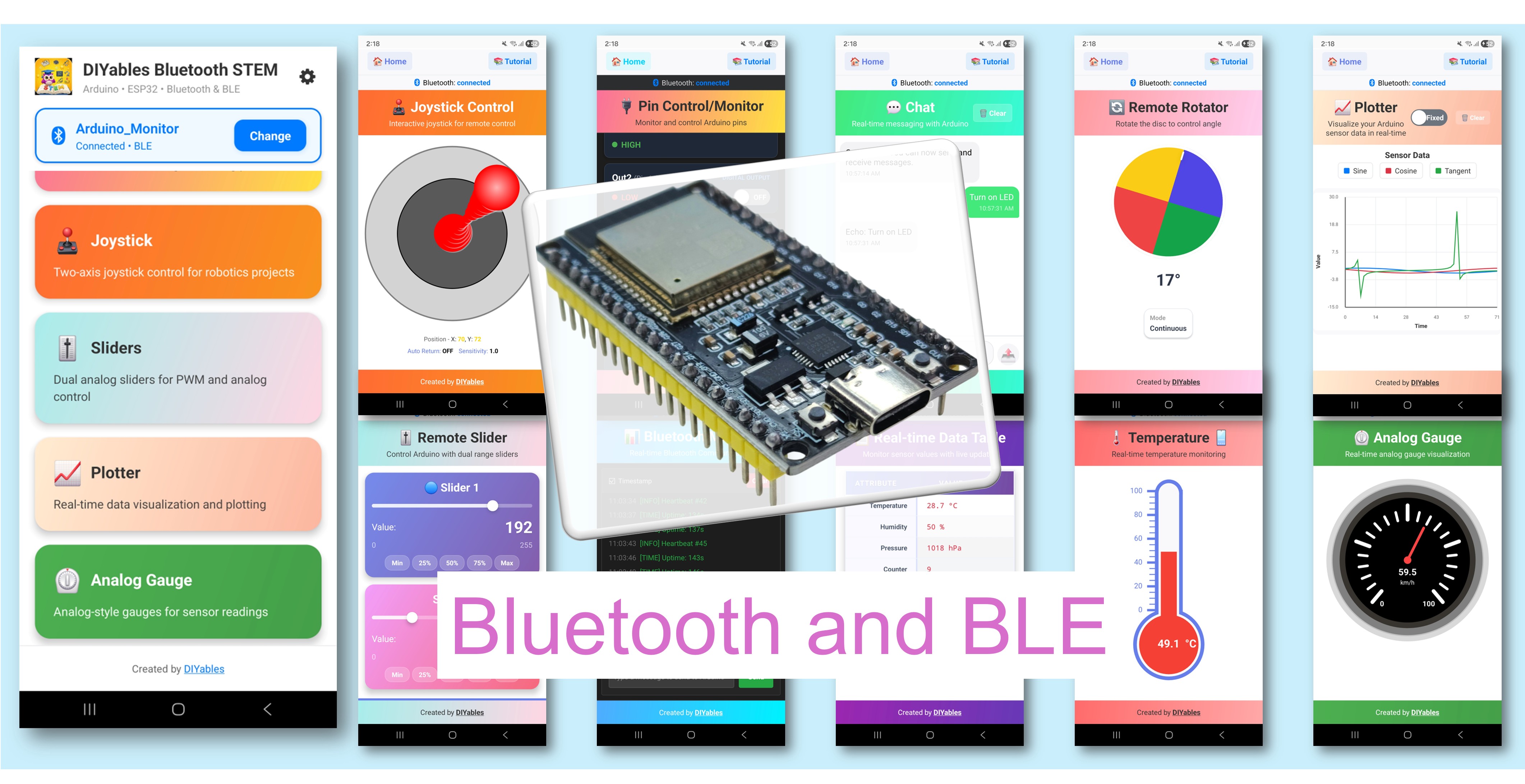
Ví dụ Multiple Bluetooth Apps (Nhiều Ứng Dụng Bluetooth) minh họa cách kết hợp nhiều giao diện ứng dụng Bluetooth thành một dự án ESP32 duy nhất. Chạy Monitor, Chat, Slider, Joystick, Temperature, Plotter, Table, Analog Gauge, và Rotator tất cả cùng lúc — có thể truy cập thông qua ứng dụng DIYables Bluetooth STEM. Được thiết kế cho các board ESP32 với hỗ trợ cả kết nối BLE (Bluetooth Low Energy) và Classic Bluetooth. Điều này lý tưởng cho các dự án phức tạp cần nhiều giao diện điều khiển và hiển thị đồng thời.
Ví dụ này hỗ trợ hai chế độ Bluetooth:
ESP32 BLE (Bluetooth Low Energy): Hoạt động trên cả Android và iOS
ESP32 Classic Bluetooth: Chỉ hoạt động trên Android. iOS không hỗ trợ Classic Bluetooth. Sử dụng BLE nếu bạn cần hỗ trợ iOS.
Tính Năng
9 Apps Trong Một: Monitor, Chat, Slider, Joystick, Temperature, Plotter, Table, Analog Gauge, và Rotator chạy đồng thời
Callbacks Độc Lập: Mỗi app có bộ xử lý sự kiện riêng
Thời Gian Độc Lập: Khoảng thời gian cập nhật khác nhau cho mỗi app
Chuyển Đổi App: Tự do chuyển đổi giữa các app trong ứng dụng di động
BLE & Classic Bluetooth: Chọn chế độ Bluetooth phù hợp với dự án của bạn
Đa Nền Tảng: Chế độ BLE hoạt động trên cả Android và iOS; Classic Bluetooth hoạt động trên Android
Tùy Chọn Tiết Kiệm Điện: Chế độ BLE tiêu thụ ít điện năng hơn Classic Bluetooth
Kết nối board ESP32 với máy tính của bạn bằng cáp USB.
Khởi động Arduino IDE trên máy tính của bạn.
Chọn board ESP32 và COM port phù hợp.
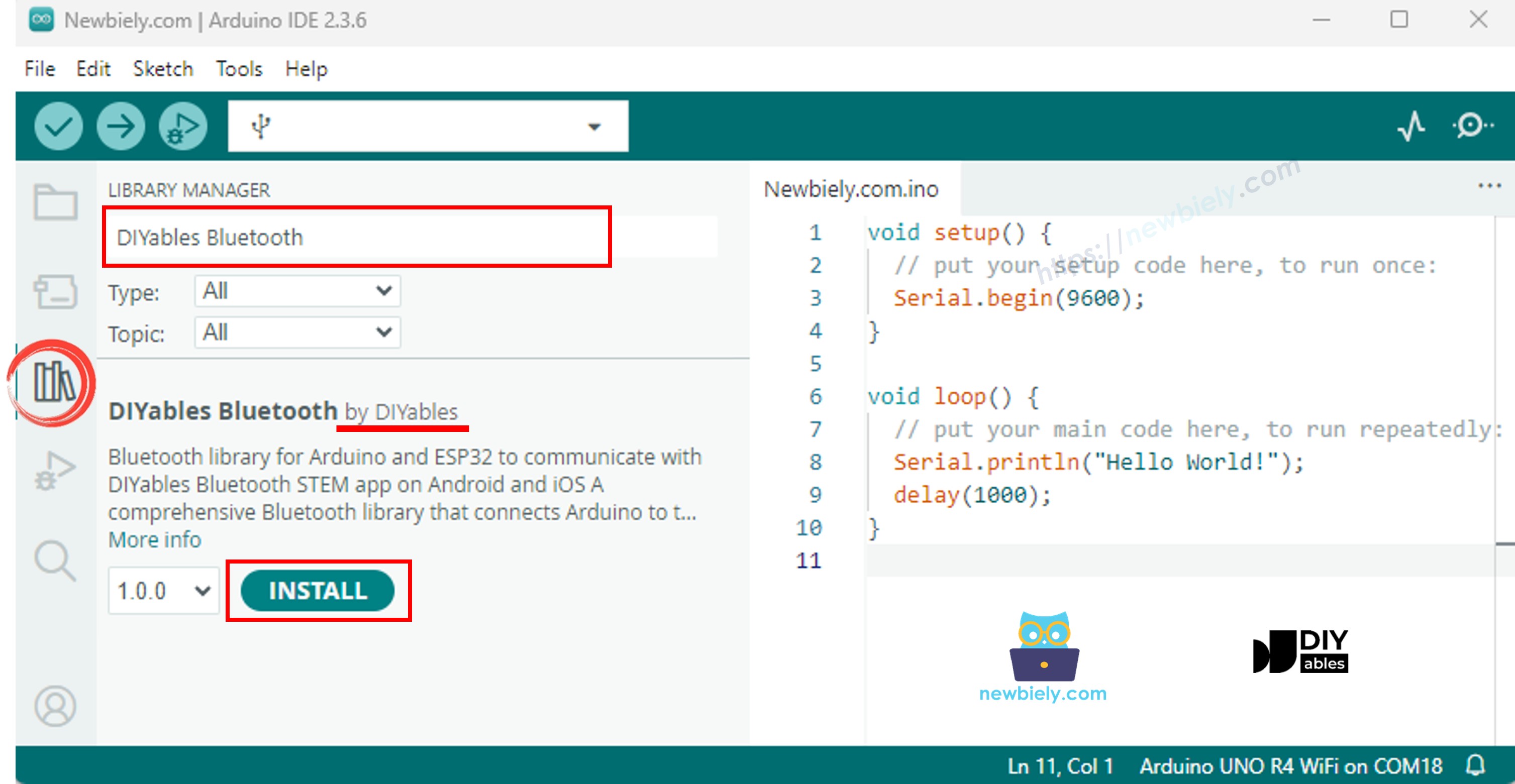
Điều hướng đến biểu tượng Libraries trên thanh bên trái của Arduino IDE.
Tìm kiếm "DIYables Bluetooth", sau đó tìm thư viện DIYables Bluetooth của DIYables
Nhấp nút Install để cài đặt thư viện.
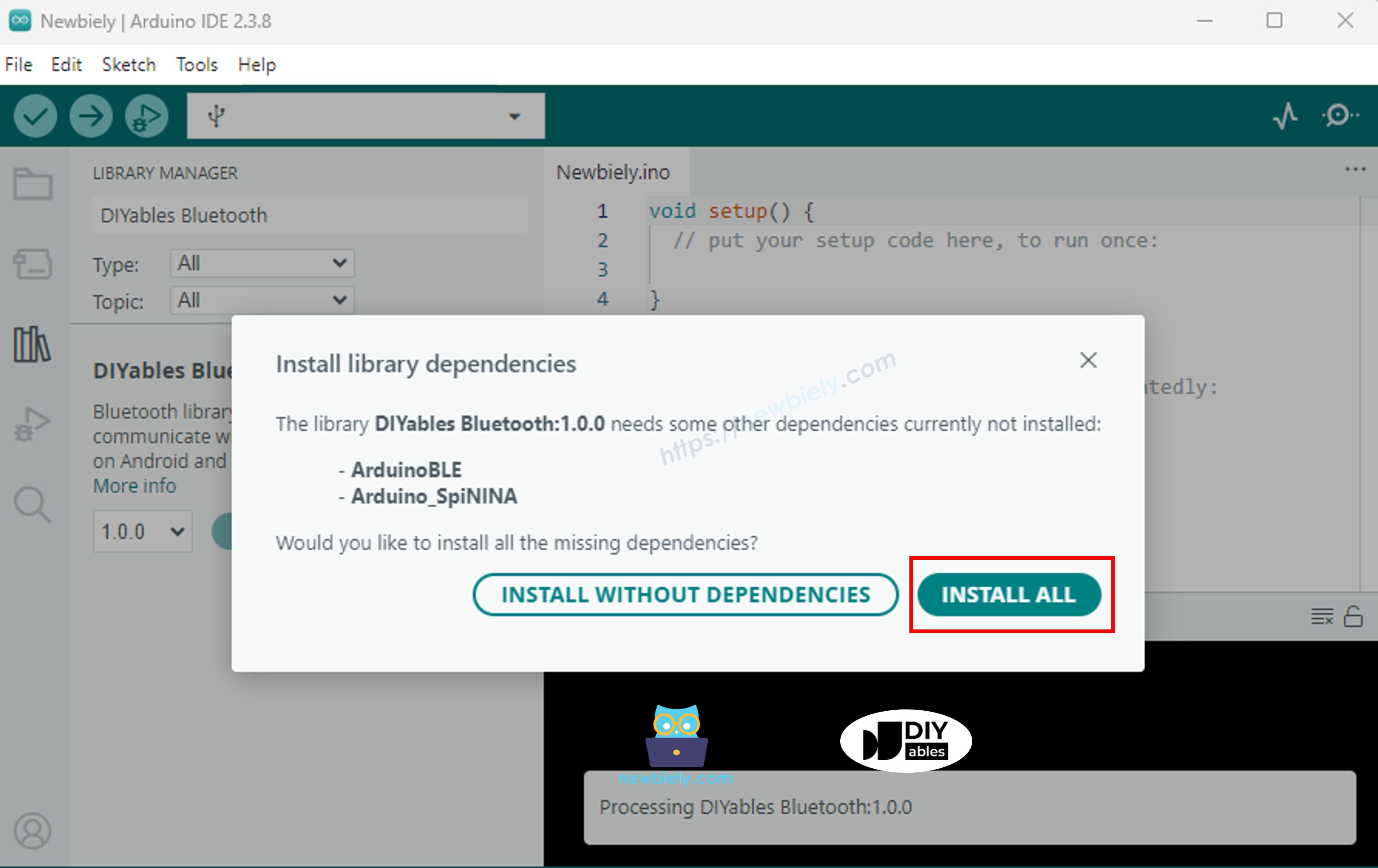
Bạn sẽ được hỏi về việc cài đặt một số thư viện phụ thuộc khác
Nhấp nút Install All để cài đặt tất cả thư viện phụ thuộc.
> Quan Trọng: Vì ví dụ này bao gồm nhiều thư viện ứng dụng Bluetooth, sketch đã biên dịch sẽ lớn hơn bình thường. Bạn phải chọn partition scheme đúng (xem bên dưới).
Chọn một trong hai chế độ Bluetooth bên dưới tùy thuộc vào nhu cầu của bạn:
Code ESP32 Classic Bluetooth (hoạt động với app chỉ trên Android)
Lưu Ý: Classic Bluetooth KHÔNG được hỗ trợ trên iOS. Nếu bạn cần hỗ trợ iOS, hãy sử dụng code BLE bên dưới.
Trong Arduino IDE, đi đến File Examples DIYables Bluetooth Esp32Bluetooth_MultipleApps example, hoặc sao chép code trên và dán vào editor của Arduino IDE
Quan Trọng: Đi đến Tools > Partition Scheme và chọn "Huge APP (3MB No OTA/1MB SPIFFS)". Điều này là bắt buộc vì ví dụ multiple apps sử dụng nhiều không gian flash hơn đáng kể.
Nhấp nút Upload trên Arduino IDE để upload code lên ESP32
Mở Serial Monitor
Kiểm tra kết quả trên Serial Monitor. Nó trông như sau:
Newbiely | Arduino IDE 2.3.8
──
☐
✕
File
Edit
Sketch
Tools
Help
ESP32 Dev Module
Newbiely.ino
···
8Serial.println("Hello World!");
Output
Serial Monitor
Message (Enter to send message to 'ESP32 Dev Module' on 'COM15')
New Line
9600 baud
DIYables Bluetooth - ESP32 Multiple Apps Example
Waiting for Bluetooth connection...
Ln 11, Col 1
ESP32 Dev Module on COM15
2
Code ESP32 BLE (hoạt động với app trên cả Android và iOS)
Trong Arduino IDE, đi đến File Examples DIYables Bluetooth Esp32BLE_MultipleApps example, hoặc sao chép code trên và dán vào editor của Arduino IDE
Quan Trọng: Đi đến Tools > Partition Scheme và chọn "Huge APP (3MB No OTA/1MB SPIFFS)". Điều này là bắt buộc vì ví dụ multiple apps sử dụng nhiều không gian flash hơn đáng kể.
Nhấp nút Upload trên Arduino IDE để upload code lên ESP32
Mở Serial Monitor
Kiểm tra kết quả trên Serial Monitor. Nó trông như sau:
Newbiely | Arduino IDE 2.3.8
──
☐
✕
File
Edit
Sketch
Tools
Help
ESP32 Dev Module
Newbiely.ino
···
8Serial.println("Hello World!");
Output
Serial Monitor
Message (Enter to send message to 'ESP32 Dev Module' on 'COM15')
New Line
9600 baud
DIYables Bluetooth - ESP32 BLE Multiple Apps Example
Waiting for Bluetooth connection...
Ln 11, Col 1
ESP32 Dev Module on COM15
2
Ứng Dụng Di Động
Cài đặt DIYables Bluetooth App trên smartphone của bạn: Android | iOS
Nếu bạn đang sử dụng code ESP32 Classic Bluetooth, bạn cần ghép đôi ESP32 với điện thoại Android trước khi mở app:
Đi đến Settings > Bluetooth của điện thoại
Đảm bảo Bluetooth đã được bật
Điện thoại của bạn sẽ quét các thiết bị khả dụng
Tìm và nhấn "ESP32 Multi-App" trong danh sách thiết bị khả dụng
Xác nhận yêu cầu ghép đôi (không cần PIN)
Đợi cho đến khi hiển thị "Paired" dưới tên thiết bị
Nếu bạn đang sử dụng code ESP32 BLE, không cần ghép đôi. Chỉ cần tiến hành bước tiếp theo.
Mở DIYables Bluetooth App
Khi mở app lần đầu tiên, nó sẽ yêu cầu quyền truy cập. Vui lòng cấp các quyền sau:
Quyền Thiết Bị Gần Đó (Android 12+) / Quyền Bluetooth (iOS) - cần thiết để quét và kết nối với thiết bị Bluetooth
Quyền Vị Trí (chỉ Android 11 trở xuống) - yêu cầu bởi các phiên bản Android cũ để quét thiết bị BLE
Đảm bảo Bluetooth đã được bật trên điện thoại của bạn
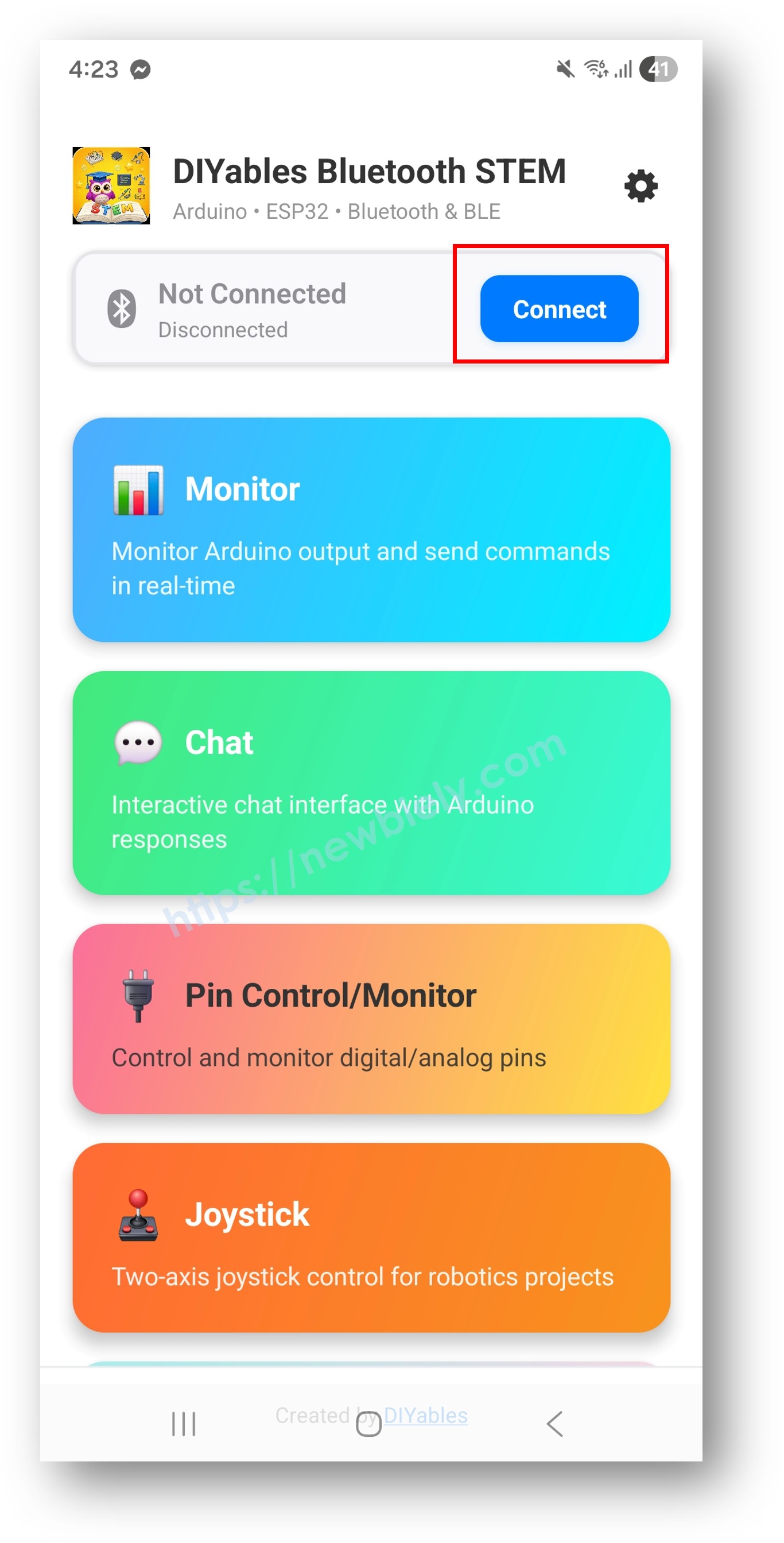
Trên màn hình chính, nhấn nút Connect. App sẽ quét cả thiết bị BLE và Classic Bluetooth.
Tìm và nhấn thiết bị của bạn trong kết quả quét để kết nối:
Đối với Classic Bluetooth: nhấn "ESP32 Multi-App"
Đối với BLE: nhấn "ESP32BLE Multi-App"
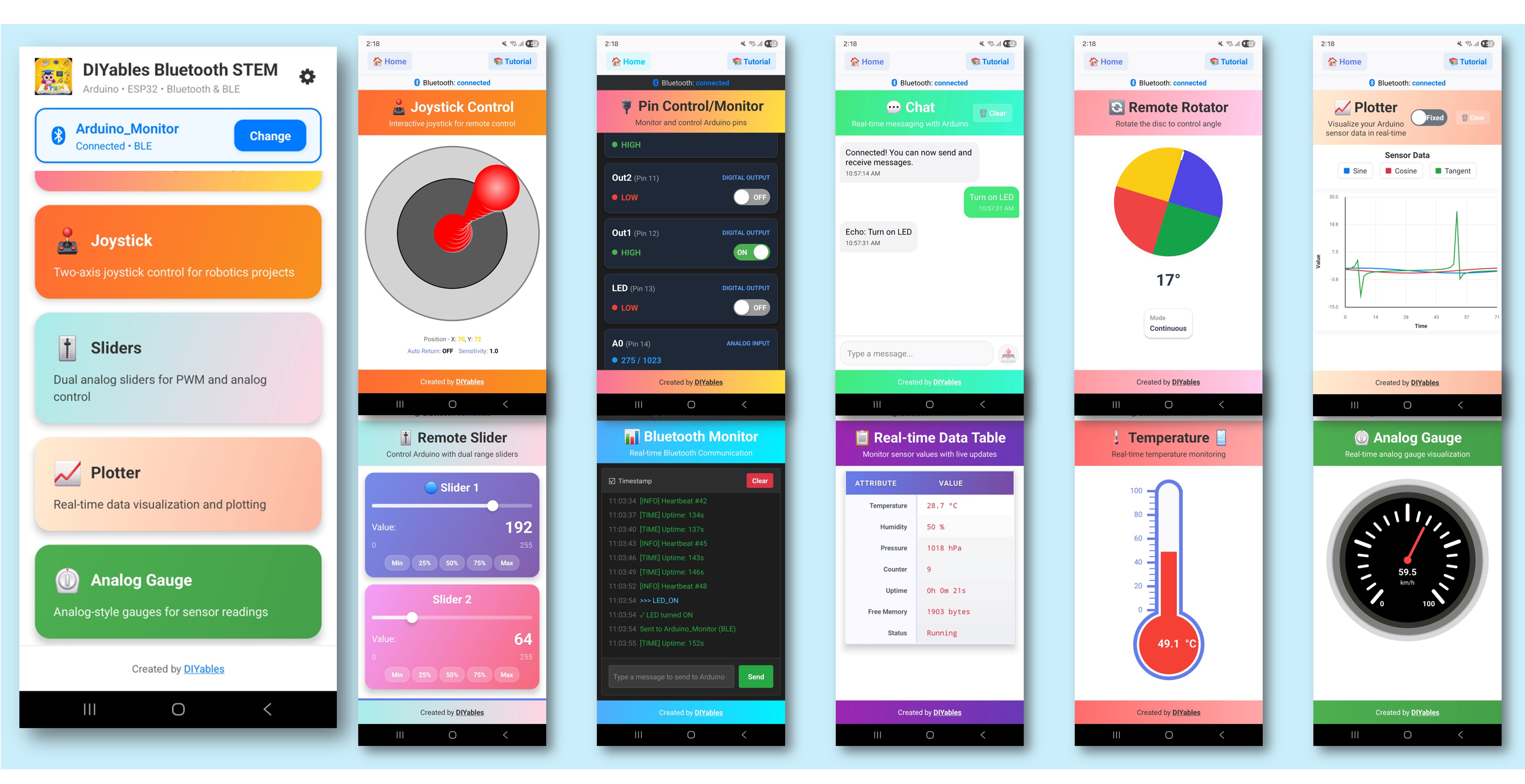
Khi đã kết nối, app tự động quay lại màn hình chính. Màn hình chính hiển thị tất cả app khả dụng. 9 apps được khởi tạo trong code Arduino sẽ phản hồi và hoạt động — các app khác trên màn hình chính sẽ xuất hiện nhưng sẽ không hoạt động với sketch này.
Lưu Ý: Bạn có thể nhấn biểu tượng cài đặt trên màn hình chính để ẩn/hiện apps trên màn hình chính. Để biết thêm chi tiết, xem Hướng Dẫn Sử Dụng DIYables Bluetooth App.
Nhấn một số app sau để mở và tương tác với ESP32: Monitor, Chat, Slider, Joystick, Temperature, Plotter, Table, Analog Gauge, Rotator
Tự do chuyển đổi giữa các app — tất cả đều chia sẻ cùng một kết nối Bluetooth
Bây giờ nhìn lại Serial Monitor trên Arduino IDE. Bạn sẽ thấy:
Newbiely | Arduino IDE 2.3.8
──
☐
✕
File
Edit
Sketch
Tools
Help
ESP32 Dev Module
Newbiely.ino
···
8Serial.println("Hello World!");
Output
Serial Monitor
Message (Enter to send message to 'ESP32 Dev Module' on 'COM15')
Tùy Chỉnh Sáng Tạo - Điều Chỉnh Code Cho Dự Án Của Bạn
Cách Multiple Apps Hoạt Động
Mỗi app được tạo như một đối tượng riêng biệt và đăng ký với cùng một Bluetooth server. Chúng chia sẻ kết nối Bluetooth duy nhất nhưng hoạt động độc lập:
// Include tất cả headers của app#include <DIYables_BluetoothMonitor.h>#include <DIYables_BluetoothChat.h>#include <DIYables_BluetoothSlider.h>#include <DIYables_BluetoothJoystick.h>#include <DIYables_BluetoothTemperature.h>#include <DIYables_BluetoothPlotter.h>#include <DIYables_BluetoothTable.h>#include <DIYables_BluetoothAnalogGauge.h>#include <DIYables_BluetoothRotator.h>// Tạo instances của appDIYables_BluetoothMonitor bluetoothMonitor;DIYables_BluetoothChat bluetoothChat;DIYables_BluetoothSlider bluetoothSlider(0, 100, 1);DIYables_BluetoothJoystick bluetoothJoystick;DIYables_BluetoothTemperature bluetoothTemperature(-10.0, 50.0, "°C");DIYables_BluetoothPlotter bluetoothPlotter;DIYables_BluetoothTable bluetoothTable;DIYables_BluetoothAnalogGauge bluetoothGauge(0.0, 100.0, "km/h");DIYables_BluetoothRotator bluetoothRotator(ROTATOR_MODE_LIMITED, 0, 180);// Đăng ký tất cả apps với Bluetooth serverbluetoothServer.addApp(bluetoothMonitor);bluetoothServer.addApp(bluetoothChat);bluetoothServer.addApp(bluetoothSlider);bluetoothServer.addApp(bluetoothJoystick);bluetoothServer.addApp(bluetoothTemperature);bluetoothServer.addApp(bluetoothPlotter);bluetoothServer.addApp(bluetoothTable);bluetoothServer.addApp(bluetoothGauge);bluetoothServer.addApp(bluetoothRotator);
Thiết Lập Callbacks Cho Mỗi App
Mỗi app có bộ xử lý sự kiện riêng:
voidsetup() {// Monitor - nhận lệnh text bluetoothMonitor.onMonitorMessage([](String message) {Serial.println("Monitor received: " + message); });// Chat - nhắn tin hai chiều bluetoothChat.onChatMessage([](String message) {Serial.println("Chat: " + message); bluetoothChat.send("Echo: " + message); });// Slider - thay đổi giá trị bluetoothSlider.onSliderValue([](int slider1, int slider2) {Serial.println("Slider: " + String(slider1)); });// Joystick - đầu vào hướng bluetoothJoystick.onJoystickValue([](int x, int y) {Serial.println("Joystick: X=" + String(x) + " Y=" + String(y)); });// Rotator - thay đổi góc bluetoothRotator.onRotatorAngle([](float angle) {Serial.println("Rotator: " + String(angle) + "°"); });}
Bạn không cần bao gồm tất cả 9 apps. Chỉ chọn những cái bạn cần:
// Ví dụ: Chỉ Monitor + Slider + Temperature#include <DIYables_BluetoothMonitor.h>#include <DIYables_BluetoothSlider.h>#include <DIYables_BluetoothTemperature.h>DIYables_BluetoothMonitor bluetoothMonitor;DIYables_BluetoothSlider bluetoothSlider(0, 100, 1);DIYables_BluetoothTemperature bluetoothTemperature(-10.0, 50.0, "°C");voidsetup() {// ... Thiết lập Bluetooth server ... bluetoothServer.addApp(bluetoothMonitor); bluetoothServer.addApp(bluetoothSlider); bluetoothServer.addApp(bluetoothTemperature);// Chỉ 3 apps này sẽ xuất hiện trong ứng dụng di động}
Xử Lý Sự Kiện Kết Nối
bluetoothServer.setOnConnected([]() {Serial.println("Bluetooth connected!");// Gửi giá trị ban đầu cho tất cả apps bluetoothTemperature.send(currentTemperature); bluetoothGauge.send(currentGaugeValue); bluetoothRotator.send(currentAngle);});bluetoothServer.setOnDisconnected([]() {Serial.println("Bluetooth disconnected!");});
Cách Sử Dụng Multiple Apps
Chuyển Đổi App
Trong DIYables Bluetooth App:
Màn hình chính hiển thị tất cả apps đã đăng ký dưới dạng nút
Nhấn bất kỳ app nào để mở nó
Sử dụng nút back hoặc nút home để quay lại và chuyển sang app khác
Tất cả apps tiếp tục chạy trên ESP32 bất kể app nào đang được hiển thị
Luồng Dữ Liệu
Input Apps (Slider, Joystick, Rotator, Chat): Gửi dữ liệu từ điện thoại đến ESP32
Output Apps (Monitor, Temperature, Plotter, Table, Gauge): Gửi dữ liệu từ ESP32 đến điện thoại
Bidirectional Apps (Chat, Monitor): Có thể gửi và nhận dữ liệu
Ví Dụ Lập Trình
Dashboard Trạm Thời Tiết
// Temperature gauge cho đọc số chínhDIYables_BluetoothTemperature bluetoothTemperature(-10.0, 50.0, "°C");// Table cho tất cả dữ liệu cảm biến (sensor)DIYables_BluetoothTable bluetoothTable;// Plotter cho trực quan hóa xu hướngDIYables_BluetoothPlotter bluetoothPlotter;// Monitor cho tin nhắn logDIYables_BluetoothMonitor bluetoothMonitor;voidsetup() {// ... Thiết lập Bluetooth ... bluetoothTable.addRow("Temperature"); bluetoothTable.addRow("Humidity"); bluetoothTable.addRow("Pressure"); bluetoothTable.addRow("Wind Speed"); bluetoothTable.addRow("Rain"); bluetoothPlotter.setPlotTitle("Weather Trends"); bluetoothPlotter.setLegendLabels("Temp", "Humidity", "Pressure");}voidloop() { bluetoothServer.loop();staticunsignedlong lastUpdate = 0;if (millis() - lastUpdate >= 2000) { lastUpdate = millis();float temp = readTemperature();float hum = readHumidity();floatpress = readPressure();// Temperature gauge bluetoothTemperature.send(temp);// Cập nhật table bluetoothTable.sendValueUpdate("Temperature", String(temp, 1) + " °C"); bluetoothTable.sendValueUpdate("Humidity", String(hum, 0) + "%"); bluetoothTable.sendValueUpdate("Pressure", String(press, 0) + " hPa");// Plotter bluetoothPlotter.send(temp, hum, press / 10.0);// Monitor log bluetoothMonitor.send("Weather update: " + String(temp, 1) + "°C, " + String(hum, 0) + "%, " + String(press, 0) + "hPa"); }delay(10);}
Bộ Điều Khiển Robot
// Joystick cho di chuyểnDIYables_BluetoothJoystick bluetoothJoystick;// Slider cho giới hạn tốc độDIYables_BluetoothSlider bluetoothSlider(0, 100, 5);// Rotator cho góc cánh tay/turretDIYables_BluetoothRotator bluetoothRotator(ROTATOR_MODE_LIMITED, 0, 180);// Monitor cho phản hồi trạng tháiDIYables_BluetoothMonitor bluetoothMonitor;// Gauge cho mức pinDIYables_BluetoothAnalogGauge bluetoothGauge(0.0, 100.0, "%");intmaxSpeed = 50;voidsetup() {// ... Thiết lập Bluetooth ... bluetoothSlider.onSliderValue([](int slider1, int slider2) {maxSpeed = slider1; bluetoothMonitor.send("Max speed set to: " + String(maxSpeed) + "%"); }); bluetoothJoystick.onJoystickValue([](int x, int y) {int leftMotor = constrain(y + x, -maxSpeed, maxSpeed);int rightMotor = constrain(y - x, -maxSpeed, maxSpeed); setMotors(leftMotor, rightMotor); bluetoothMonitor.send("Motors: L=" + String(leftMotor) + " R=" + String(rightMotor)); }); bluetoothRotator.onRotatorAngle([](float angle) { setArmAngle((int)angle); bluetoothMonitor.send("Arm angle: " + String((int)angle) + "°"); });}voidloop() { bluetoothServer.loop();// Cập nhật mức pin mỗi 10 giâystaticunsignedlong lastBattery = 0;if (millis() - lastBattery >= 10000) { lastBattery = millis();float battery = readBatteryLevel(); bluetoothGauge.send(battery); }delay(10);}
Hub Tự Động Hóa Nhà
// Chat cho lệnh voice/textDIYables_BluetoothChat bluetoothChat;// Slider cho dimmer/thermostatDIYables_BluetoothSlider bluetoothSlider(0, 100, 1);// Table cho trạng thái thiết bịDIYables_BluetoothTable bluetoothTable;// Temperature cho nhiệt độ phòngDIYables_BluetoothTemperature bluetoothTemperature(10.0, 40.0, "°C");// Monitor cho log hoạt độngDIYables_BluetoothMonitor bluetoothMonitor;voidsetup() {// ... Thiết lập Bluetooth ... bluetoothTable.addRow("Living Room Light"); bluetoothTable.addRow("Bedroom Light"); bluetoothTable.addRow("AC Status"); bluetoothTable.addRow("Door Lock"); bluetoothTable.addRow("Security"); bluetoothChat.onChatMessage([](String message) { message.toLowerCase();if (message == "lights on") { setLights(true); bluetoothChat.send("Lights turned ON"); bluetoothTable.sendValueUpdate("Living Room Light", "ON ✅"); } elseif (message == "lights off") { setLights(false); bluetoothChat.send("Lights turned OFF"); bluetoothTable.sendValueUpdate("Living Room Light", "OFF ❌"); } elseif (message == "status") { bluetoothChat.send("Temp: " + String(readTemperature(), 1) + "°C"); bluetoothChat.send("All systems normal"); } bluetoothMonitor.send("[CMD] " + message); }); bluetoothSlider.onSliderValue([](int slider1, int slider2) { setDimmer(slider1); bluetoothMonitor.send("[DIMMER] Set to " + String(slider1) + "%"); });}
Kỹ Thuật Lập Trình Nâng Cao
Giao Tiếp Giữa Các App
Sử dụng dữ liệu từ một app để cập nhật app khác:
// Joystick điều khiển di chuyển, plotter hiển thị quỹ đạofloat posX = 0, posY = 0;bluetoothJoystick.onJoystickValue([](int x, int y) { posX += x * 0.1; posY += y * 0.1;// Vẽ vị trí trên plotter bluetoothPlotter.send(posX, posY);// Hiển thị trên table bluetoothTable.sendValueUpdate("Position X", String(posX, 1)); bluetoothTable.sendValueUpdate("Position Y", String(posY, 1));// Log trong monitor bluetoothMonitor.send("Pos: (" + String(posX, 1) + ", " + String(posY, 1) + ")");});

 English for KidsHọc tiếng Anh vui nhộn cho trẻ nhỏ.Tải về trênGoogle PlayTải về trênApp Store
 Bubble NoteGhi chú tự xóa — viết như nhắn tin.Tải về trênGoogle PlayTải về trênApp Store
 Tôi Không MuaĐánh bại mua sắm bốc đồng, tiết kiệm hơn.Tải về trênGoogle PlayTải về trênApp Store
 Con Đường Tri ThứcBài thi thử để học mọi thứ.Tải về trênGoogle PlayTải về trênApp Store