ESP32 Bluetooth Temperature Example Hướng Dẫn Hiển Thị Đồng Hồ Đo Nhiệt Độ

Tổng Quan

Ví dụ Bluetooth Temperature cung cấp màn hình đồng hồ đo nhiệt độ chuyên dụng có thể truy cập qua ứng dụng DIYables Bluetooth STEM. Được thiết kế cho các board ESP32 với hỗ trợ cả kết nối BLE (Bluetooth Low Energy)Classic Bluetooth. Gửi dữ liệu nhiệt độ với phạm vi tối thiểu/tối đa và nhãn đơn vị có thể cấu hình — hoàn hảo cho nhiệt kế, trạm thời tiết, giám sát HVAC và bất kỳ ứng dụng cảm biến nhiệt độ nào.

Ví dụ này hỗ trợ hai chế độ Bluetooth:

  • ESP32 BLE (Bluetooth Low Energy): Hoạt động trên cả Android và iOS
  • ESP32 Classic Bluetooth: Chỉ hoạt động trên Android. iOS không hỗ trợ Classic Bluetooth. Sử dụng BLE nếu bạn cần hỗ trợ iOS.
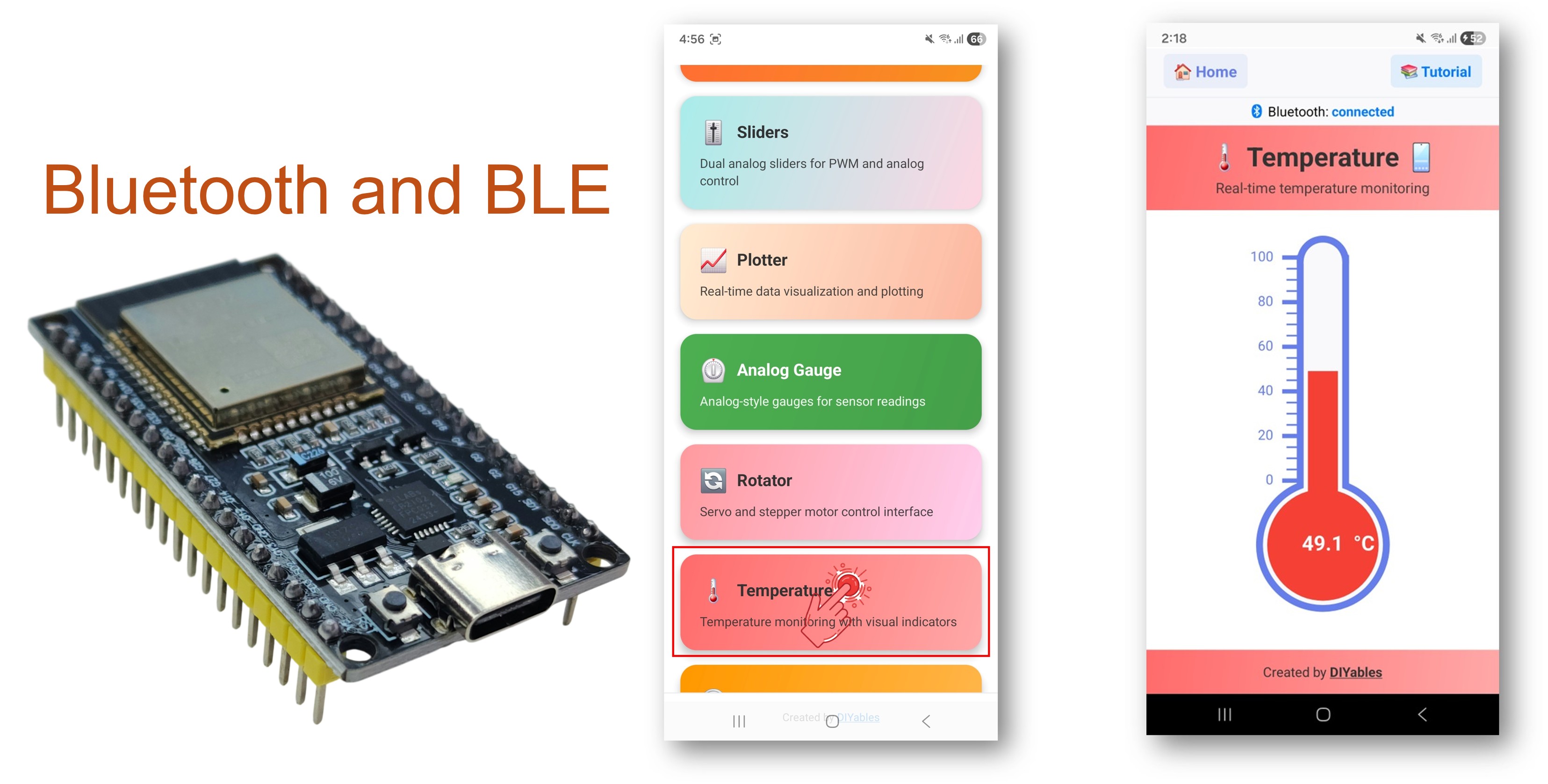
ESP32 Bluetooth temperature example - hướng dẫn hiển thị Đồng hồ Đo nhiệt Độ

Tính Năng

  • Đồng Hồ Nhiệt Độ: Hiển thị trực quan kiểu nhiệt kế
  • Phạm Vi Cấu Hình: Thiết lập giá trị nhiệt độ tối thiểu và tối đa
  • Đơn Vị Tùy Chỉnh: Hiển thị °C, °F, K, hoặc bất kỳ chuỗi đơn vị tùy chỉnh nào
  • Cập Nhật Thời Gian Thực: Gửi dữ liệu nhiệt độ trực tiếp
  • Request Callback: Ứng dụng có thể yêu cầu nhiệt độ hiện tại theo nhu cầu
  • BLE & Classic Bluetooth: Chọn chế độ Bluetooth phù hợp với dự án của bạn
  • Đa Nền Tảng: Chế độ BLE hoạt động trên cả Android và iOS; Classic Bluetooth hoạt động trên Android
  • Tùy Chọn Tiết Kiệm Năng Lượng: Chế độ BLE tiêu thụ ít điện năng hơn Classic Bluetooth

Linh Kiện Cần Thiết

1×mô-đun phát triển ESP-WROOM-32
1×Alternatively, ESP32 Uno-form board
1×Alternatively, ESP32 S3 Uno-form board
1×Cáp USB Type-C
1×breadboard
1×Dây Jumper
1×(Khuyến nghị) Screw Terminal Expansion Board for ESP32
1×(Khuyến nghị) Breakout Expansion Board for ESP32
1×(Khuyến nghị) Power Splitter for ESP32

Or you can buy the following kits:

1×DIYables ESP32 Starter Kit (ESP32 included)
1×DIYables Sensor Kit (30 sensors/displays)
1×DIYables Sensor Kit (18 sensors/displays)

Code ESP32

Các Bước Thực Hiện

Thực hiện theo hướng dẫn từng bước:

  • Nếu đây là lần đầu bạn sử dụng ESP32, hãy tham khảo hướng dẫn về ESP32 - Cài Đặt Phần Mềm.
  • Kết nối board ESP32 với máy tính bằng cáp USB.
  • Khởi chạy Arduino IDE trên máy tính.
  • Chọn board ESP32 và COM port thích hợp.
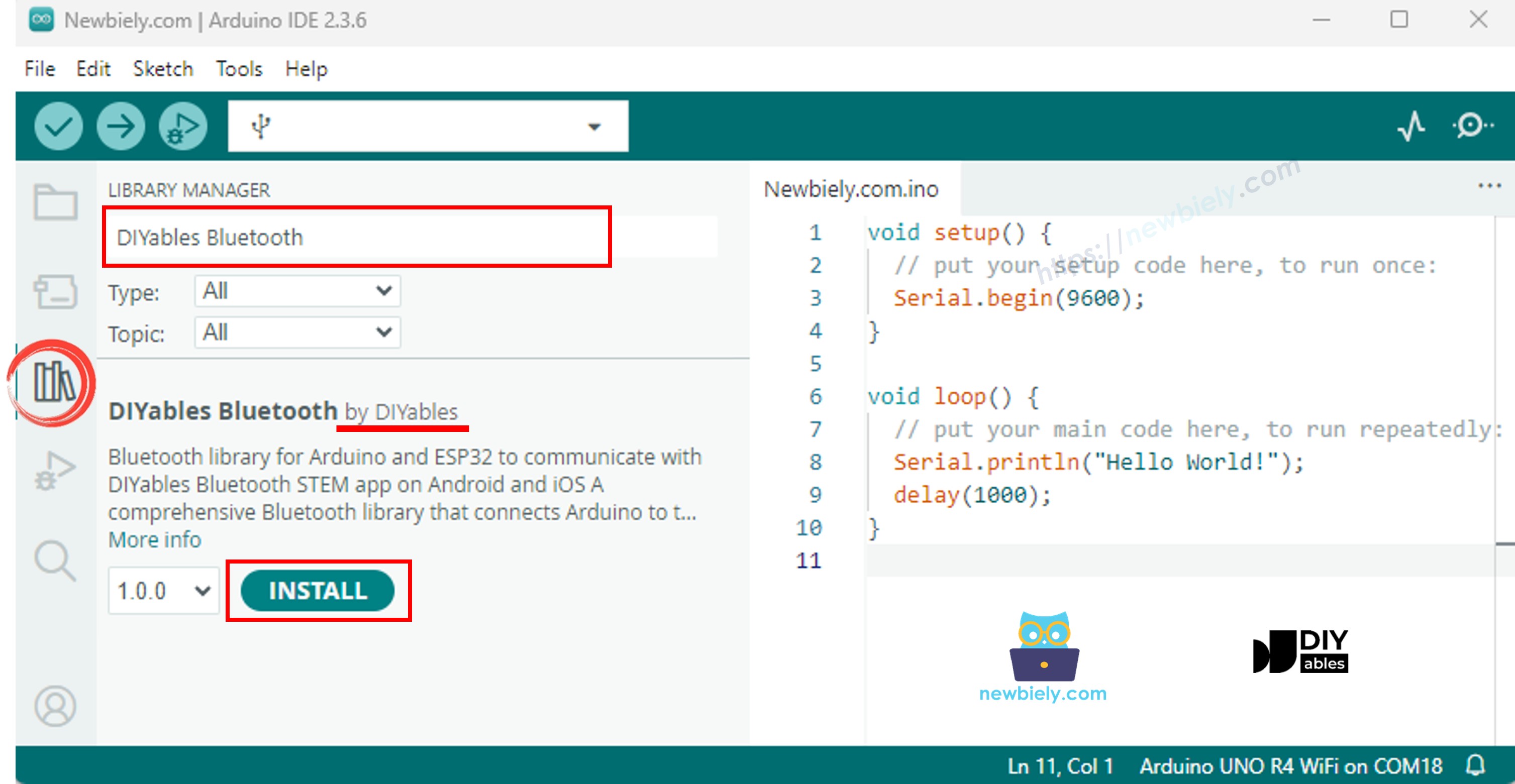
  • Điều hướng đến biểu tượng Libraries trên thanh bên trái của Arduino IDE.
  • Tìm kiếm "DIYables Bluetooth", sau đó tìm thư viện DIYables Bluetooth của DIYables
  • Nhấp nút Install để cài đặt thư viện.
ESP32 diyables Bluetooth thư viện
  • Bạn sẽ được hỏi về việc cài đặt một số thư viện phụ thuộc khác
  • Nhấp nút Install All để cài đặt tất cả các thư viện phụ thuộc.
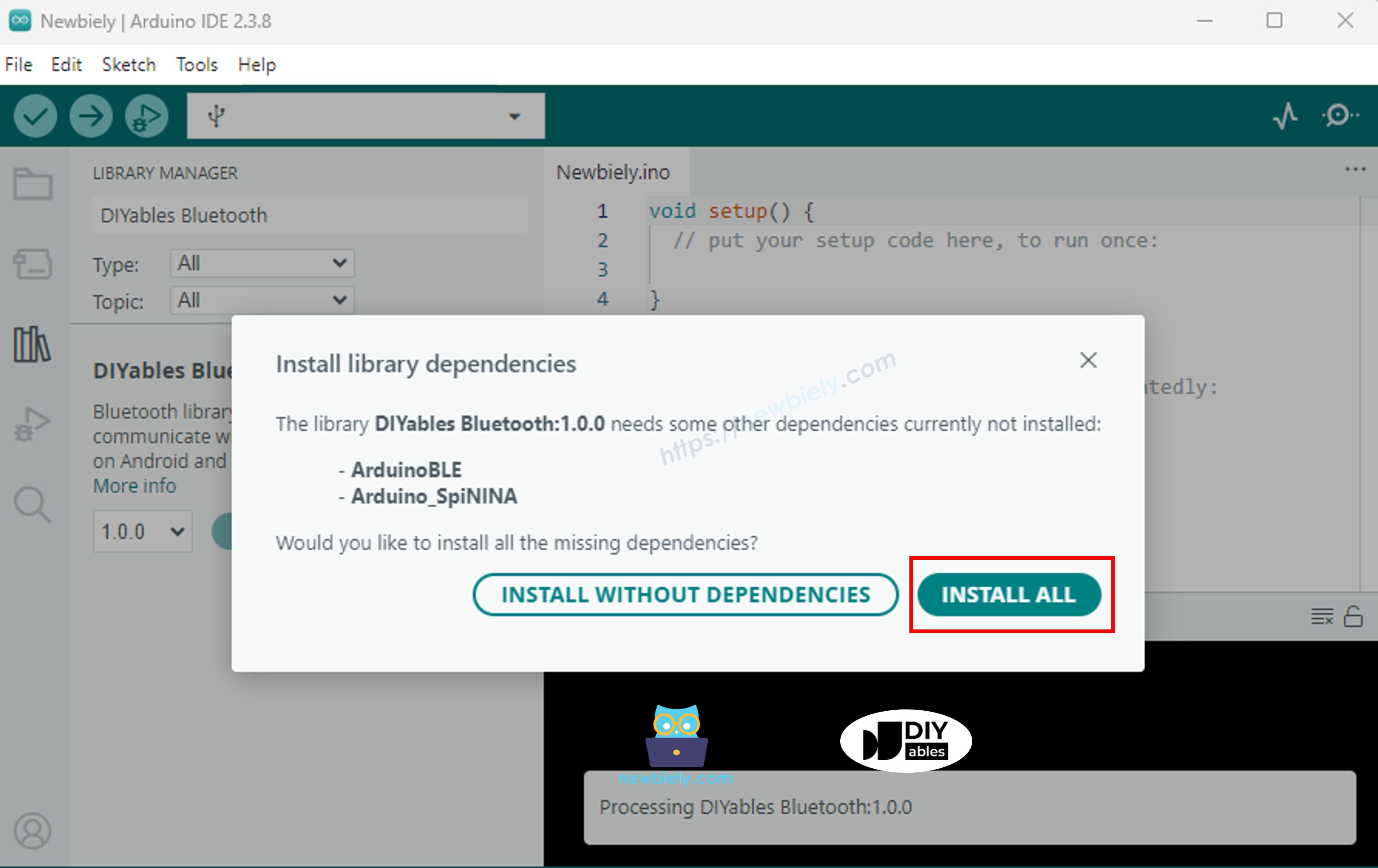
ESP32 diyables Bluetooth dependency

Chọn một trong hai chế độ Bluetooth dưới đây tùy theo nhu cầu của bạn:

Code ESP32 Classic Bluetooth (chỉ hoạt động với ứng dụng trên Android)

Lưu ý: Classic Bluetooth KHÔNG được hỗ trợ trên iOS. Nếu bạn cần hỗ trợ iOS, hãy sử dụng code BLE bên dưới.

  • Trên Arduino IDE, vào File Examples DIYables Bluetooth Esp32Bluetooth_Temperature example, hoặc sao chép code trên và dán vào editor của Arduino IDE
/* * DIYables Bluetooth Library - ESP32 Classic Bluetooth Temperature Example * Works with DIYables Bluetooth STEM app on Android * Note: Classic Bluetooth is NOT supported on iOS. Use BLE examples for iOS support. * * This example demonstrates the Bluetooth Temperature feature: * - Display temperature sensor readings * - Configurable temperature range and unit * - Real-time temperature updates * * Compatible Boards: * - ESP32 (all variants with Classic Bluetooth) * - ESP32-WROOM-32 * - ESP32-DevKitC * - ESP32-WROVER * * Note: Select "Huge APP (3MB No OTA/1MB SPIFFS)" partition scheme * in Arduino IDE: Tools > Partition Scheme * * Optional: Temperature sensor (DHT22, DS18B20, or analog thermistor) * * Setup: * 1. Upload the sketch to your ESP32 * 2. Open Serial Monitor (115200 baud) to see connection status * 3. Use DIYables Bluetooth App to connect and view temperature * * Tutorial: https://diyables.io/bluetooth-app * Author: DIYables */ #include <DIYables_BluetoothServer.h> #include <DIYables_BluetoothTemperature.h> #include <platforms/DIYables_Esp32Bluetooth.h> // Create Bluetooth instances DIYables_Esp32Bluetooth bluetooth("ESP32_Temp"); DIYables_BluetoothServer bluetoothServer(bluetooth); // Create Temperature app instance (min=-10°C, max=50°C, unit="°C") DIYables_BluetoothTemperature bluetoothTemperature(-10.0, 50.0, "°C"); // Variables for temperature simulation float currentTemperature = 25.0; unsigned long lastTempUpdate = 0; const unsigned long TEMP_UPDATE_INTERVAL = 2000; // Update every 2 seconds // Simulated temperature sensor reading float readTemperature() { // TODO: Replace with actual sensor reading // Examples: // - DHT22: dht.readTemperature() // - DS18B20: sensors.getTempCByIndex(0) // - Analog thermistor: analogToTemperature(analogRead(34)) // - ESP32 internal temp: temperatureRead() (approximate) // Simulate temperature changes static float offset = 0; offset += random(-10, 11) / 10.0; // Random walk if (offset > 5.0) offset = 5.0; if (offset < -5.0) offset = -5.0; return 25.0 + offset; // Base temperature 25°C with variation } void setup() { Serial.begin(115200); delay(1000); Serial.println("DIYables Bluetooth - ESP32 Temperature Example"); // TODO: Initialize your temperature sensor here // Examples: // dht.begin(); // sensors.begin(); // Initialize Bluetooth server with platform-specific implementation bluetoothServer.begin(); // Add temperature app to server bluetoothServer.addApp(&bluetoothTemperature); // Set up connection event callbacks bluetoothServer.setOnConnected([]() { Serial.println("Bluetooth connected!"); // Send initial temperature reading float temp = readTemperature(); bluetoothTemperature.send(temp); Serial.print("Initial temperature sent: "); Serial.print(temp); Serial.println("°C"); }); bluetoothServer.setOnDisconnected([]() { Serial.println("Bluetooth disconnected!"); }); // Optional: Handle requests for temperature value bluetoothTemperature.onTemperatureRequest([]() { float temp = readTemperature(); bluetoothTemperature.send(temp); Serial.print("Temperature requested - Sent: "); Serial.print(temp); Serial.println("°C"); }); // You can change temperature configuration at runtime: // bluetoothTemperature.setRange(-40.0, 125.0); // Wide range for industrial sensors // bluetoothTemperature.setUnit("°F"); // Change to Fahrenheit Serial.println("Waiting for Bluetooth connection..."); } void loop() { // Handle Bluetooth server communications bluetoothServer.loop(); // Send temperature updates periodically (only when connected) if (bluetooth.isConnected() && millis() - lastTempUpdate >= TEMP_UPDATE_INTERVAL) { lastTempUpdate = millis(); // Read temperature from sensor currentTemperature = readTemperature(); // Send to Bluetooth app bluetoothTemperature.send(currentTemperature); // Print to Serial Monitor Serial.print("Temperature: "); Serial.print(currentTemperature); Serial.println("°C"); } delay(10); }
  • Nhấp nút Upload trên Arduino IDE để tải code lên ESP32
  • Mở Serial Monitor
  • Kiểm tra kết quả trên Serial Monitor. Nó trông như thế này:
COM6
Send
DIYables Bluetooth - ESP32 Temperature Example Waiting for Bluetooth connection...
Autoscroll Show timestamp
Clear output
9600 baud  
Newline  

Code ESP32 BLE (hoạt động với ứng dụng trên cả Android và iOS)

  • Trên Arduino IDE, vào File Examples DIYables Bluetooth Esp32BLE_Temperature example, hoặc sao chép code trên và dán vào editor của Arduino IDE
/* * DIYables Bluetooth Library - ESP32 BLE Temperature Example * Works with DIYables Bluetooth STEM app on Android and iOS * * This example demonstrates the Bluetooth Temperature feature: * - Display temperature sensor readings * - Configurable temperature range and unit * - Real-time temperature updates * * Compatible Boards: * - ESP32-WROOM-32 * - ESP32-DevKitC * - ESP32-WROVER * - ESP32-S3 * - ESP32-C3 * - Any ESP32 board supporting BLE * * Note: Select "Huge APP (3MB No OTA/1MB SPIFFS)" partition scheme * in Arduino IDE: Tools > Partition Scheme * * Optional: Temperature sensor (DHT22, DS18B20, or analog thermistor) * * Setup: * 1. Upload the sketch to your ESP32 * 2. Open Serial Monitor (115200 baud) to see connection status * 3. Use DIYables Bluetooth App to connect and view temperature * * Tutorial: https://diyables.io/bluetooth-app * Author: DIYables */ #include <DIYables_BluetoothServer.h> #include <DIYables_BluetoothTemperature.h> #include <platforms/DIYables_Esp32BLE.h> // BLE Configuration const char* DEVICE_NAME = "ESP32BLE_Temp"; const char* SERVICE_UUID = "19B10000-E8F2-537E-4F6C-D104768A1214"; const char* TX_UUID = "19B10001-E8F2-537E-4F6C-D104768A1214"; const char* RX_UUID = "19B10002-E8F2-537E-4F6C-D104768A1214"; // Create Bluetooth instances DIYables_Esp32BLE bluetooth(DEVICE_NAME, SERVICE_UUID, TX_UUID, RX_UUID); DIYables_BluetoothServer bluetoothServer(bluetooth); // Create Temperature app instance (min=-10°C, max=50°C, unit="°C") DIYables_BluetoothTemperature bluetoothTemperature(-10.0, 50.0, "°C"); // Variables for temperature simulation float currentTemperature = 25.0; unsigned long lastTempUpdate = 0; const unsigned long TEMP_UPDATE_INTERVAL = 2000; // Simulated temperature sensor reading float readTemperature() { // TODO: Replace with actual sensor reading static float offset = 0; offset += random(-10, 11) / 10.0; if (offset > 5.0) offset = 5.0; if (offset < -5.0) offset = -5.0; return 25.0 + offset; } void setup() { Serial.begin(115200); delay(1000); Serial.println("DIYables Bluetooth - ESP32 BLE Temperature Example"); // Initialize Bluetooth server with platform-specific implementation bluetoothServer.begin(); // Add temperature app to server bluetoothServer.addApp(&bluetoothTemperature); // Set up connection event callbacks bluetoothServer.setOnConnected([]() { Serial.println("Bluetooth connected!"); float temp = readTemperature(); bluetoothTemperature.send(temp); Serial.print("Initial temperature sent: "); Serial.print(temp); Serial.println("°C"); }); bluetoothServer.setOnDisconnected([]() { Serial.println("Bluetooth disconnected!"); }); bluetoothTemperature.onTemperatureRequest([]() { float temp = readTemperature(); bluetoothTemperature.send(temp); Serial.print("Temperature requested - Sent: "); Serial.print(temp); Serial.println("°C"); }); Serial.println("Waiting for Bluetooth connection..."); } void loop() { bluetoothServer.loop(); if (bluetooth.isConnected() && millis() - lastTempUpdate >= TEMP_UPDATE_INTERVAL) { lastTempUpdate = millis(); currentTemperature = readTemperature(); bluetoothTemperature.send(currentTemperature); Serial.print("Temperature: "); Serial.print(currentTemperature); Serial.println("°C"); } delay(10); }
  • Nhấp nút Upload trên Arduino IDE để tải code lên ESP32
  • Mở Serial Monitor
  • Kiểm tra kết quả trên Serial Monitor. Nó trông như thế này:
COM6
Send
DIYables Bluetooth - ESP32 BLE Temperature Example Waiting for Bluetooth connection...
Autoscroll Show timestamp
Clear output
9600 baud  
Newline  

Ứng Dụng Di Động

  • Cài đặt DIYables Bluetooth App trên smartphone của bạn: Android | iOS
  • Nếu bạn đang sử dụng code ESP32 Classic Bluetooth, bạn cần ghép nối ESP32 với điện thoại Android trước khi mở ứng dụng:
    • Vào Settings > Bluetooth của điện thoại
    • Đảm bảo Bluetooth được bật
    • Điện thoại sẽ quét các thiết bị có sẵn
    • Tìm và nhấn "ESP32_Temp" trong danh sách thiết bị có sẵn
    • Xác nhận yêu cầu ghép nối (không cần PIN)
    • Chờ đến khi hiển thị "Paired" dưới tên thiết bị
  • Nếu bạn đang sử dụng code ESP32 BLE, không cần ghép nối. Chỉ cần tiến hành bước tiếp theo.
  • Mở DIYables Bluetooth App
  • Khi mở ứng dụng lần đầu tiên, nó sẽ yêu cầu quyền. Vui lòng cấp những quyền sau:
    • Quyền Nearby Devices (Android 12+) / quyền Bluetooth (iOS) - cần thiết để quét và kết nối với thiết bị Bluetooth
    • Quyền Location (chỉ Android 11 và thấp hơn) - được yêu cầu bởi các phiên bản Android cũ để quét thiết bị BLE
  • Đảm bảo Bluetooth được bật trên điện thoại
  • Trên màn hình chính, nhấn nút Connect. Ứng dụng sẽ quét cả thiết bị BLE và Classic Bluetooth.
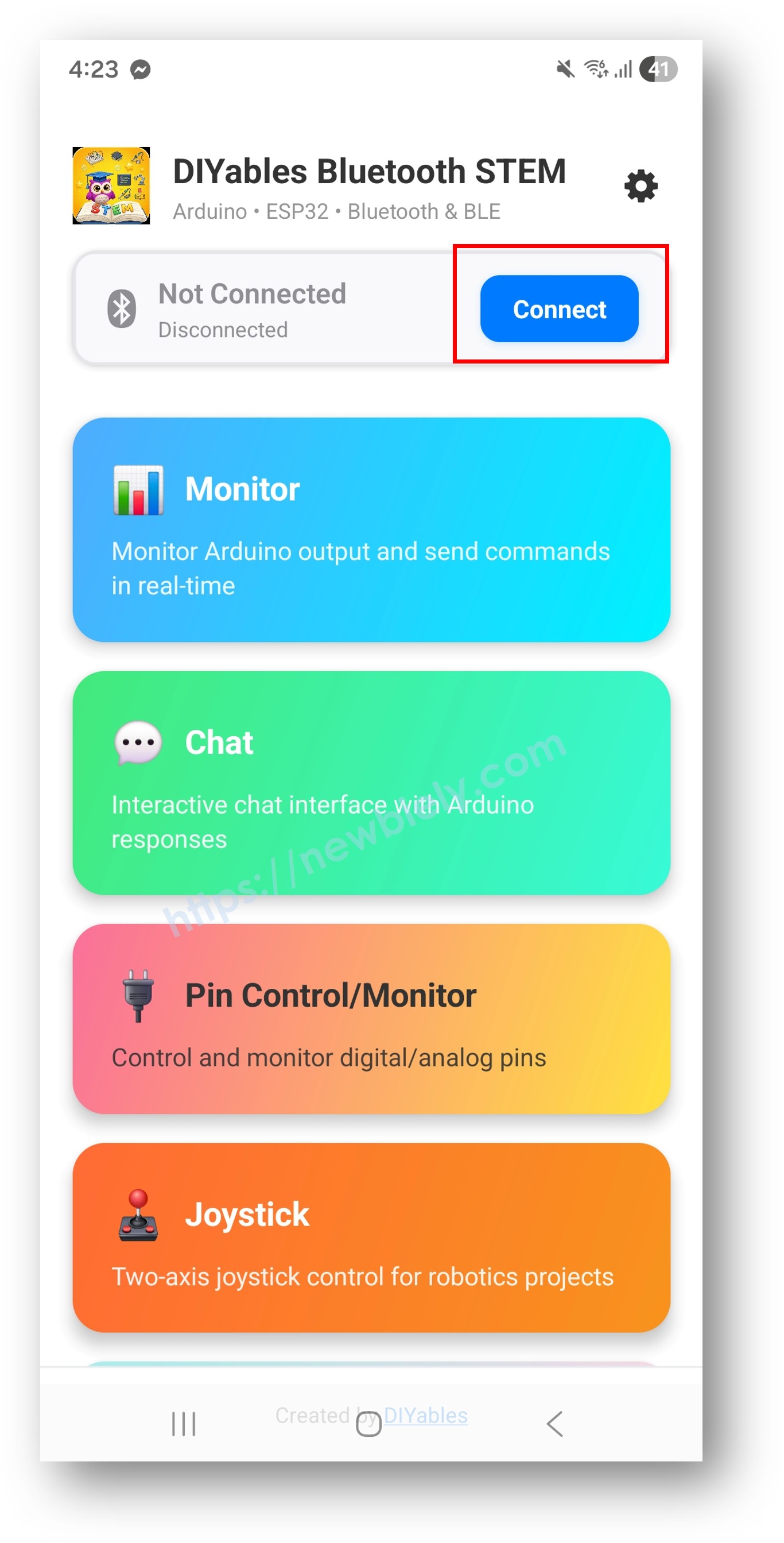
diyables Bluetooth app - home screen with scan nút nhấn
  • Tìm và nhấn vào thiết bị của bạn trong kết quả quét để kết nối:
    • Đối với Classic Bluetooth: nhấn "ESP32_Temp"
    • Đối với BLE: nhấn "ESP32BLE_Temp"
  • Sau khi kết nối, ứng dụng tự động quay về màn hình chính. Chọn ứng dụng Temperature từ menu ứng dụng.
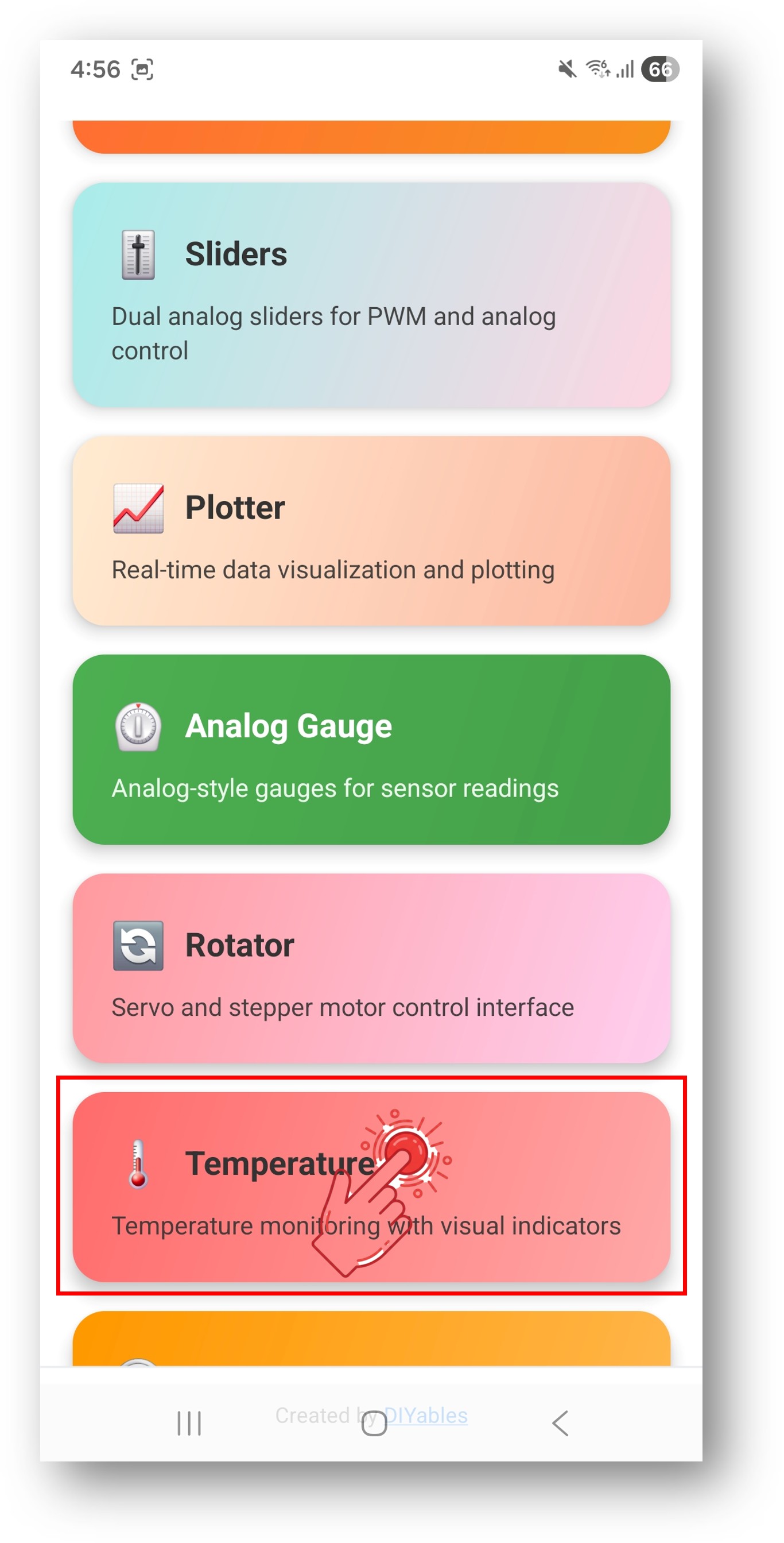
diyables Bluetooth app - home screen with temperature app

Lưu ý: Bạn có thể nhấn biểu tượng cài đặt trên màn hình chính để ẩn/hiển thị ứng dụng trên màn hình chính. Để biết thêm chi tiết, xem Hướng Dẫn Sử Dụng DIYables Bluetooth App.

  • Đồng hồ đo nhiệt độ sẽ hiển thị giá trị nhiệt độ hiện tại
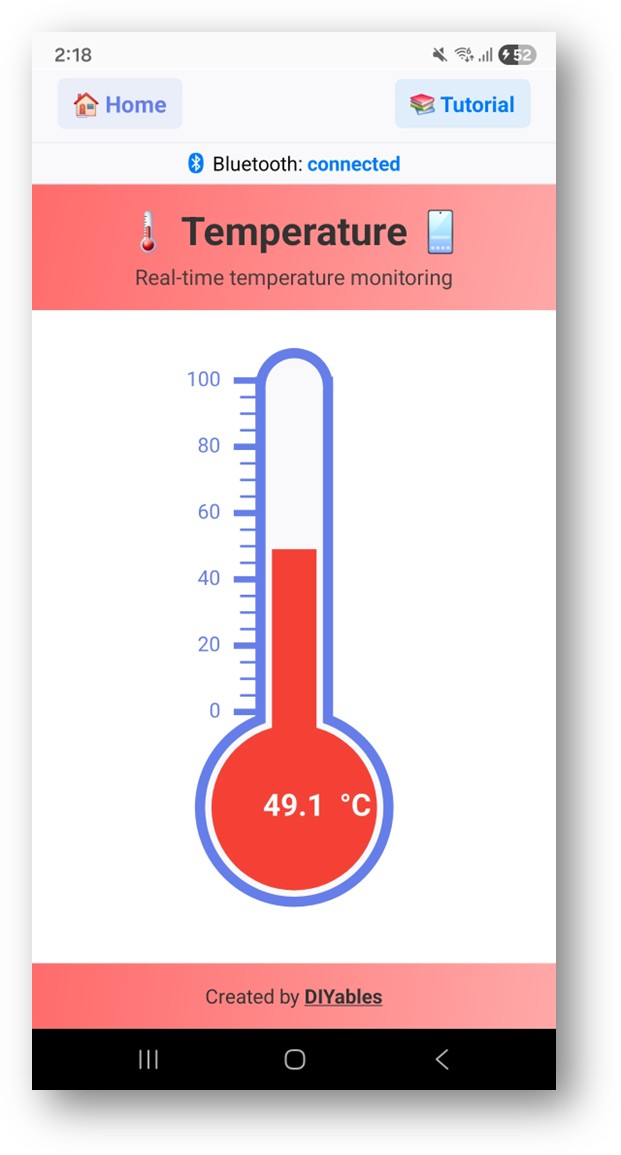
diyables Bluetooth app - temperature gauge screen

Bây giờ nhìn lại Serial Monitor trên Arduino IDE. Bạn sẽ thấy:

COM6
Send
Bluetooth connected! Temperature: 24.5 °C Temperature: 24.8 °C Temperature: 25.1 °C Temperature: 24.9 °C
Autoscroll Show timestamp
Clear output
9600 baud  
Newline  
  • Xem đồng hồ đo nhiệt độ cập nhật theo thời gian thực trong ứng dụng

Tùy Chỉnh Sáng Tạo - Điều Chỉnh Code Cho Dự Án Của Bạn

Cấu Hình Phạm Vi Nhiệt Độ và Đơn Vị

Thiết lập phạm vi hiển thị và đơn vị:

// Constructor: DIYables_BluetoothTemperature(min, max, unit) DIYables_BluetoothTemperature bluetoothTemperature(-10.0, 50.0, "°C"); // Thay đổi phạm vi khi chạy bluetoothTemperature.setRange(-20.0, 60.0); // Thay đổi đơn vị bluetoothTemperature.setUnit("°F"); // Đọc cấu hình hiện tại float minTemp = bluetoothTemperature.getMin(); // Trả về -10.0 float maxTemp = bluetoothTemperature.getMax(); // Trả về 50.0 String unit = bluetoothTemperature.getUnit(); // Trả về "°C"

Gửi Giá Trị Nhiệt Độ

// Gửi giá trị nhiệt độ hiện tại float temperature = 25.3; bluetoothTemperature.send(temperature); // Gửi tin nhắn văn bản bluetoothTemperature.send("Sensor error");

Xử Lý Yêu Cầu Nhiệt Độ Từ Ứng Dụng

bluetoothTemperature.onTemperatureRequest([]() { float temp = readTemperature(); bluetoothTemperature.send(temp); Serial.println("App requested temperature: " + String(temp)); });

Xử Lý Sự Kiện Kết Nối

bluetoothServer.setOnConnected([]() { Serial.println("Bluetooth connected!"); // Gửi nhiệt độ hiện tại ngay lập tức bluetoothTemperature.send(currentTemperature); }); bluetoothServer.setOnDisconnected([]() { Serial.println("Bluetooth disconnected!"); });

Cách Sử Dụng Hiển Thị Nhiệt Độ

Giao Diện Ứng Dụng

Giao diện nhiệt độ trong DIYables Bluetooth App hiển thị:

  • Đồng Hồ Đo Nhiệt Độ: Nhiệt kế trực quan hiển thị giá trị hiện tại
  • Hiển Thị Số: Hiển thị giá trị nhiệt độ chính xác
  • Nhãn Đơn Vị: Hiển thị chuỗi đơn vị đã cấu hình
  • Chỉ Báo Phạm Vi: Hiển thị min và max của phạm vi đã cấu hình

Đơn Vị Nhiệt Độ

Cấu hình phổ biến:

  • Celsius: DIYables_BluetoothTemperature(-10.0, 50.0, "°C")
  • Fahrenheit: DIYables_BluetoothTemperature(14.0, 122.0, "°F")
  • Kelvin: DIYables_BluetoothTemperature(263.0, 323.0, "K")

Ví Dụ Lập Trình

Đọc Cảm Biến DHT22

#include <DHT.h> #define DHT_PIN 4 #define DHT_TYPE DHT22 DHT dht(DHT_PIN, DHT_TYPE); void setup() { Serial.begin(115200); dht.begin(); // ... Thiết lập Bluetooth ... bluetoothTemperature.onTemperatureRequest([]() { float temp = dht.readTemperature(); if (!isnan(temp)) { bluetoothTemperature.send(temp); } }); } void loop() { bluetoothServer.loop(); static unsigned long lastUpdate = 0; if (millis() - lastUpdate >= 2000) { lastUpdate = millis(); float temp = dht.readTemperature(); if (!isnan(temp)) { bluetoothTemperature.send(temp); Serial.println("Temperature: " + String(temp, 1) + " °C"); } } delay(10); }

Cảm Biến DS18B20 One-Wire

#include <OneWire.h> #include <DallasTemperature.h> #define ONE_WIRE_PIN 4 OneWire oneWire(ONE_WIRE_PIN); DallasTemperature sensors(&oneWire); void setup() { Serial.begin(115200); sensors.begin(); // ... Thiết lập Bluetooth với phạm vi phù hợp với khả năng cảm biến ... // Phạm vi DS18B20: -55°C đến +125°C bluetoothTemperature.onTemperatureRequest([]() { sensors.requestTemperatures(); float temp = sensors.getTempCByIndex(0); if (temp != DEVICE_DISCONNECTED_C) { bluetoothTemperature.send(temp); } }); } void loop() { bluetoothServer.loop(); static unsigned long lastUpdate = 0; if (millis() - lastUpdate >= 1000) { lastUpdate = millis(); sensors.requestTemperatures(); float temp = sensors.getTempCByIndex(0); if (temp != DEVICE_DISCONNECTED_C) { bluetoothTemperature.send(temp); Serial.println("Temperature: " + String(temp, 1) + " °C"); } else { Serial.println("Sensor disconnected!"); } } delay(10); }

Đọc NTC Thermistor

const int THERMISTOR_PIN = 34; const float SERIES_RESISTOR = 10000.0; const float NOMINAL_RESISTANCE = 10000.0; const float NOMINAL_TEMP = 25.0; const float B_COEFFICIENT = 3950.0; float readThermistor() { int raw = analogRead(THERMISTOR_PIN); float resistance = SERIES_RESISTOR / (4095.0 / raw - 1.0); float steinhart = log(resistance / NOMINAL_RESISTANCE) / B_COEFFICIENT; steinhart += 1.0 / (NOMINAL_TEMP + 273.15); float temperature = 1.0 / steinhart - 273.15; return temperature; } void loop() { bluetoothServer.loop(); static unsigned long lastUpdate = 0; if (millis() - lastUpdate >= 1000) { lastUpdate = millis(); float temp = readThermistor(); bluetoothTemperature.send(temp); Serial.println("Temperature: " + String(temp, 1) + " °C"); } delay(10); }

Hiển Thị Fahrenheit

// Cấu hình để hiển thị Fahrenheit DIYables_BluetoothTemperature bluetoothTemperature(32.0, 122.0, "°F"); float celsiusToFahrenheit(float celsius) { return celsius * 9.0 / 5.0 + 32.0; } void loop() { bluetoothServer.loop(); static unsigned long lastUpdate = 0; if (millis() - lastUpdate >= 2000) { lastUpdate = millis(); float tempC = dht.readTemperature(); if (!isnan(tempC)) { float tempF = celsiusToFahrenheit(tempC); bluetoothTemperature.send(tempF); Serial.println("Temperature: " + String(tempF, 1) + " °F"); } } delay(10); }

Kỹ Thuật Lập Trình Nâng Cao

Làm Mượt Nhiệt Độ / Tính Trung Bình

const int NUM_SAMPLES = 10; float samples[NUM_SAMPLES]; int sampleIndex = 0; bool bufferFull = false; float getSmoothedTemperature(float newReading) { samples[sampleIndex] = newReading; sampleIndex = (sampleIndex + 1) % NUM_SAMPLES; if (sampleIndex == 0) bufferFull = true; int count = bufferFull ? NUM_SAMPLES : sampleIndex; float sum = 0; for (int i = 0; i < count; i++) { sum += samples[i]; } return sum / count; } void loop() { bluetoothServer.loop(); static unsigned long lastUpdate = 0; if (millis() - lastUpdate >= 1000) { lastUpdate = millis(); float rawTemp = readTemperature(); float smoothed = getSmoothedTemperature(rawTemp); bluetoothTemperature.send(smoothed); Serial.println("Raw: " + String(rawTemp, 2) + " Smoothed: " + String(smoothed, 2) + " °C"); } delay(10); }

Phát Hiện Ngưỡng Cảnh Báo

const float HIGH_THRESHOLD = 35.0; const float LOW_THRESHOLD = 5.0; bool alertActive = false; void checkTemperatureAlerts(float temp) { if (temp > HIGH_THRESHOLD && !alertActive) { alertActive = true; bluetoothTemperature.send("HIGH TEMP ALERT!"); Serial.println("⚠️ High temperature alert: " + String(temp, 1) + " °C"); // Kích hoạt quạt làm mát, buzzer, v.v. } else if (temp < LOW_THRESHOLD && !alertActive) { alertActive = true; bluetoothTemperature.send("LOW TEMP ALERT!"); Serial.println("⚠️ Low temperature alert: " + String(temp, 1) + " °C"); // Kích hoạt máy sưởi, v.v. } else if (temp > LOW_THRESHOLD && temp < HIGH_THRESHOLD) { alertActive = false; } }

Ý Tưởng Tích Hợp Phần Cứng

DHT22 / DHT11

Kết nối với bất kỳ chân GPIO nào để đọc độ ẩm và nhiệt độ. Lựa chọn phổ biến cho giám sát trong nhà.

DS18B20 Waterproof Probe

Sử dụng giao thức OneWire để đo nhiệt độ chống nước. Tuyệt vời cho chất lỏng, đất và ứng dụng ngoài trời.

BME280 / BMP280

Cảm biến I2C cho nhiệt độ, độ ẩm và áp suất khí quyển. Độ chính xác cao cho trạm thời tiết.

NTC Thermistor

Cảm biến nhiệt độ analog đơn giản. Chi phí thấp, hoạt động với mạch chia điện áp.

Thermocouple (MAX6675 / MAX31855)

Để đo nhiệt độ cao (lên đến 1000°C+). Được sử dụng trong lò nướng, lò nung và ứng dụng công nghiệp.

BLE vs Classic Bluetooth - Nên Chọn Loại Nào?

Tính NăngBLE (Esp32BLE_Temperature)Classic Bluetooth (Esp32Bluetooth_Temperature)
Hỗ Trợ iOS✓ Có✗ Không
Hỗ Trợ Android✓ Có✓ Có
Tiêu Thụ ĐiệnThấpCao hơn
Phạm Vi~30-100m~10-100m
Tốc Độ Dữ LiệuThấp hơnCao hơn
Cần Ghép NốiKhông (tự động kết nối)Có (ghép nối thủ công)
Tốt Nhất ChoThiết bị pin, đa nền tảngThroughput cao, chỉ Android

Khắc Phục Sự Cố

Vấn Đề Thường Gặp

1. Không thể tìm thấy thiết bị trong ứng dụng

  • Đảm bảo ESP32 được cấp nguồn và sketch đã được tải lên
  • Đối với BLE: Đảm bảo Bluetooth và Location của điện thoại được bật
  • Đối với Classic Bluetooth: Ghép nối thiết bị trước trong cài đặt Bluetooth của điện thoại
  • Kiểm tra partition scheme đúng được chọn (Huge APP)

2. Nhiệt độ hiển thị 0 hoặc giá trị không chính xác

  • Xác minh kết nối dây và kết nối cảm biến
  • Kiểm tra loại cảm biến và cấu hình thư viện
  • Sử dụng Serial Monitor để xác nhận dữ liệu đọc được trước Bluetooth
  • Đối với cảm biến DHT: đảm bảo điện trở pull-up (4.7k-10k) trên chân data

3. Nhiệt độ không cập nhật

  • Kiểm tra khoảng thời gian cập nhật trong loop()
  • Xác minh bluetoothServer.loop() được gọi trong vòng lặp chính
  • Đảm bảo cảm biến đọc giá trị hợp lệ (kiểm tra NaN)

4. Phạm vi hiển thị đồng hồ đo không khớp

  • Xác minh tham số constructor: DIYables_BluetoothTemperature(min, max, unit)
  • Sử dụng setRange() để điều chỉnh động
  • Giá trị nhiệt độ ngoài phạm vi vẫn sẽ hiển thị nhưng có thể bị cắt

5. Kết nối thường xuyên bị ngắt

  • Di chuyển gần ESP32 hơn (giảm khoảng cách)
  • Đối với BLE: Kiểm tra can nhiễu từ thiết bị BLE khác
  • Đối với Classic Bluetooth: Đảm bảo nguồn cung cấp ổn định cho ESP32

6. Sketch quá lớn / không đủ không gian

  • Trong Arduino IDE, vào Tools > Partition Scheme và chọn "Huge APP (3MB No OTA/1MB SPIFFS)" hoặc "No OTA (Large APP)"
  • Partition scheme mặc định chỉ cung cấp ~1.2MB cho app code, không đủ cho thư viện Bluetooth
  • Cài đặt này cung cấp ~3MB bằng cách hy sinh phân vùng OTA (over-the-air update)

Mẹo Debug

Thêm debug toàn diện:

void debugTemperature(float temp) { Serial.println("=== Temperature Debug ==="); Serial.println("Value: " + String(temp, 2) + " " + bluetoothTemperature.getUnit()); Serial.println("Range: " + String(bluetoothTemperature.getMin(), 1) + " - " + String(bluetoothTemperature.getMax(), 1)); Serial.println("In Range: " + String(temp >= bluetoothTemperature.getMin() && temp <= bluetoothTemperature.getMax() ? "Yes" : "No")); Serial.println("========================="); }

Ý Tưởng Dự Án

Nhà & Môi Trường

  • Nhiệt kế phòng trong nhà
  • Trạm thời tiết ngoài trời
  • Giám sát nhiệt độ tủ lạnh/tủ đông
  • Giám sát khí hậu nhà kính

Bếp & Thực Phẩm

  • Giám sát nhiệt độ nấu ăn
  • Hiển thị bộ điều khiển sous vide
  • Theo dõi nhiệt độ lên men
  • Nhiệt kế lò nướng

Công Nghiệp & Phòng Thí Nghiệm

  • Cảnh báo nhiệt độ phòng server
  • Giám sát quy trình hóa học
  • Hiển thị nhiệt độ tủ ấm
  • Đọc nhiệt độ mỏ hàn

Nước & Thủy Sản

  • Nhiệt kế bể cá
  • Hiển thị nhiệt độ bể bơi/spa
  • Giám sát máy nước nóng
  • Nhiệt độ nước thủy canh

Tích Hợp Với Ứng Dụng Bluetooth Khác